Complete guide on how to install b2evolution
You may have been searching for an excellent tutorial to teach you how to install b2evolution. Many of you may not be very familiar with Fantastico and how the various features work. To begin with, Fantastico is a service provider that provides web hosting services. Now, the good part is you can use an add-on called Fantastico support with the services. This add-on can be used with the current cPanel that you are using. You will also have access to a sound script library that will help you install b2evolution automatically on your computer. Using these scripts can surely help you save time; people all around the globe are now using these scripts.
If you are consulting this tutorial, then it is assumed that you already know how to initialize Fantastico.
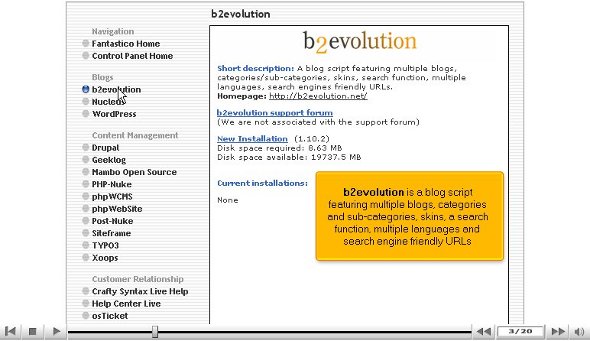
1. Now, you must locate a button that says b2 evolution and click on it.

2. After that, you will be taken to the b2evolution installation page. On this page, you will notice a new installation link; click on it.

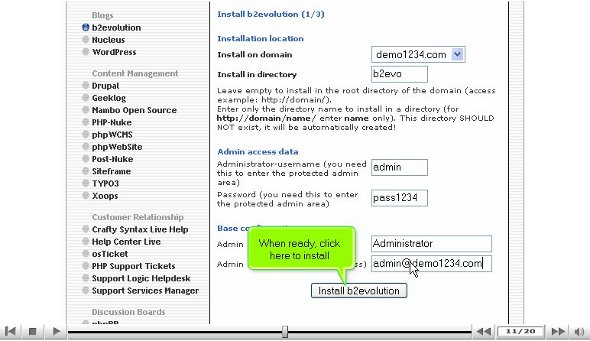
3. After that, you must type a directory name in which you want to install the application.

4. You are also required to type in an admin name and password; you must also give an admin nickname.

5. After that, you must scroll down and press a tab that says install b2evolution
6. You must click on finish to complete the process.

With that, we have completed the installation process successfully, and now you are set to start using the applications immediately. However, you must follow the steps correctly to complete the installation process. So you can get started right away.
If you have successfully gone through the above steps without fumbling at any point, you have installed b2evolution successfully without any problems. After the installation process, you will need to configure the application as per your requirements. After configuring, you can go through the various tools and their uses. The tools that come with this application are very sophisticated, and you can accomplish your goals very quickly. This particular tutorial will immensely help you, especially if you are a new user using Fantastico for the first time.
Initially, you may feel that the application is a bit tough to use, but you will get used to it with time. This application has tons of features, so you should take your time and pay attention to every detail. A relaxed and calm approach during the learning process can help you absorb things much faster. Using this application, you can fully utilise the e-commerce and open-sourced shopping cart features.
However, to install b2evolution to the fullest, you must follow the steps carefully; to understand this better, you may also consult other tutorials.
Go to the top of the page. Back to the tutorial

 Ananova