How To Add Mx Entry in cPanel
Now, to learn how to add an Mx entry in cPanel, you must go through this tutorial. Before we get into all of this, you must know what a cPanel is in the first place. Well, the good news is that it is not complicated at all. In fact, it is a software that is very easy to use. In fact, this software comes with specific automated tools that help users carry out their business operations quickly and without facing any technical problems. You may have understood that a cPanel is essential and helps manage servers easily.
Now, let us look at the steps that will help you to add an Mx entry in cPanel.
Now, it can be assumed that you know how to log into cPanel.
1) Firstly, you will have to locate an MX entry icon. Once you have found this icon, you have to click on it. After that, it is best to set the settings to custom, as this will also make it compatible with other servers.
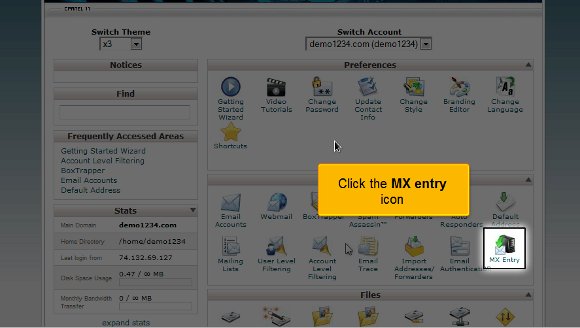
2) After the above, you must fill in a priority number to create a fresh MX record. The most minor priority numbers will be put in first, and the highest numbers will be entered.

3) After that, you may enter the fresh MX entry

4) After you have completed the above steps, you will need to click on a button called Add new record.
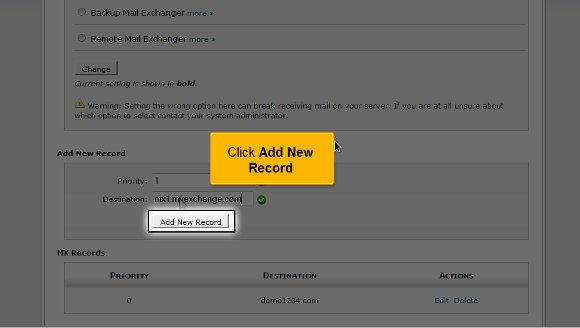
So that is about all; at this point, your new MX record is added. This is where the tutorial ends.
Now, you have to go back to the cPanel interface and look at the settings correctly. You must take your own time in going through the other tabs that are present in the cPanel.
Now, you must know how to log out; that should not be so tough, as you must locate a logout button at the top of the page. By now, you may feel that this tutorial is not complicated to understand. All you need is a good amount of patience so that you can put in some effort to try and understand the
various aspects of the cPanel. You do not have to rush the learning process, as there are things that you need to absorb well. It is always advisable to have a relaxed approach to things as this will benefit you in the long run.
You may also feel free to look at other tutorials on adding an Mx entry in cPanel. If you are new to all of this, you will face failure the first couple of times, but things will work out just fine. So keep your cool and follow the tips in the tutorial, and you should face no problems using the cPanel to the fullest.

 Ananova
You must be logged in to post a comment.