Webmail from Within Cpanel
So, read on if you are looking for a tutorial to teach you to use webmail from within cPanel. This tutorial will guide you through simple steps to access webmail using cPanel. However, before we get into the technical side, it is best to learn about cPanel. To begin with, cPanel is a prevalent software that lets users utilize very sophisticated features to carry out business operations smoothly. So you can understand that cPanel has occupied an essential part of our daily lives. Follow the guidelines given below to get the best results possible.
It is assumed that you know the procedure to log in to cPanel.
1) First, you must locate the icon that says Email Account. You can use this link to access the webmail within your main account. However, we will discuss an alternative method.

2) What you can do is click on the option more.
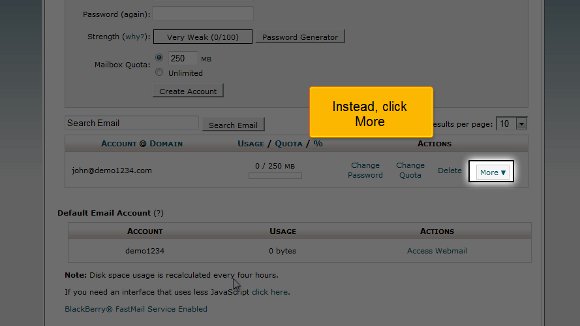
3) After that, you will find an option called Access Webmail, and you must click on that.

4) You must fill in the password for the particular email account and not the password for your cPanel.
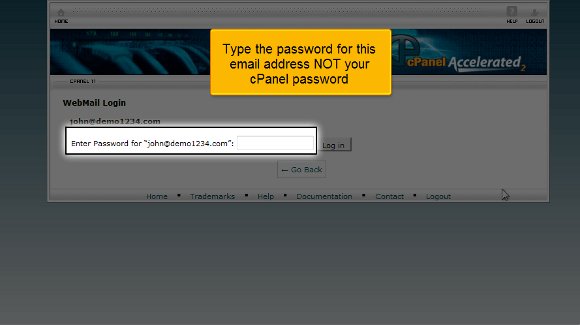
5) You can now click on login

6) Now, you must click on a particular option called Horde. On this specific screen, you will see your inbox; you can even write a new message.


7) After you are done with the webmail, you can click on Log-out.

So this is where the tutorial ends, and now you know exactly how to use webmail from within cPanel.
So, by now, you can see the interface of your cPanel, so you can get started immediately by going through the various settings. In fact, you should look at the different tabs at your own pace, as there are multiple things to learn.
Okay, the next thing you need to know is how to log out from the interface. Well, that should be a breeze; try locating a log-out tab on top of the page and click on it, and the job’s done. If you pay attention, you will notice that this tutorial
is not challenging to understand. You just need a decent level of patience to absorb things correctly. Another advice is to to try not to hurry through the learning process, as you may miss out on some essential aspects.
You may also take the time to look at some other tutorials that will teach you to use webmail from within cPanel. If you are new to using this software, you have no reason to get worried. This tutorial will guide you through the entire process step by step. In fact, you should go through the tips in this tutorial and start using cPanel right away.

 Ananova
You must be logged in to post a comment.