How To Setup Email Filters in cPanel
If you pay attention to this tutorial, you will learn how to set email filters in cPanel. Many of you may not know what a cPanel is, so let us learn a little bit about cPanel first. Firstly, cPanel is quite an exciting software that allows users to utilise sophisticated and automated tools that permit any user to conduct smooth business operations using the internet. cPanel is a software often used to manage servers and monitor other factors related to any website.
Since you are looking at a tutorial that deals with the setup of email filters in cPanel, it can be assumed that you already know how to log in to the application.
1) First, you have to click an icon that says account level filtering
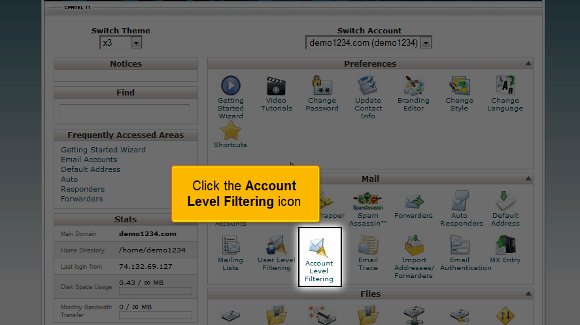
2) After you have done the above, you have to now click on an option that says Create a new filter

3) You have to put in a name for the filter that you have created
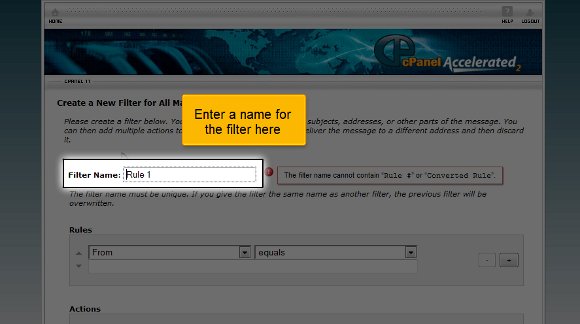
4) You also have to mention a specific rule here

5) Afterwards, you must go for an option that says the To field contains the text, which should be the folder name. So, this particular action will ensure that the email is delivered to the folder mentioned above with a designated term.

6) Lastly, you click on the tab that says create


So now you have been successful in creating a filter. From this point, you will have the liberty to edit all the existing filters. This is where the tutorial ends, and now you have the knowledge to help you set up email filters in cPanel.
You can now go back to your cPanel interface and check the settings. In fact, you should take some time to study the other tabs relating to the filter feature on your cPanel. Now you must know how to log out; okay, this is easy. You just have to look for the logout tab, which should be at the top of the page. You should not have too much trouble understanding the tips mentioned in this tutorial, and by
now, you have also noticed that there are no technicalities involved in the whole thing, just a few easy steps for you to follow. You simply need to have a cool head and a little patience. You shouldn’t rush the learning phase. Go over each point until you have the whole thing worked out. You may find something complicated as a beginner, so do not get agitated or stressed out. Things will fall into place eventually. So relax and try to get a grip on things, which will help you in the long run. You may also feel free to look at other tutorials teaching how to set up email filters in cPanel. So follow the tips carefully.

 Ananova
You must be logged in to post a comment.