How To Create Custom Error Pages in cPanel
Well, if you are looking for a way to learn to create custom error pages in cPanel, you have definitely found the right article. This article is not just an ordinary article but a tutorial that will explain how to create custom error pages in cPanel in some straightforward steps without getting too technical at any point in time. cPanel is a handy software that has a wide plethora of features. The tools found in the software facilitate smooth business operations over the Internet. The software’s primary function is to help the users manage the servers very well.
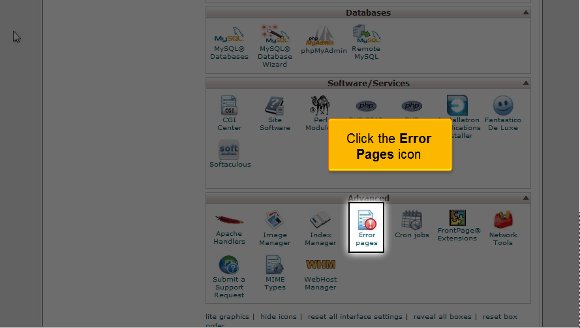
1) You must begin by locating the icon that says Error pages; once you have found it, you must click on it. Now, you should remember that there are many ways to carry out the customization, but in this particular tutorial, we will go with the 404 error page option.
2) Now, bearing the above point in mind, you will have to click the link that says 404.

3) This is where you can create custom error pages in cPanel. You can use more than one tag to add customization.
4) You can utilize the HTML tags on your page to match the set-up of the error page you created.
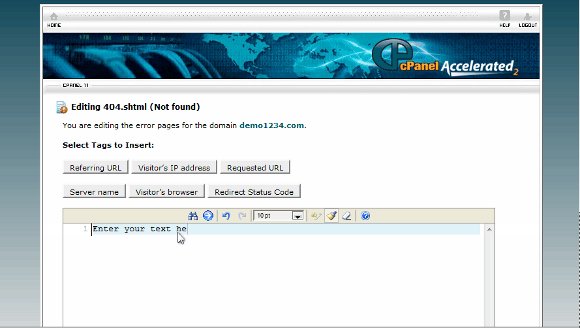
5) create custom error pages in cPanel: You are ready to create your very own custom 404 page.
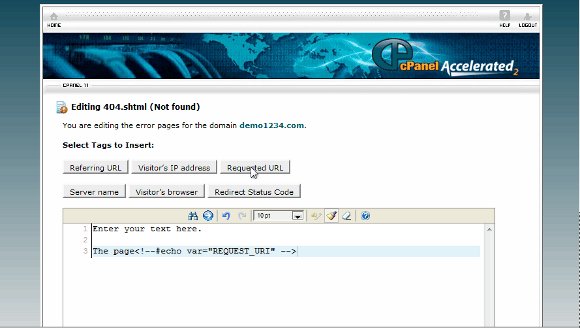
6) create custom error pages in cPanel: When you are done, click save.

Create custom error pages in cPanel: When you have cleared the above steps, your 404 error pages have been created. You can also add your touch of customization. Well, this is where the tutorial ends.
Now, you can return to the cPanel interface and start by reviewing all the available features. Now, since there are so many features, you should take the time to go through them properly.
Now, you must know how to log out from the interface; the good news is that it is not difficult. You simply have to locate the log-out tab and click on it. You may have also realized that the tips mentioned in the article are not challenging to follow. You just need time to go through the details and understand what the software is all about. So, when you are in the learning phase, you should not rush the process as you can get a grip on things a little bit better. So, having a calmer and more relaxed approach to things is better. You may also take a look at some of the other tutorials. A tutorial is an excellent way to learn new software aspects. To get the best out of this software, you should follow the tips given in the tutorial, and soon, you will be able to master the software.

 Ananova
You must be logged in to post a comment.