How To Create a MYSQL Database in cPanel
If you want to create a MYSQL database in cPanel, follow the tips mentioned in this tutorial, as they will immensely help you in the long run. Many of you may be new to cPanel, so it is better to be acquainted with the software before getting into the technical aspects. cPanel is a handy software that has very sophisticated tools. These tools allow the users to complete any business activity smoothly without any hitch. With these tools, you can manage your servers without facing any problems.
When reading this tutorial, it can be safely assumed that you already know how to log in to the cPanel. Let us now look at the steps that will help you create a MySQL database in cPanel
1) You must start by locating an icon that says MySQL database wizard. Once you locate this icon, click on it.
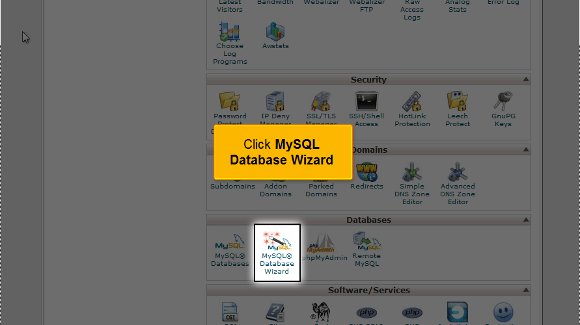
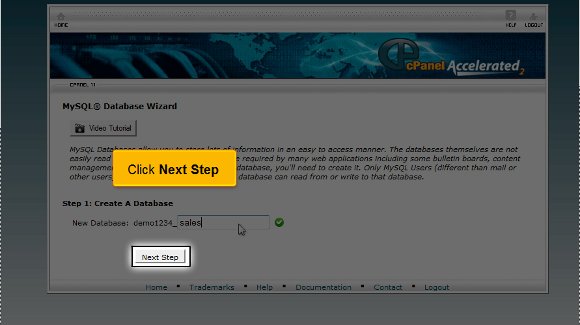
2) Then you must enter a specific name for a new database

3) Click on the next step button
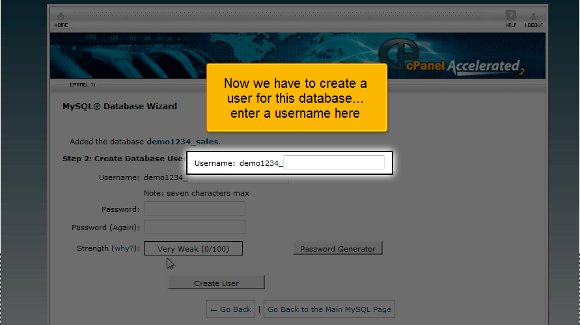
4) This step will make you create an ID for a user and fill out a username in this step.
5) You have to press enter, and then you have to type in a password for confirmation.
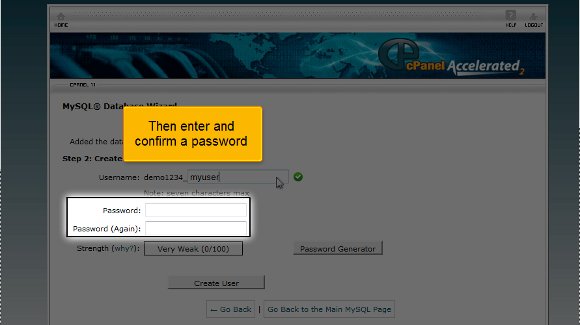
6) After you have taken care of the above, you must click on the Create User button

7) This step is where you can assign privileges to a user
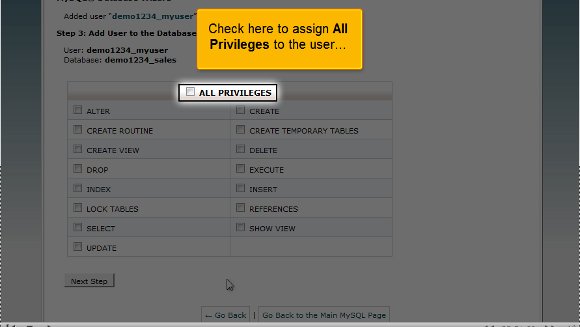
8) To finish off, you must click on the next step button
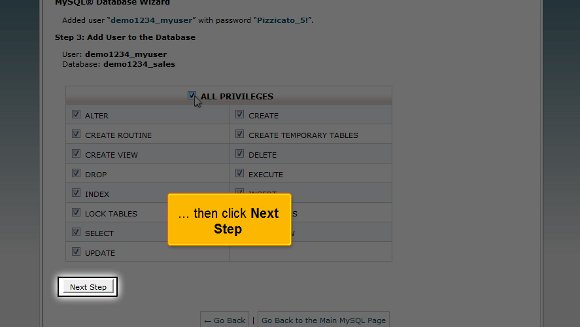
Once you have taken care of the above eight steps, you have successfully created a MySQL database in cPanel. So now you can simply go back to your interface, look at the other features, and even configure specific settings. There is a lot on the interface you can use, so take the time to review them.
If you pay close attention, you will see that this tutorial is not challenging to understand. You need to have a decent level of patience to understand what your software is all about. During the learning period, try not to rush things, as you may miss out on some of the most critical aspects of the software. Items will not be accessible initially, but eventually, you will get used to it. So, it is best to have a relaxed approach while learning about this software, as you can learn something effectively. You can consult other tutorials to get a good idea if you want. If you are a new user, you may take some time to get accustomed to things, so do not get worked up or disheartened. Follow the tips in the article very closely, and you shall have no problems creating a MySQL database in cPanel.

 Ananova
You must be logged in to post a comment.