How To Setup Domain Redirects in cPanel
While trying to learn something technical, it is always better to take the help of a tutorial that guides you through a process with clear instructions. Now, speaking of tutorials, this article could be a good tutorial that will help you set up domain redirects in cPanel. Before we get into the technicalities of it all, you should know something about cPanel, especially if you are new.
cPanel is a beautiful software with automated tools that allow the smooth execution of business activities. The devices respond rapidly to any command. People use the various features of the cPanel to manage their servers.
Now, here are the easy steps on how you can set up domain redirects in cPanel.
The tutorial assumes that you already know how to log in to cPanel.
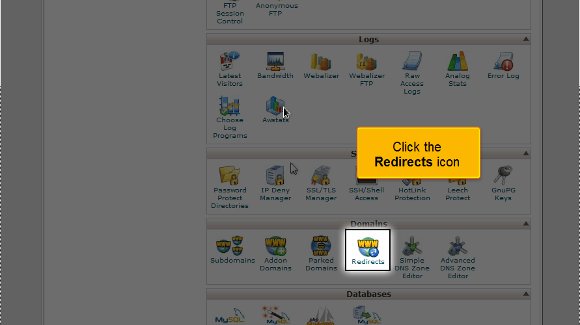
1) First, you must locate the redirects icon and click on it.
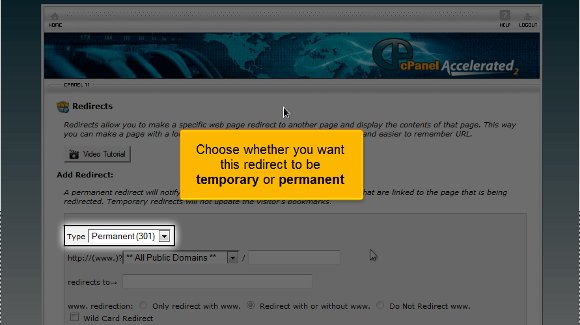
2) Then, you can state whether you want this redirect option to be permanent or temporary.
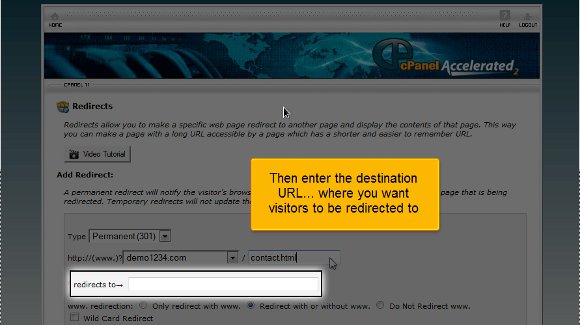
3) After that, you must enter the URL you wish to redirect.

4) The most crucial part is entering the URL to which you want to be redirected.
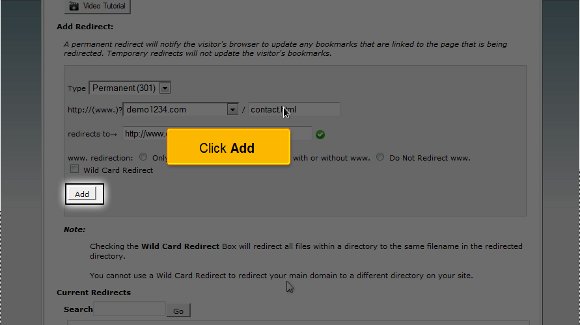
5) Lastly, simply click on Add. So you see, it is pretty simple, provided you have taken care of the above.
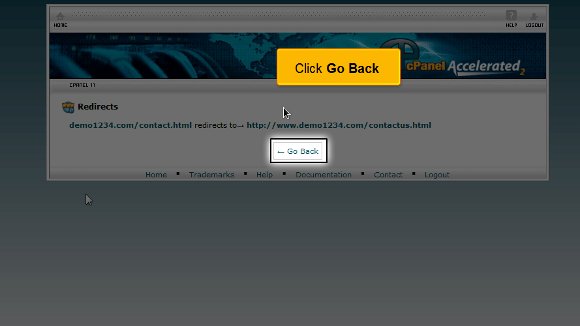
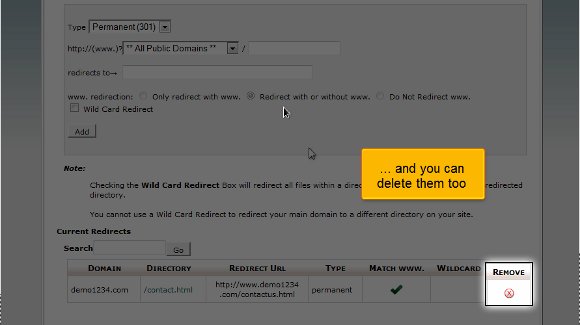
6) Now, you may click on the go back; here, you can view the list of the domains; you can manage them or even delete some of them from the list.
This is where the tutorial ends, and you already know how to set up domain redirects in cPanel.
So now you can return to the user-friendly interface of cPanel and start by looking at some of the features such as the shopping carts, multiple domains, and the various email settings and going over the databases. However, when going through such features, you must take the time to absorb every part of the software. By now, it may have dawned upon you that understanding the points mentioned in the article is not challenging. So, when learning about the various features, you must not rush the process as some may be technical; try to pay close attention. You should know at your own pace; a relaxed approach is the best way to do such things. This will help you in all forms.
Now, if you are a newcomer to cPanel, then you should know that there are certain things that you should know that initially, things are not going to go your way, but that is not a sign for you to get agitated or feel like giving up; just have some patience and things will work out fine. Follow the tips in the tutorial very closely to get the whole process right without facing any problems.

 Ananova
You must be logged in to post a comment.