Guidelines on how to install a 4image gallery
Now, here is a tutorial on how you can install a 4-image gallery in Fantastico. Here is an introduction for those who do not know what Fantastico is all about. Fantastico is nothing but an internet hosting service that is available with Fantastico support, which is another popular add-on and can be bought with the current cPanel. You do not have to worry as a user, as Fantastico is available with cPanel hosting accounts. This is a script library that can carry out the automatic installation of specific scripts and internet-based applications on a website. These scripts definitely help to save time and are being installed on computers all over the world.
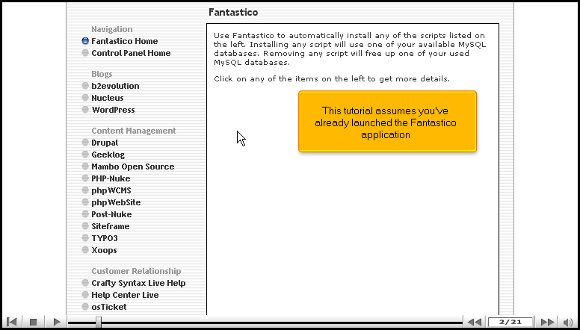
Now, when you are looking at the tutorial, it means you know how to start up the Fantastico application.
1. On your left, you must locate the 4 images gallery tab and click on it. After you click on it, you will be taken to the 4 images gallery installation screen.

2. On the installation screen, you will notice a link that says New installation; you must click on it. This will then take you to a page withe terms and conditions are mentioned. You will need to agree, and press continue.


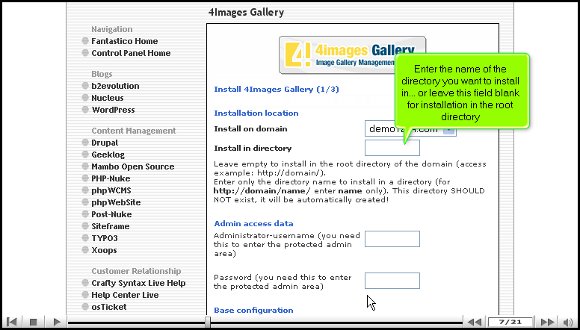
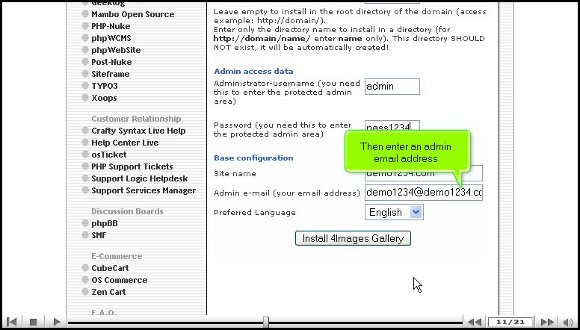
3. After that, you will be taken to a page where you must enter the name of the directory you want to install. You can also leave it blank and install it in the root directory. On that same page, you will notice two other boxes requiring you to enter the admin name and password. You will also have to submit an alternative email address.

4. When you are done, click on Install. You then have to finish the process by clicking on finish installation.
Once you have completed the above steps, it means that you have successfully installed the 4image gallery, and you are now ready to start configuring the set-up as per your requirements. After configuring it, you can immediately start looking around and exploring the application directly. The application has excellent tools that make your work so much easier. If you are a new user and have never used this technology, you can go through this tutorial to help you.
You may find this application a little complicated at first, but it is best to stay relaxed and focused when learning to use the various tools. It is better to take your time and not rush the learning process, as you can absorb a dozen things. When using Fantastico, you can take advantage of utilizing E-commerce and shopping carts that are open-sourced.
So make sure that you follow each step very carefully to get things right; you can also feel free to consult other tutorials.
Go to the top of the page. Back to the tutorial

 Ananova
You must be logged in to post a comment.