Installing a gallery application from Fantastico is easy.
You may have looked for countless tutorials to teach you how to install Gallery, but not all are good. However, you do not have to worry; this tutorial is proper. It lays down some easy steps to follow to install this application from Fantastico. Now, for those of you who have not heard of Fantastico, you should know that Fantastico is a very reliable service provider for web hosting. This service provider also gives the users various applications they can install on their computers. Note that all applications offered by Fantastico are compatible with the current version of cPanel.
This tutorial assumes that you already know how to use Fantastic.
1. You can begin the process by locating the Gallery tab on the Fantastico interface. You will then have to click on it.

2. Clicking the Gallery tab will take you straight to the installation screen, and there is a link called New Installation, which you again have to click.

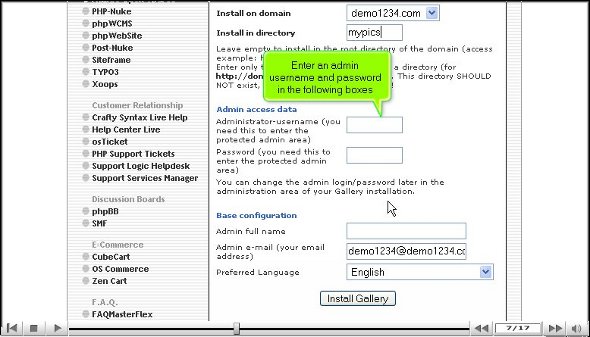
3. You will then have to provide the name of a directory where you want the application installed; you can also let the application install in the root directory.

4. After the above step, you must provide a password and an administration name.
5. At the bottom of the page, you will notice an install Gallery tab; you have to click on that.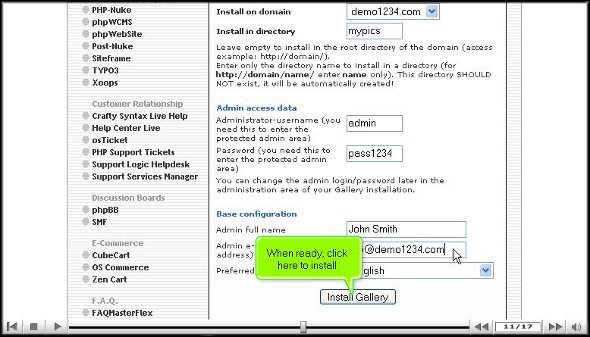
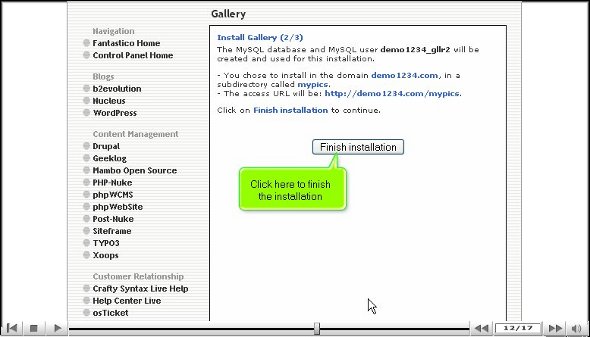
6. To finish the installation process, you simply have to click on the tab that says finish.
So, with that, we have come to the end of the tutorial, and now you can view the application’s features.
If you have followed the above steps, then it can be assumed that you have been able to install Gallery the right way. So, after you are done with the installation process, you can start by exploring the application; you can go through each feature to see what it does.
You can also spend some time tweaking the application’s features per your preference. Before you get to the configuring part, you should spend some time reviewing and learning about the features. This application has many features. You try not to rush through the learning process as there are tons of things that you can absorb things properly. This particular tutorial will help you out quite a bit.
As a new user, you may feel a little frustrated trying to use this application for the first time, but you should try to keep a cool head and have a relaxed approach while trying to learn to use this application. After some time, you will notice that you have benefited from using this application.
By now, you have probably realized that the application is perfect, so follow all the steps mentioned in the tutorial to install Gallery correctly on your computer.
Go to the top of the page. Back to the tutorial

 Ananova