An easy tutorial on how to install OSCommerce
Before we get into the tutorial to teach you how to install OScommerce on your computer, let us learn about Fantastico. Fantastico is a web hosting service provider that provides excellent applications to users. You can use all the applications provided by Fantastico with the current cPanel. All the applications from Fantastico are very user-friendly and have tons of features you can utilize to achieve great results. Now, you can utilize scripts from Fantastico’s script library to make the installation process more accessible and less time-consuming. By using these scripts, you can make the building process almost automatic.
Now that you are looking at this tutorial on installing the OScommerce application, it is assumed that you already know how to use Fantastico. So now let us look at the steps to install OScommerce on your computer.
1. The first step would be to locate the OScommerce tab on the Fantastico interface.

2. After that, you need to click on OScommerce; once you click on this, you will be taken to an installation screen where you have to click on a link that says new installation.

3. Once you click on a new installation, you will be directed to yet another page where you must type in the name of a particular directory in which you want to install the application. You also have the option of installing the application in the root directory.

4. On the very same page, you will have to provide a name for the admin, and you also have to provide a password.

5. When you scroll down, you will notice a tab that says install OS commerce; once you click it, the application will start installing.
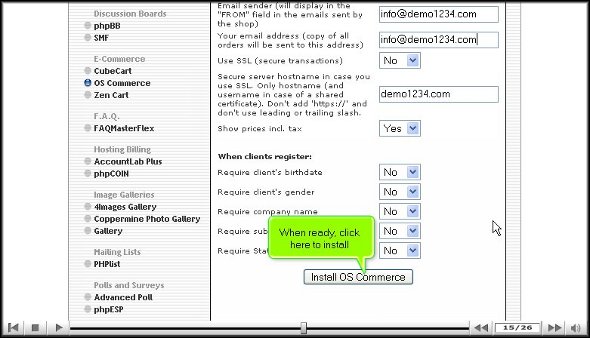
6. To complete the installation process, you must click on finish.

So you see that installing OSCommerce is not a big deal. You simply have to follow the steps in the order mentioned above. You will install the application well on your computer once you can go through the steps without problems.
After installing the application on the computer, you can look at the various tools provided. In fact, you should spend considerable time learning how to use the multiple features. To absorb things better, you should not rush the learning process. You should maintain a level of patience so that you can learn how to use the application.
After you are familiar with the application, you can start configuring the settings per your requirements. You can consult some other tutorials to learn more about configuring this app. You will take some time getting used to the tutorial software, so try not to get too worked up, keep a cool head and try to get the best out of a beautiful application like OS Commerce.
Go to the top of the page. Back to the tutorial

 Ananova