The easy way to install phpAdsNew
Here is a tutorial on installing phpAdsNew on your computer without hassle. For those who do not know anything about phpAdsNew, phpAdsNew is an application by Fantastico. This very reliable web hosting company offers valuable applications to users.
Fantastico has been around for many years now and has already become very popular amongst the people. The service provider has a good stock of scripts for users to install the applications. The hands make the installation process less time-consuming. The applications provided by Fantastico will work well when combined with the current Cpanel that you are using.
Since you are reading this tutorial, it can be assumed that you already know how to use the interface.
1. Now, when going through the Fantastico interface, you will notice a tab that says phpAdsNew on the left-hand side of the screen. You must click on it to initiate installation.

2. After that, you will be directed to an installation screen where you will have to click on a new installation link, and again, you will be taken to yet another page.

3. On this page, you must provide the directory name you want to install phpAdsNew. You also have the option of installing the application in the root directory.

4. You are required to provide a name for administration, and you have to give a password.
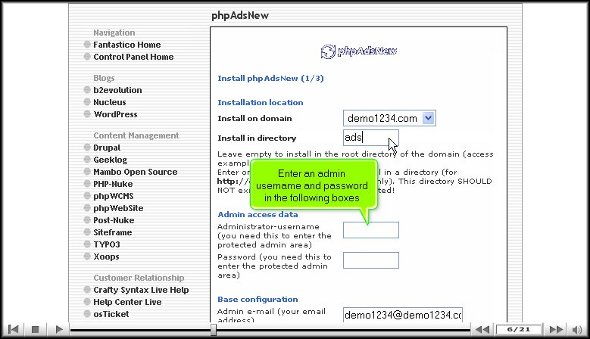
5. Once you are done with the above steps, you can click on install phpAdsNew

6. To finish the entire process of phpAdsNew, you must click on finish.

With that, we have come to the end of the tutorial. If you have completed the above steps correctly, the installation was successful. Now that you have installed the application, you must start looking at the various features provided and learn their usage. Since this application has
many tools, you should take the time and carefully review each of them to absorb their use correctly. You can consult other tutorials to learn how to use the tools provided by the application.
You may take a while to get used to this application, mainly if you have not used a similar application before. So, if you do not get certain things right, you must not lose hope; you must keep a calm and relaxed mind and continue to explore the application.
After a while, when you feel that you know how to use each tool properly and are confident enough, you can start configuring each device per your requirements. You will notice a tremendous improvement in your website’s performance once you have used this application.
So, to install the application successfully, you must follow the tips mentioned in the tutorial in the order mentioned above.
Go to the top of the page. Back to the tutorial

 Ananova