How to install PHPList
Installing PHPList on your computer is not a big deal, provided you follow the guidelines of a well-written Tutorial. If you are contemplating installing this fantastic application on your computer, this is the proper tutorial you are reading. If you consult this tutorial, you can install PHPList on your computer without problems.
PHPList is an application provided by a reliable web hosting service provider named Fantastico. Fantastico has been around for many years, providing users with beautiful applications like PHPList. The best part about the applications provided by Fantastico is that they are very user-friendly and have sophisticated tools that give excellent results. You can use these applications in conjunction with Cpanel. Fantastico has an extensive stock of scripts; you can use those scripts to install the applications. In fact, you save a lot of time in using these scripts.
The steps to install PHPList on your computer are listed below.
1. When exploring the interface of Fantastic, you will have to locate a tab that says PHPList. Once you identify this tab, you must click on it right away.

2. After doing the above activities, you will be taken to an installation screen where you have to click on a link that says new installation.

3. Again, you will be directed to yet another page. On this page, you must type the directory name in which the application will be installed. You can also let PHPList install automatically within the root directory.
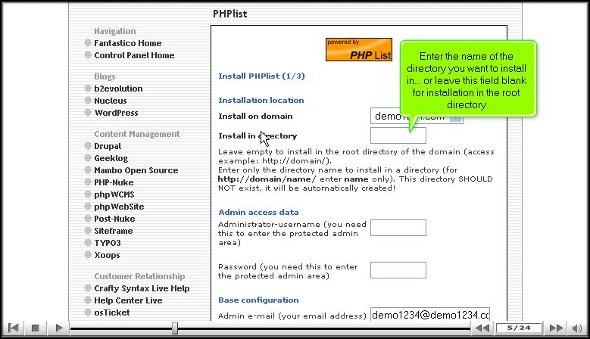
4. On the very same screen, you will have to provide a name for the administrator and a password.

5. On the bottom end of the page, you will find a tab that says install PHPList. You will need to click on that only after you have completed the above steps without fumbling.

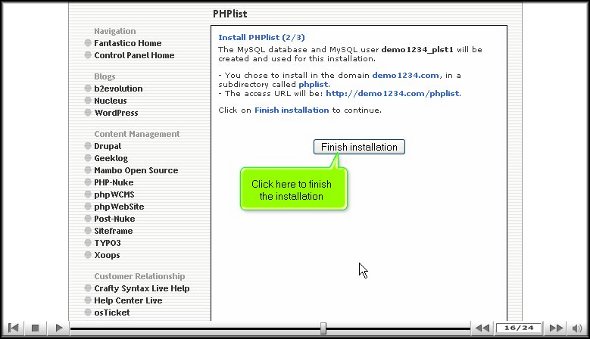
6. To wrap up the installation process, click finish.
Well, by now, you must have understood that the installation process of PHPList is not challenging. You simply need to follow the steps mentioned in the tutorial word for word, and you will not face any problems. Now that you are sure that the application has been installed correctly, it’s time you look around and check out the features and the various tools of this application. You will have to spend a little time learning how to use the multiple parts to get the best out of the application, so you shouldn’t rush through the learning process.
You will face a lot of trouble when you try to use this application, especially if you are a new user, but you should not get too worked up about it. Try to have a calm and composed approach towards the application; things will work out fine eventually.
Go to the top of the page. Back to the tutorial

 Ananova