The installation process of Siteframe
Siteframe is another beautiful application that Fantastico provides to its users. Now, fantastico is a service provider that gives people reliable services in terms of web hosting. For years, this company has provided users with valuable applications such as Siteframe and many others.
The good part about the applications provided by Fantastico is that most of them are very user-friendly and easy to install. These applications are also compatible with cPanel. Fantastico also gives you access to a script library so you can install the applications quickly. This tutorial will teach you how to install Siteframe on your computer without much trouble. All you need to do is follow some simple steps listed below.
The steps for installing Siteframe on your computer. Since you are going through the tutorial, it can be assumed that you have a lot of knowledge of Fantastico.
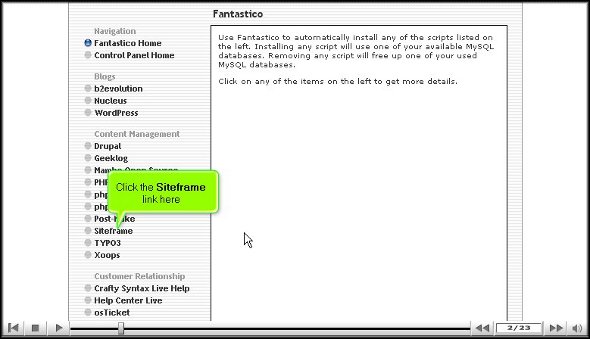
1. To kick-start, locate the Siteframe tab and click on it. Once you click on the account, you will be taken to another screen, the installation screen for Siteframe.
2. On the installation screen, click on a new linkInstallation.

3. After you click on the new installation, you will be directed to another screen where you have to provide a name for a directory in which you want the application installed.
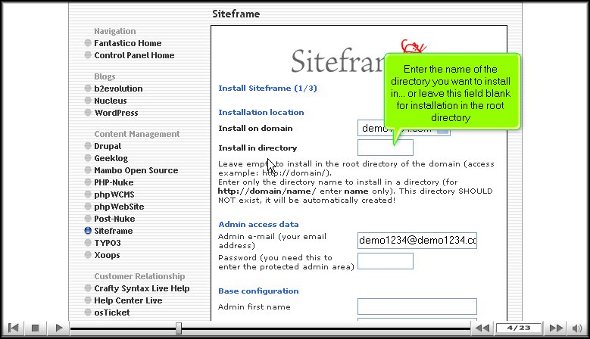
4. On the very same screen, you must provide a username for the admin and a strong password.

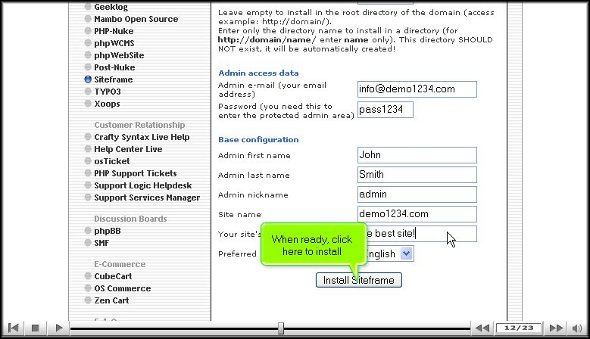
5. To begin the installation process, you will have to click on Install Siteframe.
6. To confirm the installation process is complete, click on finish.

This is the end of the tutorial on how you can install Siteframe. Once you are sure that you have installed the application correctly on the computer, you can then start looking at the application’s interface. This application has very advanced features and helpful tools, so there is a lot that you can achieve with it. However, rushing through the entire learning process is not advisable, as you can miss out on some fundamental aspects of the application.
In the beginning, you will face some difficulty using the application; however, once you start spending some time with the application, you will be able to work things out in the long run. You can consult other tutorials to understand how to use the application and its tools.
Once you start using this application, you will realize you have greatly benefited. The application also supports certain E-commerce features, which are added benefits. So, to get the best out of the application, you must install it properly, and to do that, you must follow the steps mentioned in the tutorial very carefully. Siteframe is indeed an excellent application.
Go to the top of the page. Back to the tutorial

 Ananova