Cool Handle Adult Web Hosting


Cool Handle Introduction

Cool Handle

The Cool Handle web hosting company was founded back in the year 2001 and has been a strong player in the adult web hosting services area. The company is furthermore among the leading companies in the industry when it comes to adult web hosting. Adult web hosting is a very delicate area in web hosting as there are strict rules and regulations that must be adhered to before a web host can start offering adult web hosting services.

CoolHandle has been able to meet all the regulations thus making it a leader when it comes to adult web hosting services.

Note:- Cool Handle no more offereing adult hosting services Updated 5/11/2015

View Other Adult web Hosting Providers >>

Features

Some of the features that the adult hosting at Cool Handle web hosting come with include unlimited disk space and unlimited bandwidth along with round the clock technical and customer care support. Clients at this web hosting company are also entitled to get a free domain and free domain privacy. Some other features of their adult hosting services are :free domain transfer, free file transfer, free script transfer, free database transfer, hosting an unlimited number of domains along with My SQL databases. Clients also get a free and instant set up on joining the hosting company along with a 30 day money back guarantee, a network up-time guarantee of up to 99.9% and round the clock,24/7 technical and customer support throughout the year.

Performance

Performance is what determines the reliability of a web host and no body wants to use a web host that  is not well performing.  Cool Handle web hosting company has servers that are very power and are of the best quality to top it all up. Their robust features also go a long way in increasing the performance of their hosting services.  On top of that, they offer a  network up-time of up to 99.9 % which keeps clients’ web sites up and running all through.

Reliability

The reliability of the adult web hosting services at Cool Handle is remarkable. Their customer care team is readily available and on top of that, their network up-time statistics are very good. With their excellent network up-time, the clients of Cool Handle never have to worry about their web sites being off line. The clients at this web hosting company can also get a refund if unsatisfied with the services offered, thanks to the 30 day money back guarantee they offer clients.

Customer support

Customers are the most important component of any business enterprise, this is why the customer care team at Coolhandle ensure that their clients are a satisfied lot.  The technical support team and customer support team at CoolHandle web hosting company are  very reliable, being accessed throughout the day and night all year round.  The customer support team can be reached  in a variety of ways: via e-mail,  phone or live chat.

Cost

The adult hosting services that are offered by CoolHandle web hosting company are very cheap, starting from as low as $ 3.95 a month, which is quite affordable. No one will go for adult web hosting services that they cannot afford, thus making Cool Handle’s adult hosting services the perfect combination, afford ability and excellent performance.

How To Install WordPress without any problems at all

WordPress is a very useful application that is provided by Fantastico. This application has many useful features and tools that allow you to perform various activities. WordPress is a very popular blog publishing application.

Fantastico is a reputed web hosting service provider that gives users fantastic applications. These applications are very easy to install and are quite compatible with the c Panel. The applications can be installed within a short period of time if you use the scripts provided by Fantastico.

Now if you are on the lookout for a tutorial that will teach you to install this application, well you have indeed found the proper tutorial. This tutorial will guide you through the entire process; all you have to do is follow the steps in the order listed below.

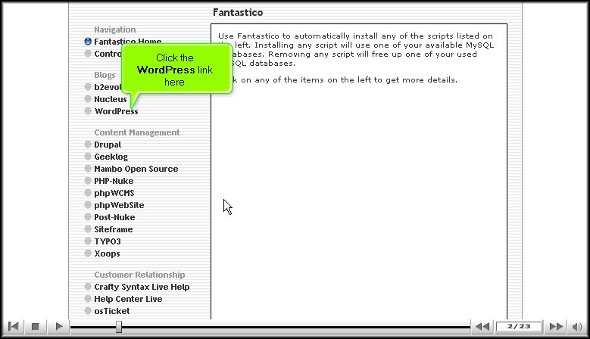
1. To begin the process of installing the application, you will have to locate a tab that says WordPress on the interface of Fantastic.

2. After you have located the tab you must click on it; doing this, you will be directed to an installation screen.

Wordpress

3. On the installation screen you will have to click on a link that says new installation.

wordpress

4. After clicking on the new installation you will be taken to yet another screen where you must mention the name of the directory in which you want to install WordPress.

Wordpress

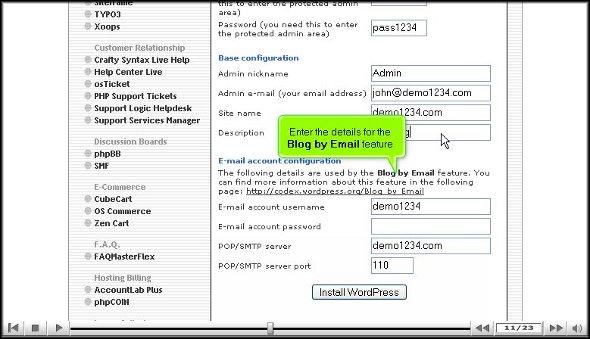
5. You will have to mention a name for the administrator and even provide a password.

WordPress

6. For the base configuration you will have to provide a nickname for the admin and an email address. You will also have to mention a description.

7. Under the email configuration you will need to mention your user name and password and the type of server.

WordPress

8. When you have completed the above procedure then you should click on install WordPress.

Wordpress

9. To finish the process you have to click on finish.

Wordpress

This brings us to the very end of the tutorial, and now you can log into the application and look at the various tools and features on its interface. When you are going through the different features make sure that you do not rush through the learning process as you may miss out on some of the most critical aspects of the application.

Now if you are a first-timer in using this application then you may have a bit of trouble in using the various tools and services. The best way to deal with this is to keep calm and go through each feature till you have absorbed things properly.

Once you are confident about using the application, you can then start by configuring the settings of the applications as per your requirements. The application has a very user-friendly interface so things should not be too difficult for you.

By now you may have understood that WordPress is indeed an excellent application with many benefits. So to get the best out of the application you must make sure that you have installed it in the right way.

Go to top of page                Back to tutorial

Ananova’s contest starts today!


Ananova’s contest starts today!

Got Tech Skills? Prove It! You Could Win $1000!

You’ve read our stuff. Now it’s your time to shine! We want you to come up with a completely unique (like, really unique!) solution for webmasters. Solution to what? Anything that can help webmasters out. Things like:

  • Web hosting topics

  • Web solutions

  • Web Technology

  • IT Help and Tips

How to KeepYour Page Rank and SEO Intact When Moving a Site


How to KeepYour Page Rank and SEO Intact When Moving a Site

moving a site
Moving your site or working on a site redesign? Don’t make the same mistake that many companies make by not going through the right steps before you do any major work on your site. Neglecting to do things the right way can result in a major loss of natural traffic, and some punishment from search engines like Google.

Before You Go Cloud: 5 Important Legal Points


Before You Go Cloud: 5 Important Legal Points

You know you want to make the switch from traditional hosting to cloud hosting for your business. It’s a big switch, but often, the right choice. Just as you did when you started your business, you need to be careful: the security of your data, and sometimes that of your customers, is depending on you.

lady justice

HTML: You Can Do It Yourself!


http://www.ananova.com/html-you-can-do-it-yourself/

You’re a beginner in the world of building websites. As such, you outsourced your cheap hosting website design to a professional. Your site has launched, and although you are very pleased with the work they’ve done, you have noted a few small things that should be modified or added.

how-to-do-html