WordPress/Drupal Vulnerability


If your website runs on CMS WordPress or Drupal, update your software now or you will lose all your data and your machine. Why so?? Since this software is suffering from specific vulnerabilities, around 100 million websites are under threat. Let us know more.

Two of the most popular and widely used open-source Content management systems, Drupal and WordPress, face vulnerabilities affecting millions of websites. The two companies are coordinating with each other for the first time to eliminate the flaw.

The flaw was discovered by Nir Goldshlager, a salesforce.com researcher. According to him, with a few keystrokes, the entire Drupal or WordPress website can be taken down quickly. The flaw is a potential denial of service (Dos) issue with the XML processing module by both WordPress and Drupal. The spot is highlighted because US government websites, including whiteHouse.gov, use Drupal. According to a post by WordPress, the WordPress issue in PHP’s XML processing and updating could protect against specific brute force attacks and address possible code execution vulnerabilities. A post by the Drupal website says that Drupal is affected because the PHP XML parser used by a publicly available XML-RPC endpoint is vulnerable to an XML entity expansion attack.
This flaw is predicated on a popular cyber-attack XML Quadratic Blow Up attack. This attack distorts the Memory Limit, MySQL and Apache Max client works.

But what is a Denial of Service (DOS) attack? It is an attempt to make a resource or a machine unavailable to a user who requested it. However, the reasons and motives behind the denial may vary, but when intentionally done, it consists of efforts to interrupt or suspend the services of a host temporarily. These attacks are sent by one person or a system.

The versions affected by these attacks are WordPress 3.5-3.9 and Drupal 6x-7x. The Quadratic Blowup Attack repeats one large entity with tens of thousands of characters repeatedly. Due to this, an XML document of a few KBs can end up requiring up to hundreds of MBs and even GBs. This heaviness can bring down an entire website or server down quickly. Here, the question arises of how this attack is exploited? The default memory allocation limit for PHP (the language in which WordPress and Drupal are written) is 128MB per process. Theoretically, you can’t exceed the 128MB limit with an XML bomb request. But the problem arises here. Apache has its “Max Clients” property set to 256 by default.Meanwhile, MySQL, WordPress and Drupal’s database, has its default “Max Connections” value set to 151. If we multiply those connections against one another (128×151), we get 19328MB — which will consume all available memory. To successfully attack the server, the attacker must fingerprint the available memory limit on the target server. If the attack overwrites the PHP limit, the server will reject the overwrite, rendering the attack unsuccessful. A successful attack, however, will return the injected payload

. This will bring down the system.

The risks created due to these attacks are:

  • Service Unavailable
  • 100% RAM and CPU Usage
  • Traffic on server
  • Server breakdown

After the disclosure of this flaw, Nir Goldshlager tried to find ways to resolve this issue and he was finally succeeded. The way by which the flaw could be destroyed is by updating both the softwares to their latest versions. Drupal and WordPress have released the updates to plug the flaw but it is still up to the users of these two CMS to use them on their sites. It is advised to the users of Drupal and wordpress to update their softwares immediately. To fix the flaw at a minute level, WordPress 3.7 introduced automatic updates. This allows security patches to get rolled out ton users automatically.

WordPress users are strongly advised to upgrade their sites to WordPress version 3.9.2. This version of WordPress can fix the possible DoS issue in PHP’s XML processing. Since the vulnerability is present in WordPress 3.5 to 3.9.1, several sites need to be manually updated to be protected. Automatic updates for security releases were introduced in WordPress 3.7, leaving users of 3.6 and 3.5 especially vulnerable. WordPress 3.9.2 has some security updates that help protect against this flaw:

  • Fixes a possible but unlikely code execution when processing widgets (WordPress is not affected by default), discovered by Alex Concha of the WordPress security team.
  • Prevents information disclosure through XML entity attacks in the external GetID3 library, as reported by Ivan Novikov of ONSec.
  • Adds protections against brute attacks against CSRF tokens, reported by David Tomaschik of the Google Security Team.
  • Contains some additional security hardening, like preventing cross-site scripting that administrators could trigger only.

Users can update to version 3.9.2 immediately by browsing Dashboard > Updates in the backend of WordPress. Sites that have automatic updates configured will be updated within 12 hours. Sites using WordPress 3.8.3 or 3.7.3 will be updated to 3.8.4 or 3.7.4. Older versions of WordPress are not supported, so it is recommended to update to 3.9.2, the latest.

Drupal 7.3.1 and 6.3.3 are security releases against security vulnerabilities.

  1. As of this release, the XML-RPC system in Drupal core will ignore information in <?xml> declarations contained within XML-RPC messages (for example, XML version or character encoding information). This is not expected to matter for the vast majority of use cases.
  2. The XML-RPC system and OpenID XRDS parser will also reject messages containing over 30,000 XML tags. This limit is not expected to matter for most use cases. If you need to process an XML-RPC message larger than that, you can change the limit by setting the “xmlrpc_message_maximum_tag_count” variable to a higher value. For example, in settings.php:

<?php
// Allow XML-RPC messages with up to 50,000 XML tags to be processed.
$conf[‘xmlrpc_message_maximum_tag_count’] = 50000;
?>

Do not set the value higher than you need since allowing too many XML tags per XML-RPC message increases your site’s vulnerability to denial of service attacks. The OpenID XRDS parser has a similar variable.

(“openid_xrds_maximum_tag_count”) which can be used similarly.

Suppose you are unable to install the latest version of Drupal immediately. Alternatively, you can remove the xmlrpc.php file from the root of Drupal core (or add a rule to .htaccess to prevent access to xmlrpc.php) and disable the OpenID module. These steps are sufficient to mitigate the vulnerability in Drupal Core if your site does not require XML-RPC or OpenID functionality. However, this mitigation will not be effective if you use a contributed module that exposes Drupal’s XML-RPC API at a different URL (for example, the Services module); updating the Drupal core is therefore strongly recommended.

At this moment, I conclude that update your websites to the latest versions of Drupal and WordPress and secure your websites.

UK Adult Hosting Sites: Banks May Soon Deny Processing Payments


UK Adult Hosting Sites

UK Adult Hosting Sites

We’ve talked about the UK porn filter before. In case you missed it, you can check out that article *here*.

So let’s raise an important point, which I believe has been raised here on the blog before, which I was thinking about with the recent news of a new form of punishment for adult hosting sites.

UK Adult Hosting Sites: Banks To Punish Adult Hosting Sites?

Before we get to that important point, let’s look at the problem. After instituting country-wide porn filters that block adult hosting sites (which, thankfully, households have the option to opt-in on explicit content if they so choose), the government wants to give banks the authority to deny processing payments to any adult hosting sites that publish legal content but do nothing to prevent children from accessing that content.

Essentially, if you aren’t following the rules, you aren’t getting paid. A summit will take place some time this month in order to agree on a plan. If no agreement is voluntarily reached, the government is prepared to step in and create legislation and force the matter.

Certain websites don’t perform any age verification check, unlike others that can’t be accessed unless a users age is verified. The Authority for Television on Demand (Atvod) exists to monitor websites in the UK that host video content, and is leading the charge against non-compliant sites.

UK Adult Hosting Sites: In The Cross-hairs

Playboy was one of the first to be punished, according to the Telegraph, and there have been others. Apparently, Playboy offers video content that minors can access with no trouble whatsoever (UK Adult Hosting Sites).

But is it okay to target all of these seemingly non-compliant sites? Since it is not okay to flat-out block free adult sites (it’s absolutely legal for those over 18 to view the content), it seems some recourse must be taken to assure sites are performing accurate age verification procedures.

UK Adult Hosting Sites: Free Isn’t Necessarily Free

What happens is these sites attract users in with free videos. From there, they can sell a premium service, enticing users to pay for better, longer lasting videos and other add-on services.

If there is no age verification process for the free service (it stands to reason that someone under 18 does not have access to a credit card, so they’ll not be able to upgrade), why should that non-compliant company receive payment? This is the view of the UK government: if you aren’t going to play by the rules, you aren’t going to get any money.

UK Adult Hosting Sites: The Future?

It seems banks and credit card companies are on board with this idea, and soon, the UK Cards Association, the Payments Council, the British Bankers Association, and the top credit card companies will meet at a summit to discuss this idea.

How far is Cameron prepared to take this (UK Adult Hosting Sites)? Should all of this content be blocked, and adult hosting websites be punished for publishing legal content by financial institutions? That’s kind of the beauty of the Internet: you can find just about anything. While I agree that children shouldn’t have access to pornography, isn’t that the role of the parent, to assure their children aren’t seeing things they shouldn’t?

More importantly, who’s deciding which content is appropriate and which content is not? It is subjective, so it seems to me there is a lot of work involved with the implementation of this proposed law.

Do you run an adult hosting sites? What are your thoughts on this topic?

Top 3 Canadian Adult Hosting Companies


Canadian Adult Hosting Companies

It can be difficult to find a hosting provider willing to host your adult website. Adult hosting sites mean an increased risk of legal issues, and most providers simply don’t want to get involved.

So how do you find the best choice in terms of an adult hosting company in Canada to host your website? Take a look at these.

Canadian Adult Hosting Providers

1. Canadian Adult Hosting Provider: Carat Networks

carat networks with Canadian adult hosting

Carat Networks is located south of Toronto in Hamilton, Ontario, and promises high quality hosting services at a cheap hosting price. They realize that each business has different needs, and strives to meet those needs thanks to a multitude of options in terms of hosting packages. As long as your adult content is not illegal or underage, they’ll provide hosting services no matter what.

Carat offers dedicated server packages starting as low as $92.60 per month, giving you real-time bandwidth stats, free remote reboot, and 6TB of data transfer. Each server is custom built, and Carat Networks promises a speedy setup.

Is VPS hosting more your speed? Their basic plan is $15 per month, offering 50GB of storage, 500GB bandwidth, and 512MB RAM. Real-time bandwidth stats and remote reboot are also offered with VPS hosting packages.

Maybe shared hosting is what you’re looking for. If so, sign on to their basic plan for $7.99 per month. That gives you 10GB of storage and 250GB bandwidth, 99.9% uptime, and phpMyAdmin for easy database management.

2. Canadian Adult Hosting Provider: Adult Hosting

The self-proclaimed “leader in adult hosting in Canada,” Adult Hosting seeks to preserve free speech on the Internet. However, if there is any content the company deems as illegal or objectionable, the site can be shut down without notice. Adult Hosting lists several violations within its ‘Acceptable Use Policy,’ and includes things like forgery or impersonation, harm to minors, SPAM, harassment, and scams. Pornographic content is not allowed on a VPS hosting site. In short: read the fine print!

Adult Hosting offers domain transfer and registration, as well as issue SSL certificates. Looking for colocation? Unmanaged plans start at $50 per month and managed plans at $99 per month.

Dedicated server hosting plans start at $99 per month, which gets you 1GB RAM, 10TB bandwidth, and 500GB storage. Looking for a cheaper option? Choose a shared hosting package, starting at only $3.95 per month. That gets you 50GB storage and unlimited bandwidth for one domain.

3. Canadian Adult Hosting Provider: Netelligent

Montreal’s ‘Netelligent Hosting Services’ offers a wide range of hosting solutions, all of which allow adult content provided it is not illegal or in the child pornography realm. Netelligent has six data centers, and there are plans in the works to open a seventh within the next few months.

All of their plans offer free setup when signing a 12-month contract, 24/7 support, and 99.9% uptime.

If you want your adult site hosted in the cloud, choose their Linux plan that starts at 10GB storage for $22 per month, or their Windows plan that starts at $71 per month.

Is dedicated hosting the right choice for your website? Plans start at $89 per month for 500GB storage and 5000GB bandwidth.

Maybe shared hosting fits your budget better. If so, they have plans that start at just $50 per year, offering 1GB of space and unlimited bandwidth for one website.

Do you rely on any of these providers to host your website? How has your experience been?

How to Find An Adult Hosting Niche


Adult Hosting

Adult Hosting Niche

You are starting an adult hosting site. But what would be most profitable? Should you start a “one-site-fits-all” website, or should you narrow your focus to a specific Adult Hosting Niche?

If you’re planning on making any money off of your website, you should definitely consider a Adult Hosting Niche . There are many niches in the adult hosting world to choose from (girl-next-door, gay, transgender, etc.), and the key to making money is setting yourself apart from the competition. There are already plenty of sites that offer it all, and this makes it difficult to get your site noticed.

A Word About Choosing A  Adult Hosting Niche

First, come up with a list of Adult Hosting  niche . Go through that list and see what interests you most. The more interested you are in the content, the more valuable users will find that content. You wouldn’t do well playing against Tiger Woods if you’ve never golfed, would you? It’s the same with your website: it can’t be successful if you don’t have an interest in it.

You also want to provide content for your site that is totally legal. Be sure you can show proof of model ages if this is applicable. You can’t run a successful adult hosting site in jail!

Find An Adult Hosting Provider

This is important: some hosting companies won’t touch adult content with a 50-foot pole. Some hosting providers we’ve reviewed, such as Hostgator and Arvixe, do provide adult hosting services. Be sure you understand what is allowed and what isn’t prior to signing a contract with any of them!
Adult Hosting Niche – Get Your Name Out There

Once your site is created, it’s time to advertise! Sign up with an affiliate marketing program for starters. This can be a great way to earn money without doing anything at all! Find some paid subscription sites to partner with, and provide links to those sites throughout your web pages. When someone clicks and purchases a membership at that site, you make a commission!

Adult Hosting Niche: Offer Membership Options

Some sites offer certain content for free, with the rest available after purchasing a membership. You can offer all of your content for free if you’d like, lacing it with advertising, enticing people to pay for a membership to enjoy advertisement-free content if you’d like. Or, you can offer “VIP membership,” with exclusive content available to members only.

Adult Hosting Niche: Above All, Content Is King

No matter how you intend to monetize the site, if the content isn’t good no one will want to enjoy it for free, let alone pay money to subscribe. Be sure your content is fresh and original, legal, and keeps visitors coming back for more.

Adult Hosting Providers

Do you run an adult hosting site? Have any tips for our readers? Share them by commenting below!

Which State Features the Most Adult Hosting Sites?


Adult Hosting Sites

California state flag Adult Hosting Sites

Ever wonder which country hosts the most porn? How about which state in the US features the most adult hosting sites? In case you did, a company has compiled this data just for you!

And it’s kind of ironic: the company that compiled this data, MetaCert, offers Internet users various tools to keep children from viewing inappropriate content while online. So, who made the list? Let’s take a look.

Top Adult Hosting Sites Countries

When it comes to countries, America is by far the winner: 60% of the world’s porn is hosted in the good old USA. That’s 428 million adult hosting pages! The Netherlands comes in at number two (26%, 187 million pages), with the UK at number three with 7%, 52 million pages.

How about the bottom of the list? Poland hosts a mere 505,000 pages. Wondering how other countries stack up? Here’s a breakdown of the top 20:

  • US – 428.3 million pages
  • Netherlands – 187.2 million pages
  • UK – 52.2 million pages
  • Germany – 8.2 million pages
  • France – 5.5 million pages
  • Canada – 2.3 million pages
  • Japan – 2.2 million pages
  • Australia – 1.9 million pages
  • British Virgin Islands – 1.4 million pages
  • Czech Republic – 1.4 million pages
  • Ukraine – 1.1 million pages
  • Taiwan – 935,000 pages
  • Spain – 935,000 pages
  • Bahamas – 889,000 pages
  • Austria – 769,000 pages
  • Switzerland – 766,000 pages
  • Belgium – 728,000 pages
  • Russia – 638,000 pages
  • Hungary – 583,000 pages
  • Poland – 505,000 pages

Top Adult Hosting Sites States

So, of those 428 million US adult hosting sites, what states host the most? The clear winner: California, hosting 66% of all adult sites in the US, followed nowhere near closely by New York and Texas, 8%, Arizona and Illinois with 2% each, and New Jersey, Florida, and Washington with 1% each.

The least likely place to see adult hosting sites is Alaska. Only 10,363 pages of pornographic content are hosted there.

Top Porn TLDs

Again, it’s not surprising that .com is the most popular TLD for porn, accounting for 82.46% of all adult hosting sites. .net is second with 7.76%, and .nl with 2.35.%.

Conclusions

So why does America love porn so much anyway? It’s not a love of porn this study demonstrates. Remember, it’s the top countries featuring adult hosting sites. One reason is likely because the US, along with the Netherlands, is one of the most common countries for a website to be hosted. Let’s not forget most of these hosting providers aren’t very restrictive regarding what kind of content they’ll host. The Netherlands are even more lenient.

Another reason is the US legal system and freedom of speech. As the old saying goes, we have bigger fish to fry than worrying about adult content. As long as our kids don’t see it, who cares?

Does any of the information above surprise you?

UK Mandatory Web Filter And What It Means For Web Hosting Companies


UK Mandatory Web Filter

uk flag UK Mandatory Web Filter

We’ve discussed the UK government’s plan to make the Internet a safer place for children by making adult hosting content filters mandatory. In case you didn’t catch those articles, here’s a recap: PM David Cameron is requiring porn filters be activated in every household in the UK unless the user opts out of it when signing up for service.

The ISP will simply change the default of the filters to “on” for new subscribers unless the user opts out. Those who already subscribe will have the chance to opt out, and if they don’t, the filters will be automatically applied by the ISP.

It isn’t just adult hosting content that will be blocked. Other objectionable material filtered out: violent material; web forums; tools that exist to bypass web filters; and content regarding anorexia, eating disorders, suicide, terrorism, and extremism. The organization Open Rights Group is concerned, however, that some sites will be mistaken for “adult” and blocked due to the fact what is considered adult content varies from person to person.

UK Mandatory Web Filter: Should All Hosting Companies Be Concerned?

Probably not. The majority of hosting companies won’t find that their sites are affected, as long as it doesn’t feature adult content. University of Cambridge security researcher Richard Clayton says it all depends on how the individual ISPs implement the filters. “In general the block will be applied at the domain name level rather than the IP level,” he said.

Basically, if one finds both racy, nude pictures and innocent family shots on the same IP and server, the family shots will be safe as long as they exist on separate domains. Added to that, said Clayton, is the fact most pornographic sites are hosted on dedicated servers rather than existing in a shared hosting environment due to the excessive bandwidth and storage requirements.

UK Mandatory Web Filter: What About The Search Engines?

Google Image Search could find themselves in trouble for the content that is displayed, along with other sites that pull content from around the Web. Also in trouble: sites like Tumblr. Because filtering is done on the domain side, they may be filtered because of the few adult content subdomains they host.

However, filters already exist within both Google Image Search and Tumblr, where content is classified as adult or NSFW, like ‘safe search.’ This filters the content based on age-appropriateness, but can be prone to over- or under-filtering. Although it’s no guarantee sites will be given the green light, giving users the option to filter adult hosting content casts that site in a more favorable light when the decision needs to be made whether or not to filter that site entirely.

UK Mandatory Web Filter: Do Filters Even Matter?

There are some that say these filters don’t matter at all, since it is so very easy to opt out of the program. Some say that the issue isn’t properly addressed. “A lot of people have argued that this basically provides a false sense of security for parents in that they’re going to believe that nothing can be seen by their precious little Johnny,” said Clayton. “And once you start taking technical measures in order to evade these blocks, they can see anything they want.”

Another issue: it won’t filter out those sites that exist on the deep web. Tor is becoming more popular for both accessing questionable content and getting around surveillance.

In the end, the majority of web hosting companies won’t need to worry. Although they aren’t 100% responsible for the content they host, they can have some say in what they will and won’t host.

What do you think about this issue?

Typo3


How to install Typo3

People have often stated that Typo3 is a complicated application to use and install; the good news is that none is genuine. The application is straightforward to install and relatively user-friendly. Typo3 is a beautiful application by Fantastico, a reliable web hosting service provider.

The applications provided by Fantastico are beneficial and can help you do a host of things. The applications have very advanced tools and features. All the applications can be used with cPanel. Fantastico provides us with a good stock of scripts that allow for the easy and smooth installation of the applications. So, if you are looking for a tutorial that will teach you to install Typo3, then you are in luck, as this tutorial is designed to guide you through the entire installation period.

So, now let us look at the series of steps that you need to follow to install Typo3 on your computer.

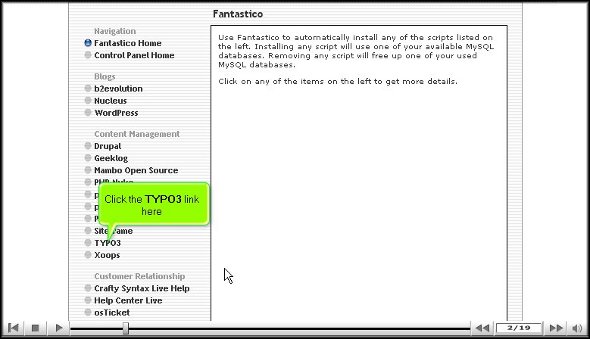
1. You have to start by clicking on Typo3.

typo3

2. Once you have clicked on Typo3, you will be taken to an installation page where you have to click on the new installation.

typo3

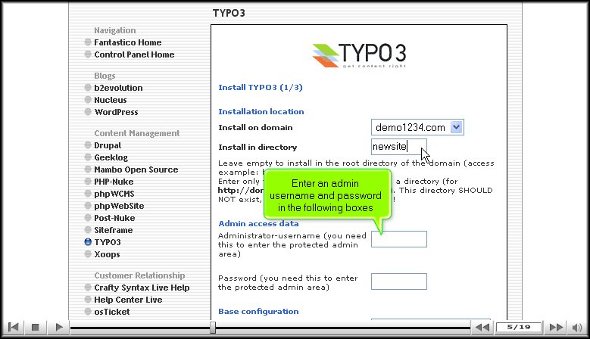
3. After That, you will be directed to yet another page where you must specify the directory in which you would like to install

typo3

4. On the same page, you will also have to specify the name of an administrator, and you must also provide a password.

typo3

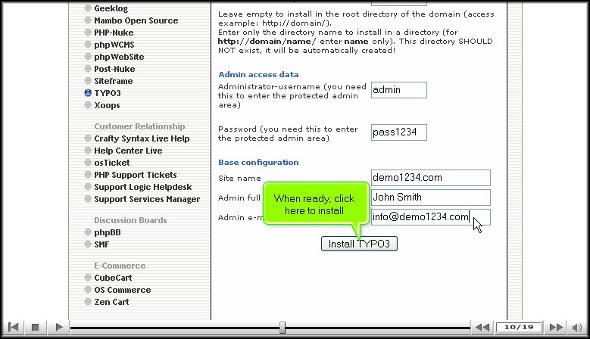
5. After that, scroll to the bottom of the page and click Install Typo3.

typo3

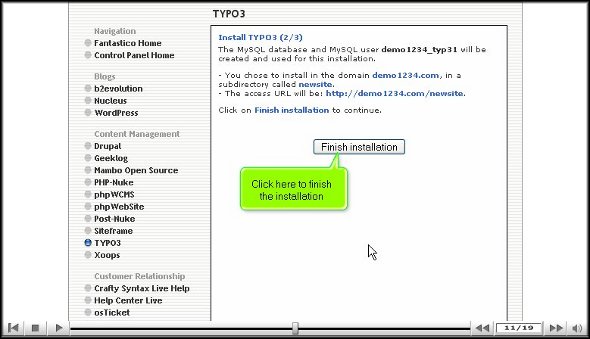
6. To round up the installation process, click finish.

typo3

So now we have reached the end of the tutorial, and if you have followed the above steps correctly, you have successfully installed Typo3 the right way.

To better understand the application, you must go through the various tools and features, as this will help you better understand the application. To absorb the simple multiplication functions, you must not rush through the learning process; you may miss out on some crucial aspects of the application.

As a new user, you will have difficulty getting used to the application’s functions. However, you may consult other tutorials to teach you how to use the tools properly. You should keep calm and go over the various parts again and again.

Once you are confident that you can handle the application, you can start configuring the application as per your requirements. After the configuration, you can log into the application and use it.

So, by now, you have probably understood that Typo3 is quite a helpful application. To get the best out of it, you must follow the steps so that you may be able to install it on your computer.

Go to the top of the page. Back to the tutorial

WebCalender


Easy installation of WebCalender

To install WebCalender, you need to follow proper steps, and this tutorial is designed to present to you the steps you need to follow if you want to install WebCalender on your computer.

WebCalender is a handy application provided by Fantastico. This application has advanced tools and useful features that allow you to perform many activities. Fantastico is a reputed web hosting service provider that has been operating for many years now. This service provider gives its users a host of applications compatible with c Panel; the applications are also straightforward to install and have user-friendly interfaces. Fantastico lets the users access its stock of scripts; these scripts help the users install the applications quickly.

Now, let us go over the steps that you will be required to follow to install Web Calendar on your computer.

1. Now, when going through the interface of Fantastico, you must locate a tab that says Web Calendar; you must click on this to be taken to an installation screen.

webcalendar

2. you must click on the new installation on the screen.

WebCalender

3. After this, you will be directed to yet another screen where you will have to provide a directory’s name, and on the very same screen, you will have to give a username for the admin and password so that you can log in to the application.

WebCalender

4. The next step would be to provide the full name for the administrator’s Username and Password.

WebCalender

5. At the bottom of the screen, you must click on Install WebCalender

WebCalender

6. To complete the process, you must click on finish.

WebCalender

This brings us to the end of the tutorial; now, you can log into the application and go through the present features and tools. Reviewing the various tools until you have absorbed everything would be best. You should not rush the process, as you miss certain essential things.

It is no secret that as a first-timer, it may be a bit of a challenge to understand the use of the tools provided in the application. So do not get worked up if you fail to understand certain things; you can feel free to take the help of other tutorials to learn about the various features and their uses. Since this application has a user-friendly interface, you will not have much trouble understanding how to use it.

After you have managed to understand the usage of each tool of the application, you can then start configuring the features as per your purpose. So, you see that this application has many benefits and can vastly improve the operations of your website. So, to get the best out of the application, you must install it correctly.

So, follow the guidelines mentioned in this tutorial to get the installation process right.

Go to the top of the page. Back to the tutorial

Xoops


The Process of Installing Xoops

Now, Fantastico is a reputed web hosting service provider that has been operating for years. Fantastico is very popular because it gives users applications that allow them to perform many different activities.

All the applications provided by Fantastico are pretty compatible with CPanel. Fantastico also provides several scripts that you can use to install the applications smoothly.

Installing Xoops is relatively easy, provided you follow the correct procedure. Now, if you are looking for a tutorial to guide you through the entire process, you have found the proper tutorial. This tutorial is broken down into a series of steps that are very easy to follow.

So, now let us understand the steps you must follow to install Xoops. You must follow the steps in the tutorial below in the same order.

1. To start the installation process, locate a tab that says Xoops. Once you find it, you have to click on it without fail.

xoops

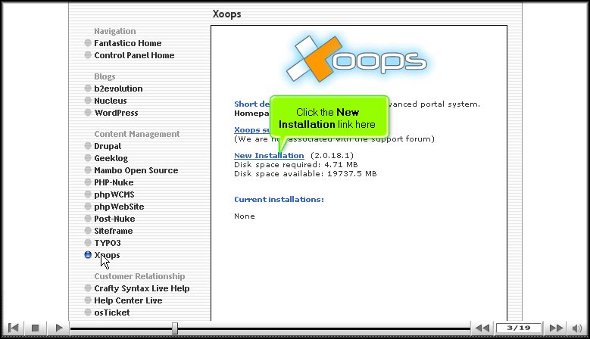
2. After you click on the tab Xoops, you will be taken to the installation screen of Xoops, and on that screen, you must click on the new installation.

xoops

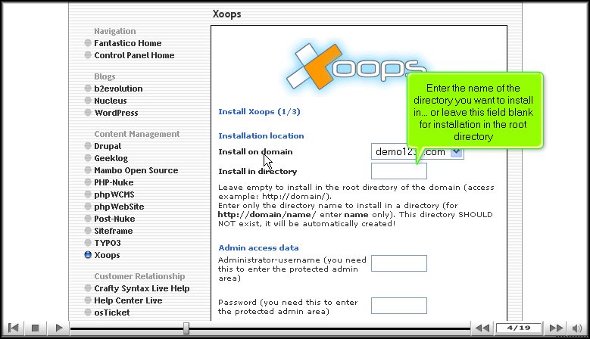
3. After you click on the new installation, you will be taken to yet another screen where you must type in a name for a directory in which you want to install Xoops.

xoops

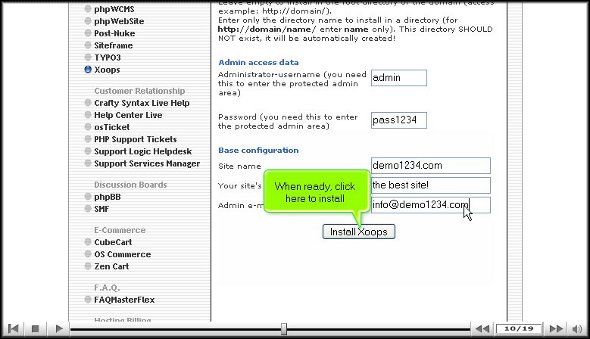
4. On this same page, you have to provide a name for the admin and a password

5. For the base configuration, you must provide a slogan for your website and an email address.

xoops

6. When you are done with the above steps, you can click on Install Xoops

xoops

7. To complete the installation process, you must click on Finish.

xoops

This brings us to the end of the tutorial. So now you can use the username and the password to log in to the application. Now, when you are going through the various tools on the application, you must take your time to go through each of them carefully. If you rush through the process, you may miss certain essential things. You may also consult some other tutorials that will teach you the various functions of the tool present in the application.

As a user, you may have a bit of trouble using the application, but the best way is to keep calm and go through the application’s various features. After spending time with the application, you can start configuring the settings per your requirements.

You may have realized by now that Xoops is quite a practical application with many benefits, so you must install it properly to get the best out of it. Following the steps in this tutorial, you can install the application properly.

Go to the top of the page. Back to the tutorial


How To Install WordPress without any problems at all

WordPress is a very useful application that is provided by Fantastico. This application has many useful features and tools that allow you to perform various activities. WordPress is a very popular blog publishing application.

Fantastico is a reputed web hosting service provider that gives users fantastic applications. These applications are very easy to install and are quite compatible with the c Panel. The applications can be installed within a short period of time if you use the scripts provided by Fantastico.

Now if you are on the lookout for a tutorial that will teach you to install this application, well you have indeed found the proper tutorial. This tutorial will guide you through the entire process; all you have to do is follow the steps in the order listed below.

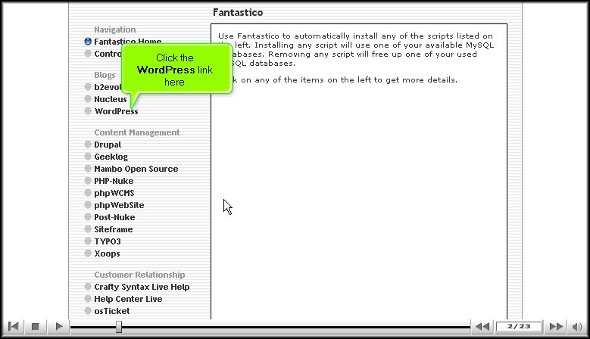
1. To begin the process of installing the application, you will have to locate a tab that says WordPress on the interface of Fantastic.

2. After you have located the tab you must click on it; doing this, you will be directed to an installation screen.

Wordpress

3. On the installation screen you will have to click on a link that says new installation.

wordpress

4. After clicking on the new installation you will be taken to yet another screen where you must mention the name of the directory in which you want to install WordPress.

Wordpress

5. You will have to mention a name for the administrator and even provide a password.

WordPress

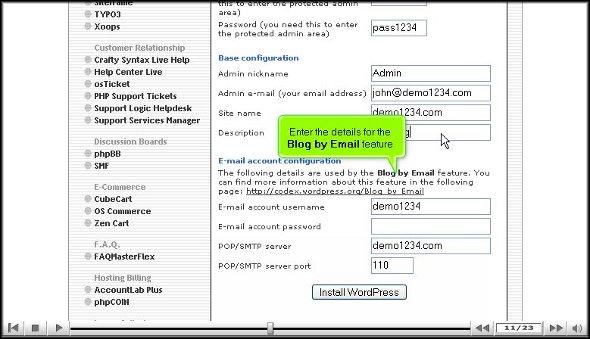
6. For the base configuration you will have to provide a nickname for the admin and an email address. You will also have to mention a description.

7. Under the email configuration you will need to mention your user name and password and the type of server.

WordPress

8. When you have completed the above procedure then you should click on install WordPress.

Wordpress

9. To finish the process you have to click on finish.

Wordpress

This brings us to the very end of the tutorial, and now you can log into the application and look at the various tools and features on its interface. When you are going through the different features make sure that you do not rush through the learning process as you may miss out on some of the most critical aspects of the application.

Now if you are a first-timer in using this application then you may have a bit of trouble in using the various tools and services. The best way to deal with this is to keep calm and go through each feature till you have absorbed things properly.

Once you are confident about using the application, you can then start by configuring the settings of the applications as per your requirements. The application has a very user-friendly interface so things should not be too difficult for you.

By now you may have understood that WordPress is indeed an excellent application with many benefits. So to get the best out of the application you must make sure that you have installed it in the right way.

Go to top of page                Back to tutorial