Fantastico has been around for many years, providing users with valuable applications to facilitate smooth operations related to web hosting. SMF is a classic example of such a helpful application. Now Fantastico is a very reputed company that has become popular worldwide.
The applications provided by the company are straightforward to use. Fantastico has a good stock of scripts, and these scripts make the installation process less time-consuming. The best part is that these applications are compatible with Cpanel. Now, if you have spent much time looking for a tutorial on installing SMF, you have certainly stumbled upon the proper tutorial.
This tutorial is just perfect for those people who are new to SMF. The tutorial will guide you through the installation period, divided into simple and systematic steps.
Now that you are reading this tutorial, it can be assumed that you already know how to use the Fantastico interface.
1. you must locate a tab that says SMF in that list. Once you find that tab, you will have to click on it.
2. After that, an installation screen will appear; on this screen, you must click on a link that says new installation.
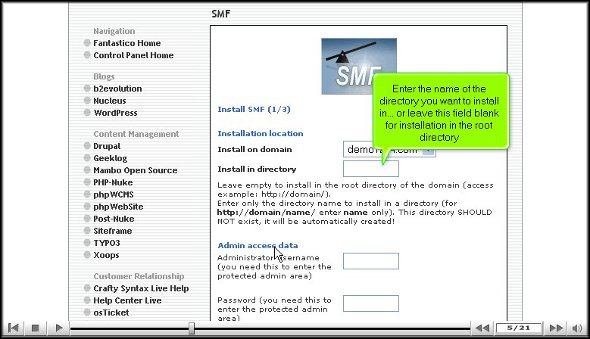
3. Once you finish the abovementioned step, you will be directed to another screen where you must note the directory in which you want to install SMF.
4. On the same screen, you must specify a username for the admin and mention a password.
5. To start the installation procedure, click Install SMF.
6. To complete the installation of SMF, you must click on finish.
This brings us to the end of the tutorial. Now, you can take the time to look at all this application’s different features and tools. Now, you must learn the application in such a way that you absorb each aspect of the application well. So you see that if you rush the process knowing, you will miss out on a lot. As a new user, you will have some trouble figuring out the use of specific tools in the application, but once you spend a little time with the application, things will be better.
The good part about this application is that certain features can be tweaked per users’ requirements. So, if you need to change specific tools’ settings or features, you can proceed. There are various tutorials on how to use this application, and you can consult them without any problem.
You may have been looking for a tutorial that teaches you how to install an excellent application like Soholaunch. This application is provided by none other than the famous company Fantastico. Fantastico is a company that has been around for many years and has been providing reliable web hosting services to users worldwide. The best part is that the applications provided by Fantastico are not only easy to install but are very easy to use and deal with and are compatible with cPanel. Fantastico provides scripts that will allow you to install the applications within a very short period. Soholaunch is an application with handy features and sophisticated tools that let you do many things.
However, with this tutorial, you will learn to install Soholaunch through a systematic process broken down into a few steps.
1. So when you are going through the interface of Fantastico, you will notice a tab that says Pro Edition in the left-hand corner of the screen. You will need to click on it.
2. After you click on the tab, you will be taken to another screen, the installation screen. On this screen, you must click a link that says new installation.
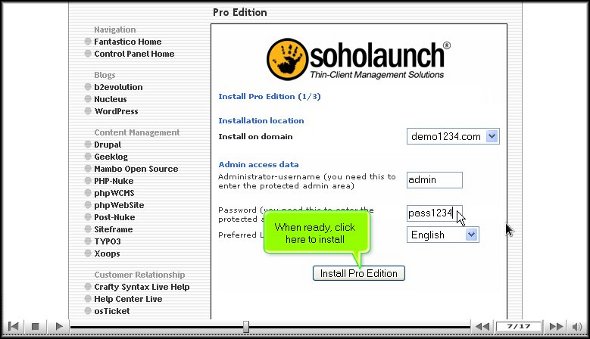
3. On the very same screen, you will also have to provide a name for the admin and a password.
4. To begin the installation process, click Install Soholaunch.
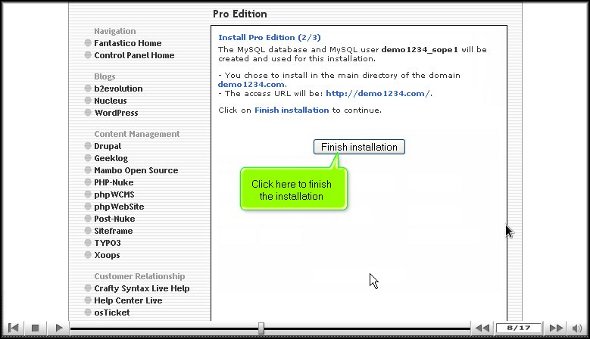
5. To complete the installation process, you must click on finish.
So, with that, we come to the end of the tutorial. So, if you have followed the above steps well, Soholaunch has been installed on your computer without any problems. Once you have installed the application, you can review its interface and check the features individually. This application has various tools that do different things. To learn more about the usage of the application, you must take your time to go through it and understand more about it; in fact, you can even go through other tutorials to learn about the tools. However, it would be best if you did not rush through the learning process as there are many essential aspects that you might miss out on. If you are a new user, you may find it initially challenging to adjust to the application, but you will get used to it over time. So, have a little patience and keep calm while using this application.
Once you start using this application, you will gradually understand its benefits. You will also see that you can configure the settings as per your requirements. Follow the tips in the tutorial, and you will have no problems.
If you have had no success locating a tutorial that will help you create a subdomain in cPanel, you are indeed lucky now. This article will be a tutorial to teach how to create a subdomain in cPanel. Well, for those of you who may not be very familiar with cPanel, this is a handy software with automated tools that facilitate smooth business operations via the internet. The primary function of cPanel is to help manage the servers.
So, it can be assumed that you already know how to log in to cPanel without difficulty. Okay, let us go over the steps that will teach you to create a subdomain in cPanel.
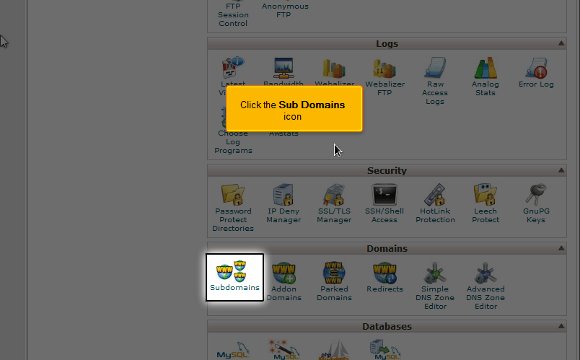
1) To begin, locate an icon that says Sub Domains. Once you have found this, you have to click on it.
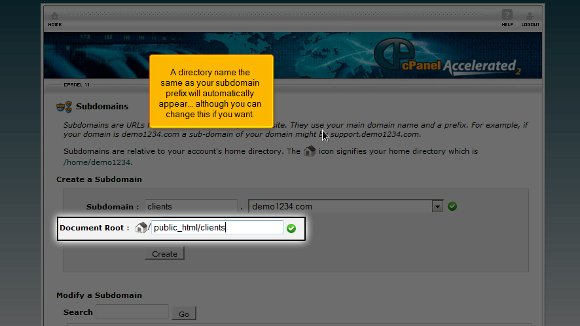
2) After that, you will be required to enter the prefix of the subdomain that you wish to create
3) You must select the domain name you wish to associate your subdomain with. After doing this, you will see that a directory name, the same as the subdomain prefix, will appear automatically, but you can change the word if you like.
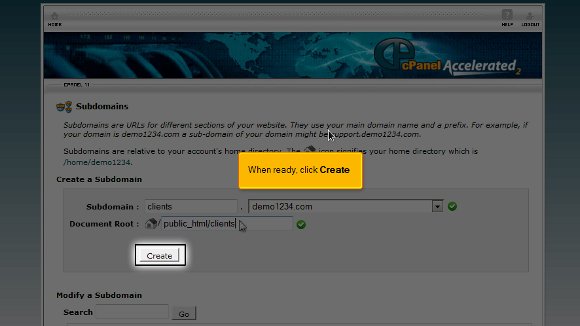
4) After you feel that you are ready, you must press create and create your subdomain.
Once you have completed the last step, it means that you have reached the end of the tutorial, and you can create a subdomain in cPanel So now you have to simply go to the interface of the cPanel, and you can begin work with the various features of the cPanel. You can start working with the emails and multiple domains and configure your emails.
Logging out from the cPanel is not so tough after all; you simply have to locate the logout button on the top end of the page. The tips mentioned in the article should not be very tough to follow. In fact, if you take the time and follow the directions, you will not have any problems. You simply have to have a little patience to understand the software. You should not rush the learning process as you can learn tons during this phase. So take your time and review things until you feel you have absorbed every aspect of the software properly. So try not to get worked up; try relaxing instead, and the results will be great. Now, you can also consult other tutorials. However, if you are a newbie to this, you should really take the time to understand the software’s various features. This tutorial is just perfect if you want to learn to create a subdomain in cPanel. To get the best results, follow the tips in the article very closely, and you should have no problems.
For filling time, the Internet with Ananova is best. Ananova is an everlasting fog of information in the form of news, articles, reports, books, pictures, videos, and audio & information on the website. Editor “Manish K.” says, “connecting with the internet cannot make everybody Solomon; True Information in the right hands leads to wisdom and prosperity”.
Sometimes, pieces of information spark new ideas and might turn your life, wasting time on useless information’s loss of intelligence.
Join Internet News – Ananova Technology Media.
Ananova Technology Media blends technology expertise and implants innovative information, articles, interviews, reviews, and regular columns; also covers most aspects of computer science – current research, developments, hosting products & issues.
Our Mission – Our curiosity is to bring you all the latest news on most of the topics from the techno-world, to learn the latest technologies, help in your career and new excellent features to lead your business.
Our Vision – Accurate and Candor News from the Maze Technology World.
Ananova has a team of professional researchers and analysts examining data in new ways; to manage simplicity and quality, we have split the news into a few sections-
WebHosting News – The latest and most relevant web hosting news, hosting-related information and services, including ‘cloud hosting’, ‘adult hosting’, ‘dedicated hosting‘, ‘shared hosting‘ and ‘reseller hosting’.
Software’s News –Software development, the development industry, software buying guides, software prices, and more news from the experts.
Hardware News – It addresses readers who work professionally with hardware.
Reports –From scholars and research analysts, provide information enabling readers to keep updated with the ever-changing regulatory environment.
Article – Delivers integrated information, solutions and expert guidance from professionals about technology industries.
Editorial –Produces content supporting decision tool performance and helps meet regulatory requirements that allow the Professionals. Cover stories from technology in print and video format.
Interviews Conducted –Interviews from industry giants and experts provide information on launching new technology, present trade scenarios, future scopes, products, and companies.
Tutorials – Ananova do provide the hosting tutorials.
cPanel Support Fantastico Support
Q&A – Helps the customers to resolve their issues,
Our presence is on social media, where hosting customers can connect with us and discuss the various issues and latest developments in hosting technology.
More than one billion Internet pages exist. Thousands of additional pages are created daily. With all those websites comes great power from every possible Internet corner. Sites promise to offer the best news all the time, but it’s hard to pick the real news from information that has been fabricated.
News is more important and instant than it has ever been before. With sites like Twitter and Reddit, news happens at the pace of life, and people are more interested in information now than ever. That says something. It says that people always want real news, the right news, and accurate news. What kind of news do people want?
News Spans the Globe and More
The only thing that a person needs to get fast news now is the Internet. With applications like RSS feeds and sites like Reuters, information is where you want it when you want it. So, what are the subjects that people enjoy the most? It really does vary quite widely.
However, recent research suggests that most Internet readers don’t search for political news. Instead, most people prefer crime news. Coming in a close second is business news. Things like fiscal policies, how the NASDAQ ended daily, and the dollar price are all at the top of the news list.
Entertainment Still Rules
Entertainment is coming in a close second to business. Glamour, fashion, style, and what’s happening in Hollywood and Bollywood are all critical news topics to the average reader. The actors’ names are, by far, one of the most Googl queries! What’s next? Sports, of course!
People want to know what’s happening with beloved teams, from race tracks to Formula One to football and cricket. Thankfully, all of that information is just a click or two away. After sports comes…technology! That’s right, people want to know what’s new in the tech world. Why?
Why Technology News is Important
Technology is such a massive part of our lives today! Just think about it: how many devices do you own? Or, how often are you plugged into your laptop, tablet, or smartphone? The world wants to know what’s new in tech so everyone can get the latest device when it arrives. Interestingly, though, the news topic that’s the most important after technology is health.
Why is that interesting? We spend so much time plugged into the world through technology that we can’t wait to find ways to unplug and be healthy! That’s kind of a funny thought, right? Internet viewers spend countless hours looking at beneficial sites, recipes, programs, and other health-related details. One of the most popular health searches is: “How to unplug!” All of this while looking for health information from a computer!
Is it Really That Different?
When we look at the news topics that are the most popular today, are we really all that different than we were decades ago? Maybe not. If you look back at the first newspapers (and even current newspapers), we see that all of the same topics are still relevant.
Newspapers have sports, business, lifestyle, and health sections. Most papers also have technology sections. So, our medium has changed from print to digital, but we are still the same. What kinds of news topics do you look for the most when you search the web? Let us know below!
Web hosting news providers offer a more flexible and enriched environment!
The Department of Electronics will conduct a three-day workshop on artificial intelligence applications on June 29. The Workshop is conducted under the auspices of the Knowledge-Based Computer Systems Programme.
The Programme was launched by the Department of Electronics in 1986 with UNDP assistance to gain extensive expertise in this area through research, design, and development to demonstrate KBCS technology-based solutions to major socio-economic problems. This Workshop aims to disseminate information regarding breakthroughs and international scenarios in Artificial Intelligence Applications, particularly in the Financial sector and other practical applications.
Two UK and USA experts have been invited to this Workshop through UNDP. These experts have done considerable work in the area of Artificial Intelligence applications. This Workshop is likely to be attended by many participants from a broader cross-section of computer experts and users, including representatives from financial institutions and the IT industry, both from the private and the public sector.









 Ananova

You must be logged in to post a comment.