Install SMF in the fastest way possible.
Fantastico has been around for many years, providing users with valuable applications to facilitate smooth operations related to web hosting. SMF is a classic example of such a helpful application. Now Fantastico is a very reputed company that has become popular worldwide.
The applications provided by the company are straightforward to use. Fantastico has a good stock of scripts, and these scripts make the installation process less time-consuming. The best part is that these applications are compatible with Cpanel. Now, if you have spent much time looking for a tutorial on installing SMF, you have certainly stumbled upon the proper tutorial.
This tutorial is just perfect for those people who are new to SMF. The tutorial will guide you through the installation period, divided into simple and systematic steps.
Now that you are reading this tutorial, it can be assumed that you already know how to use the Fantastico interface.
1. you must locate a tab that says SMF in that list. Once you find that tab, you will have to click on it.

2. After that, an installation screen will appear; on this screen, you must click on a link that says new installation.

3. Once you finish the abovementioned step, you will be directed to another screen where you must note the directory in which you want to install SMF.
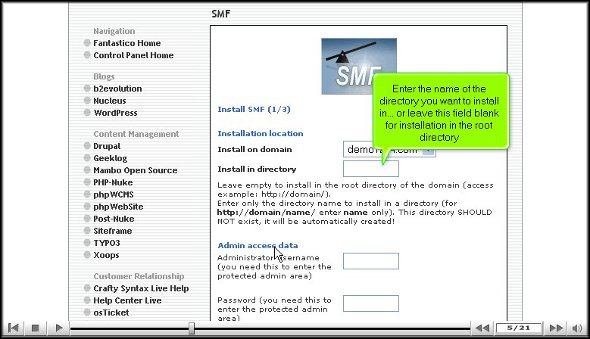
4. On the same screen, you must specify a username for the admin and mention a password.

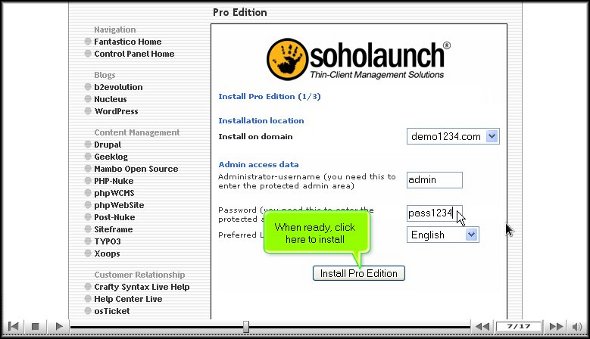
5. To start the installation procedure, click Install SMF.

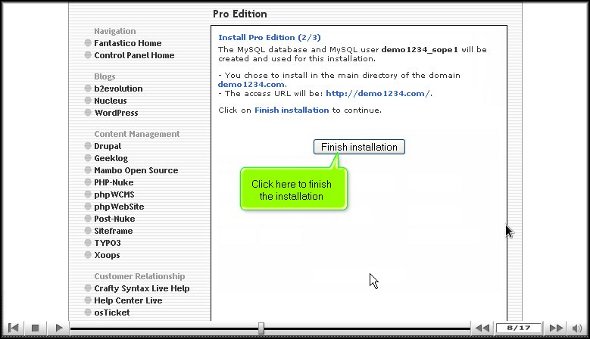
6. To complete the installation of SMF, you must click on finish.

This brings us to the end of the tutorial. Now, you can take the time to look at all this application’s different features and tools. Now, you must learn the application in such a way that you absorb each aspect of the application well. So you see that if you rush the process knowing, you will miss out on a lot. As a new user, you will have some trouble figuring out the use of specific tools in the application, but once you spend a little time with the application, things will be better.
The good part about this application is that certain features can be tweaked per users’ requirements. So, if you need to change specific tools’ settings or features, you can proceed. There are various tutorials on how to use this application, and you can consult them without any problem.
Go to the top of the page. Back to the tutorial



 Ananova