How To Use Hotlink Protection in Cpanel
This article will be a tutorial to help you understand how to use Hotlink protection in cPanel. The tutorial will give you a series of easy steps to follow. Now, before we proceed, it would be better to have a bit of an introduction to cPanel. cPanel is a beautiful software loaded with sophisticated tools that make some of the most complicated operations seem like a walk in the park. This software is basically used to manage the servers properly.
So, it can be assumed that you are already logged into the cPanel interface; so now, let us look at the steps to use Hotlink protection in cPanel.
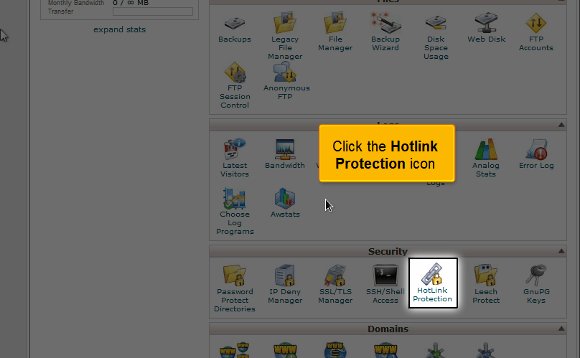
1) To start, locate the Hotlink protection icon and click on it. This will stop any other website from linking specific files, mainly image files, to your website. This feature would be good for you if you have images under copyright or want to save a little bit of bandwidth. This helps you hotlink all the photos.
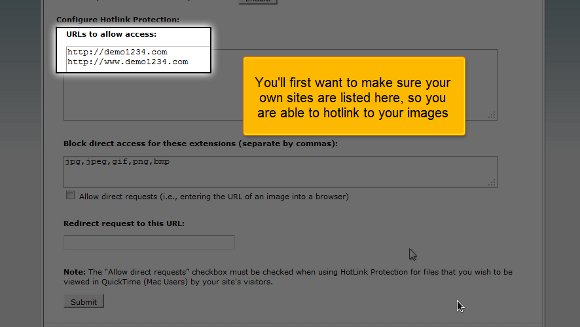
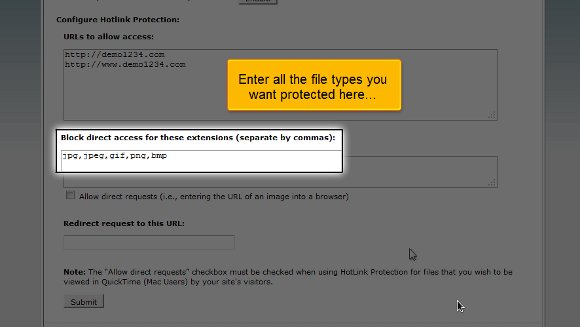
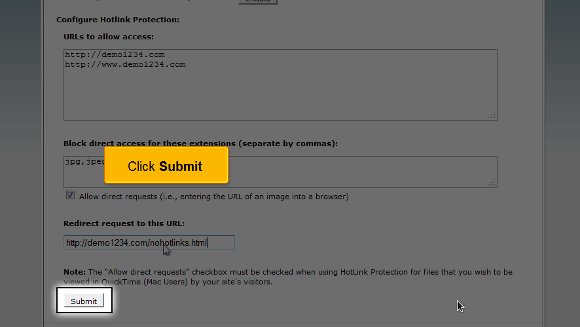
2) The second step will be when you will have to enter all the files that you are looking to protect.
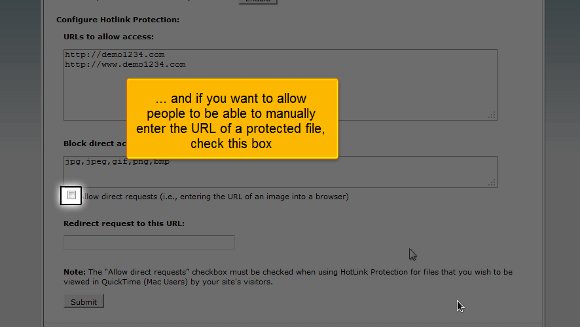
3) This option is also significant if you want to permit people to type in the URL of a file that is under protection; then you will need to enable this.
4) You then have to type out a URL to which you want people to redirect if someone wants to hotlink to the images.

5) After you have taken care of the above, you must click on Submit, and with this, you have successfully enabled hotlink protection.
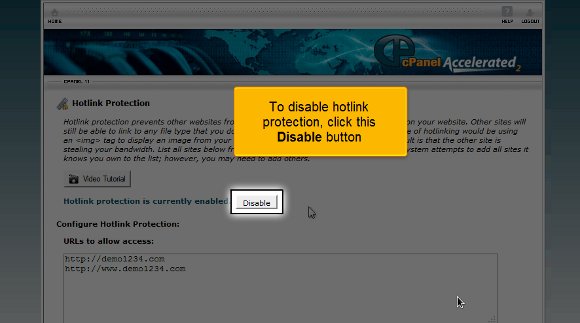
6) If you want to disable the hotlink protection, simply click on the disable protection.
So this is the end of the tutorial, and now you can use hotlink protection in cPanel without any difficulties.
The next most important thing you should know is how to log out from the interface, which is not challenging. All you have to do is locate a log-out button at the top of the page and click on it. The tips mentioned in this tutorial are not challenging; you must pay close attention to them to get the best results possible. You have to be patient with things as this will give you some time to understand the software and its features well. So, do not rush the process when you are learning the software. In fact, you should try to keep calm and go over the various features repeatedly to get a grasp of things.
You may also feel free to look into other tutorials as well. If you are using cPanel for the first time, you may take a little time to get familiar with things. It would be wise to consult the tips mentioned in the article to get the best results.

 Ananova
You must be logged in to post a comment.