The Process of Installing Xoops
Now, Fantastico is a reputed web hosting service provider that has been operating for years. Fantastico is very popular because it gives users applications that allow them to perform many different activities.
All the applications provided by Fantastico are pretty compatible with CPanel. Fantastico also provides several scripts that you can use to install the applications smoothly.
Installing Xoops is relatively easy, provided you follow the correct procedure. Now, if you are looking for a tutorial to guide you through the entire process, you have found the proper tutorial. This tutorial is broken down into a series of steps that are very easy to follow.
So, now let us understand the steps you must follow to install Xoops. You must follow the steps in the tutorial below in the same order.
1. To start the installation process, locate a tab that says Xoops. Once you find it, you have to click on it without fail.

2. After you click on the tab Xoops, you will be taken to the installation screen of Xoops, and on that screen, you must click on the new installation.
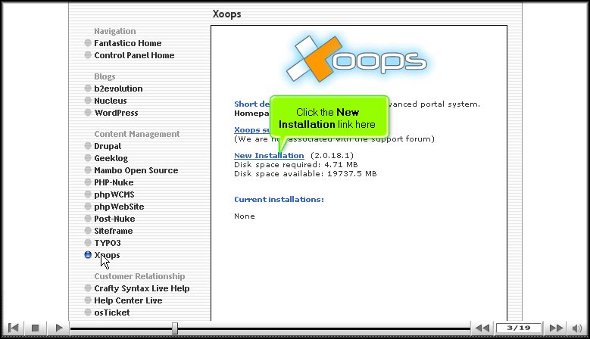
3. After you click on the new installation, you will be taken to yet another screen where you must type in a name for a directory in which you want to install Xoops.
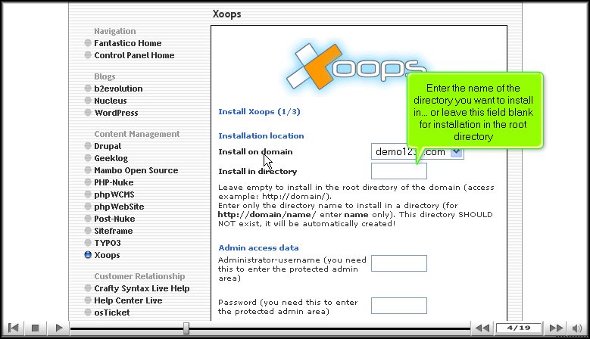
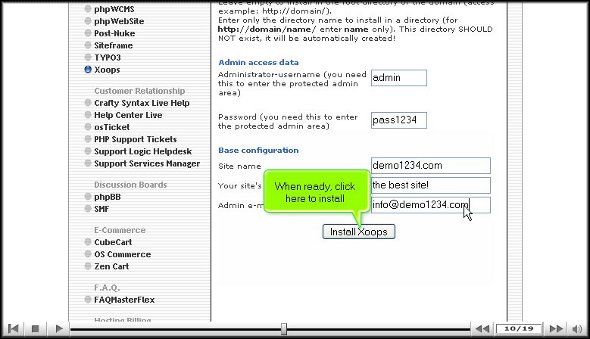
4. On this same page, you have to provide a name for the admin and a password
5. For the base configuration, you must provide a slogan for your website and an email address.

6. When you are done with the above steps, you can click on Install Xoops
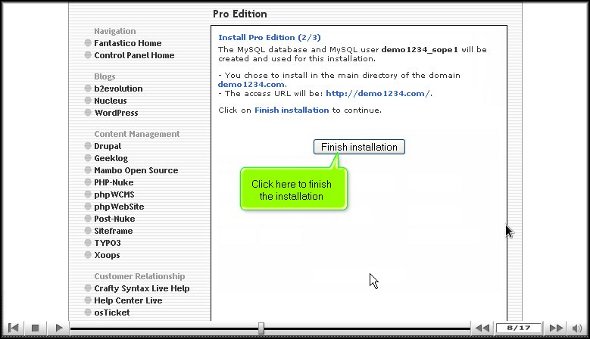
7. To complete the installation process, you must click on Finish.

This brings us to the end of the tutorial. So now you can use the username and the password to log in to the application. Now, when you are going through the various tools on the application, you must take your time to go through each of them carefully. If you rush through the process, you may miss certain essential things. You may also consult some other tutorials that will teach you the various functions of the tool present in the application.
As a user, you may have a bit of trouble using the application, but the best way is to keep calm and go through the application’s various features. After spending time with the application, you can start configuring the settings per your requirements.
You may have realized by now that Xoops is quite a practical application with many benefits, so you must install it properly to get the best out of it. Following the steps in this tutorial, you can install the application properly.
Go to the top of the page. Back to the tutorial



 Ananova
You must be logged in to post a comment.