How To Create POP email account in cPanel
Finding a way to create a POP email account in cPanel may not be easy for a novice. However, getting going with your POP email account is not difficult. Some may want to know what it is before they even start operating it. Of course, this may look difficult to beginners, but this tutorial will make it a cakewalk for you in no time. Read on to learn more about the POP email account in your cPanel.
A POP or Post Office Protocol is an application which is a layer of Internet standard protocol. This is mainly used to retrieve emails from remote servers in general. Again, the Internet Message Access Protocol or IMAP and POP are the most popular ways of retrieving emails. This is why most of the webmail service providers also make use of either of these applications.
Here are the steps to follow when you try to create a POP email account in cPanel:
1) First, you must log into your cPanel account.

2) Then click on the icon that reads “Email account.”
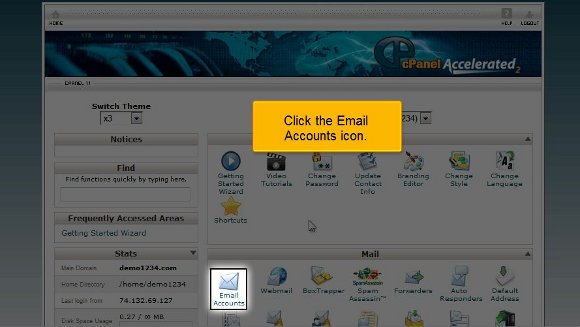
3) Clicking on this icon will take you to another page that asks for your email registration. This usually reads as only “Email”; enter any name to set your email ID.

4) Below this, you can see a box advising you to enter a password. Make sure that the password is of more than five letters. Ideally speaking, you should choose an alphanumeric password.
5) The following box will prompt you to type in your password again for a match.
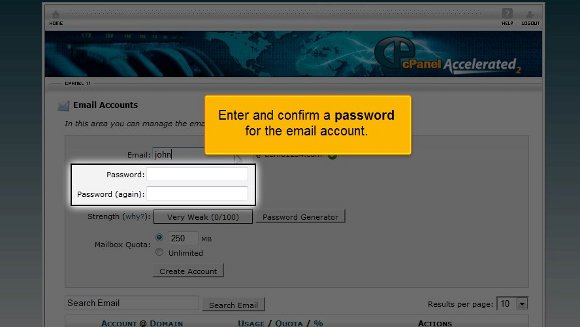
6) Also, you can check your password’s good by clicking on the “Password Generator” button if your interface has one.

7) Right down under this box, you may see what is known as the “Quota” box, which is used to put a limit on your email account. If you have a number on your mind, feel free to express it!
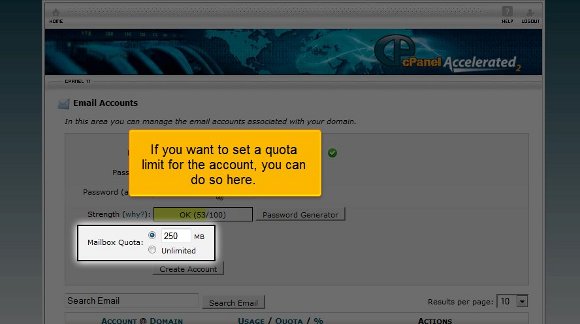
8) Finally, click on the “Create Account” tab, as this will immediately create your much-desired POPmail account.


9) After this, you can scroll down only to see that you can change your password, quota, delete, or make any necessary changes to your email and administer them simultaneously without much of a problem.

Hence, it must be mentioned that creating a Pop email account in cPanel is undoubtedly not that difficult, but the problem lies with one’s expertise. Once you know it, there is no need to worry as you will get used to it soon. In fact, the tutorial mentioned above will give you the confidence to log into your Popmail account without much difficulty. So what are you waiting for? Go ahead and try it right away!

 Ananova