How To Use cPanel Login
Most hosting companies provide an interface to allow end users to manage allocated resources. cPanel is one such Control Panel.
With cPanel, users can access control panel functions without worrying about anything else. cPanel is a fully automated graphics tool offered to users to help manage all resources offered. cPanel is for server administrators, hosting resellers, and end users.
GUI (Graphical User Interface) is one part of cPanel that provides users with extreme ease of use. Here’s how to access cPanel functions:
1) cPanel Login: A cPanel URL is usually emailed to you after signing up with a web hosting company. To use this URL, open the email and click on the URL (this could be a company’s domain name or IP address ending with either 2083 or 2087). The best way to access a control panel is to simply add a /cpanel to the end of your domain name. This will work once domain name servers are propagated.
2) cPanel Login: Press enter and wait for the browser to load the page.
3) cPanel Login: Now, a page asks you to log in with your user name. Very carefully put your user name into the space provided.
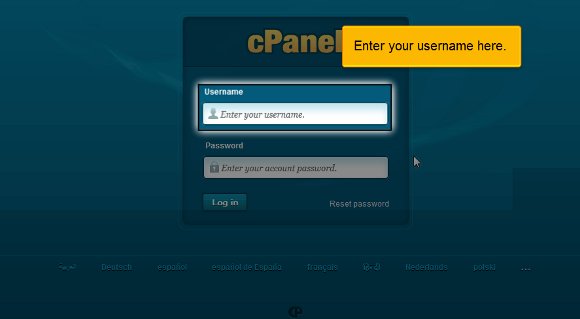
4) cPanel Login: Right under this, you will see a small box asking you to enter your password. Typed characters won’t be displayed due to security reasons.

5) cPanel Login: Scroll down to the trim tab that allows you to log into your cPanel account.

Viola! Now, you can see your cPanel interface. Now, you can immediately start accessing databases, setting up email addresses, managing shopping carts, and much more! Take your time to go through the numerous tables that are part of your cPanel. This will help you familiarize yourself with cPanel and all of its offerings. That’s it!
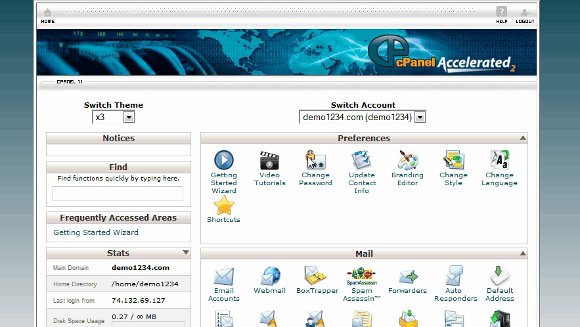

So, how do you log out of the cPanel interface? Simply click the logout button (usually at the top of the page). As you can see, cPanel is easy to use and figure out, and you’ll get the hang of it in no time! Let us know if you have any questions!

 Ananova
You must be logged in to post a comment.