How to install Typo3
People have often stated that Typo3 is a complicated application to use and install; the good news is that none is genuine. The application is straightforward to install and relatively user-friendly. Typo3 is a beautiful application by Fantastico, a reliable web hosting service provider.
The applications provided by Fantastico are beneficial and can help you do a host of things. The applications have very advanced tools and features. All the applications can be used with cPanel. Fantastico provides us with a good stock of scripts that allow for the easy and smooth installation of the applications. So, if you are looking for a tutorial that will teach you to install Typo3, then you are in luck, as this tutorial is designed to guide you through the entire installation period.
So, now let us look at the series of steps that you need to follow to install Typo3 on your computer.
1. You have to start by clicking on Typo3.
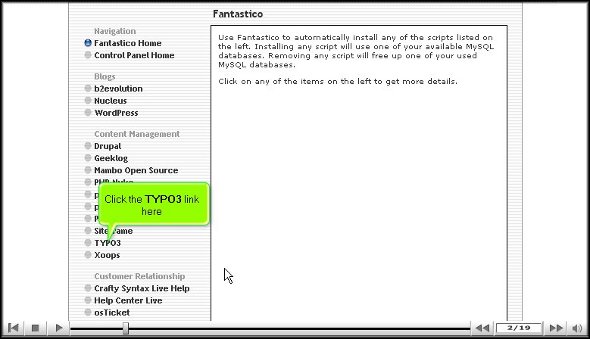
2. Once you have clicked on Typo3, you will be taken to an installation page where you have to click on the new installation.

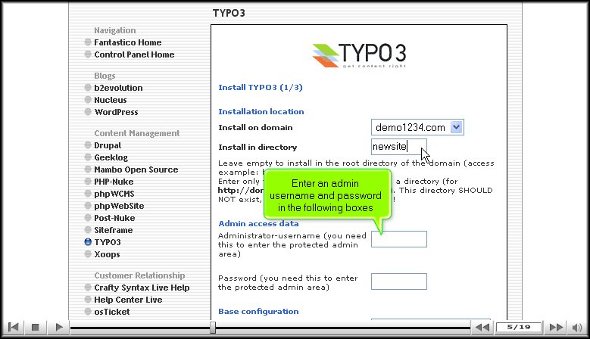
3. After That, you will be directed to yet another page where you must specify the directory in which you would like to install

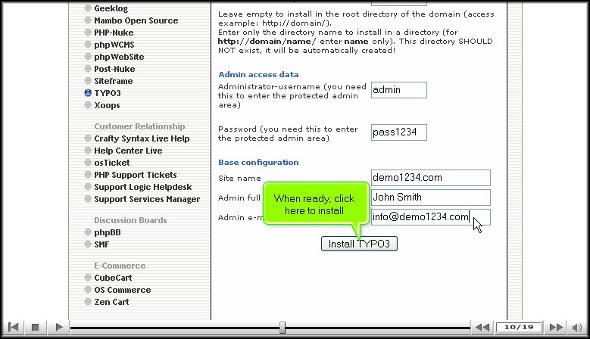
4. On the same page, you will also have to specify the name of an administrator, and you must also provide a password.
5. After that, scroll to the bottom of the page and click Install Typo3.
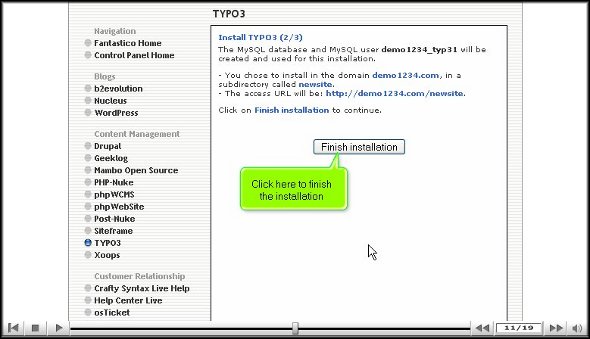
6. To round up the installation process, click finish.
So now we have reached the end of the tutorial, and if you have followed the above steps correctly, you have successfully installed Typo3 the right way.
To better understand the application, you must go through the various tools and features, as this will help you better understand the application. To absorb the simple multiplication functions, you must not rush through the learning process; you may miss out on some crucial aspects of the application.
As a new user, you will have difficulty getting used to the application’s functions. However, you may consult other tutorials to teach you how to use the tools properly. You should keep calm and go over the various parts again and again.
Once you are confident that you can handle the application, you can start configuring the application as per your requirements. After the configuration, you can log into the application and use it.
So, by now, you have probably understood that Typo3 is quite a helpful application. To get the best out of it, you must follow the steps so that you may be able to install it on your computer.
Go to the top of the page. Back to the tutorial

 Ananova
You must be logged in to post a comment.