Cloud Hosting


cloud computing, hosting, and storage is essential in networking and achieving demand for utilization.

cloud-hosting-computing-storage

1) Cloud Computing:

In simple term cloud computing is defined as the process of using the main remote servers to store, control and execute data rather than having local servers or personal devices to handle applications. Cloud computing is a type of internet based computing which includes servers, storage, and application. This technology has several interactive advantages for businesses and end-users.  Here  we discuss three main benefits:

  • Self-service provisioning:  End users can switch resources for any workloads, on-demand and without direct involvement from IT administrators.
  • Elasticity: Organization can scale up computing requirements and then scale down when demands decrease.
  • Pay Per Use: It allows users to pay only for the resources and workloads which used.
  • Dynamic Resources: Cloud computing has built on both shared and dynamic resources. Cloud hosting providers can provide competitive packages by dynamically resource allocation. These packages may fit various organizations. The core benefit is that hosting partners can add additional services, space or even sites quickly based on the demand of the customer.
  • Distributed Locations: Cloud computing includes a set of distributed servers and data center which are designed to host clients solutions. This architecture makes able to hosted workloads more resilient and uptime of cloud-hosted environment. It is also beneficial for disaster recovery and business continuity (DRBC) platforms which provided by service providers and cloud hosting organizations.

2) Cloud Storage:

The storage of data online in the cloud wherein digital data is stored and accessible from multiple distributed and connected resources.
It includes benefits like accessibility, reliability, rapid deployment, strong protection for data backup and disaster- recovery, etc.  cloud storage does have the potential for security and compliance concerns.

There Are Three Types of Cloud Storage:

  1. Cloud-hosting-Computing-Storage

  • Private Cloud Storage in this storage, the enterprise and cloud storage provider are collaborating in the company’s data center which provides a dedicated environment. These are suitable for users who wants customization and more control over their data. It helps to resolve the security and performance issues while offering the advantage of cloud storage.
  • Public Cloud Storage: It provides a multi- tenant storage environment where the enterprise and storage providers are separate.  There are not any cloud resources stored in the company’s data center which are most suitable for unstructured data. The cloud storage provider fully manages the enterprise’s public cloud storage.
  • Hybrid Cloud Storage: It is the integration of public and private cloud storage for providing storage services. These services are accessible by using a Web services API framework or cloud applications. An organization actively uses structured data in a private cloud and unstructured and archival information in a public cloud. It is a technique that uses internal and external cloud applications infrastructure and storage systems to form integrated storage architecture.

3) Cloud Hosting:

Cloud hosting services provide hosting for websites on virtual servers which take their computing resource from extensive underlying networks of physical web servers. A client can merge into their service as much as they need, depending on the demands of their website, and they would only pay for what they use.

Companies Price Server Location Price Visit Now
cpwebhosting $2.75 /mo USA/UK/AU/BG/FI Price : $2.75/mo Visit Site
A2Hosting $15/mo. Ann Arbor, MI, US Price : $15/mo. Visit Now
liquidweb $110/mo. Lansing, MI, US Price : $110/mo. Visit Now
bluehost $5.95/mo. Orem, UT, US Price : $5.95/mo. Visit Now

Off-site Hosting:

Cloud hosting is remote and off-site. The system supported by an outside provider like a website or virtual machines. They would provide a certain uptime and service level for their customers. Off-site hosting used for creating an own content distribution network. This CDN improves the experience for the web and mobile content and applications with rich media and videos. It would also allow having remote/off-site backups of an environment.

    2. Migration to Cloud Hosting Making Waves

When it comes to innovation in technology, then there is always open space for improvements and progress. Extensive research and analysis report says that large enterprises and firms are shifting to the cloud hosting and has already started to overshadow the current shared server hosting infrastructure because it requires paying for free space on the web. On the same token cloud infrastructure provides a flexible, affordable, scalable solution. Web sites would utilize only those resources which they require. That is why companies are heading their essential workloads and applications to the Cloud. The cloud hosting is expected to reach its value at $121 billion in 2015 accordingly MarketsandMarkets report 2014.

     3. Over Shading The Security Issue

InetU and THINKStrategies have conducted research on 358 companies. Research implies that transiting to the cloud is not simple as we think. Survey has reported that half of the companies either failed their implementations or had to keep layoff. Some of them said that they have to rethink about budgeting and shifting. As survey has detailed about 27% of respondents were satisfied with their cloud migration. On the further note transition on new infrastructure may cause some pitfalls as security despite the promising of advantages. It remains a significant hurdle to leap on cloud and coping in the cloud system.

ICT: public sector enterprise has stated key points to overcome the security issue in a cloud like upgrading your knowledge, migrate smartly, bust the ‘in-house is best’ myth and make the ‘quick wins’ a number 1 priority.

Three Top Venture Companies Seeking Cloud-Based Startups


http://www.ananova.com/three-top-venture-companies-seeking-cloud-based-startups/

lightspeed logo

Venture companies are taking notice of the recent cloud boom. Certain backers are looking for cloud-based startups that provide the cloud sphere with something unique. If you have a great cloud-based idea, there are some venture companies that you’ll want to impress.

Data Recovery In The Cloud


http://www.ananova.com/data-recovery-in-the-cloud/

data recovery

Looking for a backup and data recovery solution for the cloud? Well, look no further than cloud-specific disaster recovery and backup solutions. They are increasing in numbers, and some users feel they offer greater protection than traditional backup solutions do. The sweetest part: they cost less, too.

When Your Cloud Storage Company Goes Bust…


When Your Cloud Storage Company Goes Bust…

Yesterday, I wrote a post about the some new cloud hosting companies that will take your data, disperse it, and make sure that it’s safe and secure forever. But, what if forever turns into a year or less? What happens when a company like Cleversafe or Symform goes under? Where does your data go?

Cloud Storage Risks

UK Mandatory Web Filter And What It Means For Web Hosting Companies


http://www.ananova.com/uk-mandatory-web-filter-and-what-it-means-for-web-hosting-companies/

We’ve discussed the UK government’s plan to make the Internet a safer place for children by making adult hosting content filters mandatory. In case you didn’t catch those articles, here’s a recap: PM David Cameron is requiring porn filters be activated in every household in the UK unless the user opts out of it when signing up for service.

uk_mandatory_filtering

Can Anything Stop The Growth Of Cloud Computing?


http://www.ananova.com/can-anything-stop-the-growth-of-cloud-computing/

morgan stanley
There’s no doubt about it: the cloud is here, and will only get bigger. A recent report by Morgan Stanley confirms this: AWS revenue is expected to hit $24 billion by 2023. It stands to reason that other cloud computing companies will see similar growth. However, it’s not all sunshine and rainbows.

Should Cloud Companies Move to Canada?


Should Cloud Companies Move to Canada?

canadain cloud hosting
Today, one of the most popular Google searches is “non-Us cloud-based companies.” Cloud users not living in the states have been frightened away by government spying. That’s not good news for cloud hosting companies based in the USA. But, it might be good news for cloud companies in other countries.

Digital Ocean: Moving Up In The Cloud Hosting World


http://www.ananova.com/digital-ocean-moving-up-in-the-cloud-hosting-world/

Cloud hosting is an industry that is growing fast, and Digital Ocean is quickly rising to the top. They recently announced a total of $3.2 million raised in seed capital, and with new subscribers joining at a rate of 500 per day, this money is much needed to adjust to their growth.

host pic

The Cloud Makes Basic Health Care In Developing Countries Possible


The Cloud Makes Basic Health Care In Developing Countries Possible.

Can cloud technology help bridge the gap between healthcare and developing countries? An open source mobile health technology company called MOTECH SUITE is doing just that – using the cloud to bring basic healthcare to people across the globe.

motech_cloud_solutions

Support Service Manager


How to install Support Service Manager

If you are having difficulty installing Support Service Manager, that is only because you may not have followed a proper procedure. Well, this tutorial will help by guiding you through the entire process. Support Service Manager is a helpful application by Fantastico, a reliable web hosting service provider. The company has been around for many years, providing users with valuable applications. The applications provided by Fantastico are straightforward to handle and equally easy to install on the computer. All the applications can be used with cPanel.

Fantastico has a beautiful stock of scripts that will let you install the applications easily on your computer. These scripts also help you to save a lot of time. This tutorial has been broken down into easy-to-follow steps to make things easier.
The steps to install Support Service Manager on your computer can be listed below.

1. To start the installation process, locate a tab that says Support Service Manager.

Support Service Manager

2. Once you locate this tab, you must click on it; you will be taken to an installation screen where you will have to click on a link that says new installation.

support service manager

3. After you have clicked on the new installation, you will again be taken to another screen where you will have to mention the directory where you want the building to take place. You also have the option of installing the application in the root directory.

Support service manager

4. On this same page, you must assign a name to the admin and provide a strong password.

support Service manager

5. To begin the installation, you will have to click on Install Support Service Manager.

Support Service Manager

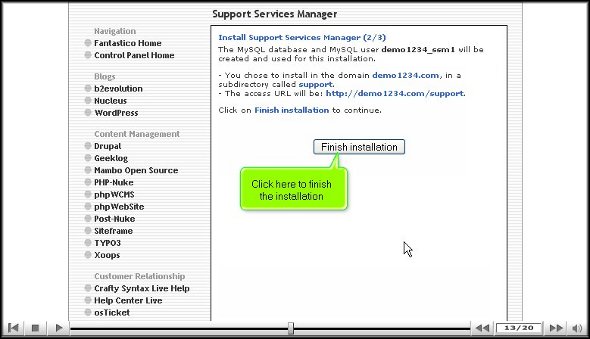
6. To complete the installation process, you must click on finish.

Support Service Manager

This is the end of the tutorial, and if you have followed the steps mentioned above in the proper order, you have successfully installed the application properly. To learn how to use the software properly, you should start exploring the tools and features that come with this application. Now, you can know how to do many things if you spend time with the application. However, you must not rush through the learning process, as you may miss out on some crucial aspects of the application.

As a new user, you may face application problems, but the best way to overcome such difficulties is to keep a cool head and relax. You can consult other tutorials to understand how to use the tools in this application. Once you feel confident about the application, you can start configuring the settings of the application to suit your purpose. You must install this application immediately without hesitation to get the best out of this application. This application is handy; as a user, you will experience tremendous improvement in your operations.

As the world becomes a global village, international trade becomes more popular and competitive. Multinational companies are growing fast, leading to the development of society as a whole. Maintaining good interaction between all branches becomes more vital as these companies grow and expand. Our computer systems, internet, and allied services like voice conferencing and video conferencing make this possible. While using these features, you will often encounter software glitches and hardware faults that a technical expert can solve. The more we depend on these technical features, the more the need for technical support increases. The support service manager helps you accomplish these tasks.

Support Service Manager is an application script proven to be a master solution to all your technical problems. Often, multinational companies outsource their technical support to a third-party vendor. These third-party vendors may be located in any part of the world. When an employee or user, as referred to in general terms, faces a software glitch or a hardware issue, they raise tickets via the Support Service Manager, and the technical experts get the same through emails. The Support Service Manager is often synchronized with the knowledge base, providing users online support. They can refer to this knowledge base and solve their issues instantly. It is a beautiful support application for translating ticketing matters and sending administrative support.

Go to the top of the page. Back to the tutorial.