The best ways to Create a POP Email Account in cPanel


How To Create POP email account in cPanel

Finding a way to create a POP email account in cPanel may not be easy for a novice. However, getting going with your POP email account is not difficult. Some may want to know what it is before they even start operating it. Of course, this may look difficult to beginners, but this tutorial will make it a cakewalk for you in no time. Read on to learn more about the POP email account in your cPanel.

A POP or Post Office Protocol is an application which is a layer of Internet standard protocol. This is mainly used to retrieve emails from remote servers in general. Again, the Internet Message Access Protocol or IMAP and POP are the most popular ways of retrieving emails. This is why most of the webmail service providers also make use of either of these applications.

Here are the steps to follow when you try to create a POP email account in cPanel:

1) First, you must log into your cPanel account.

cpanel POP Email Account

2) Then click on the icon that reads “Email account.”
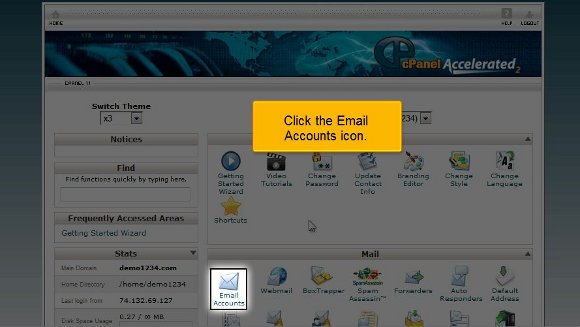
cPanel Email account

3) Clicking on this icon will take you to another page that asks for your email registration. This usually reads as only “Email”; enter any name to set your email ID.

Cpanel New Email

4) Below this, you can see a box advising you to enter a password. Make sure that the password is of more than five letters. Ideally speaking, you should choose an alphanumeric password.

5) The following box will prompt you to type in your password again for a match.
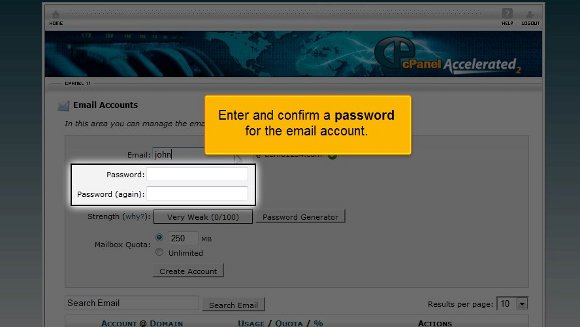
Cpanel confirm Password

6) Also, you can check your password’s good by clicking on the “Password Generator” button if your interface has one.

Cpanel Password ganerator

7) Right down under this box, you may see what is known as the “Quota” box, which is used to put a limit on your email account. If you have a number on your mind, feel free to express it!
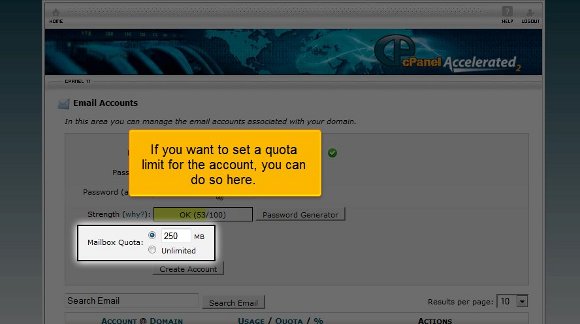
Cpanel Mailbox Quota

8) Finally, click on the “Create Account” tab, as this will immediately create your much-desired POPmail account.

cPanel Create Account
cPanel Email Created

9) After this, you can scroll down only to see that you can change your password, quota, delete, or make any necessary changes to your email and administer them simultaneously without much of a problem.

cPanel Change Email & Quota

Hence, it must be mentioned that creating a Pop email account in cPanel is undoubtedly not that difficult, but the problem lies with one’s expertise. Once you know it, there is no need to worry as you will get used to it soon. In fact, the tutorial mentioned above will give you the confidence to log into your Popmail account without much difficulty. So what are you waiting for? Go ahead and try it right away!

Handling Your Email Addresses


Lot of companies now the time maintains the email accounts the strategy behind this is the Web hosting companies should provide company email accounts for each person in your company. Email addresses should appear like this:

yourname@cpwebhosting.com
myname@cpwebhosting.com

Most websites work with web mails. Web-based email enable you to access email via a web browser such as Internet Explorer. You log into your email account via the Web to send and retrieve email. You are able to access your emails from anywhere in the world and it makes checking of emails convenient and portable. Web mails for your company will most probably be accessed at http://www.yourcompanyname.com/webmail.

It will be useful if you can send out emails to a large number of users. Start up with collecting opt-in email addresses from interested parties and send monthly promotions of your business products and services. Before long, your mailing list will be your another marketing channel of your business.

Evaluating Any Website Host..


people often waste resources when they create websites because they are under the stanza of creating heavy website at straight go without considering the basic facts.The result they have a dismal feeling after creating their website as it is showing poor performance.I am mentioning some of the facts which must be considered for a fruitful business.

Total Storage:
How much space do you get to store your website files? If you operate a small website with a handful of pages and only a couple of pictures per page, you can get by with 5-10 MB (megabytes) of disk space or less. However, if your site contains dozens of pages and hundreds of pictures, you may need a hosting plan with 10- 25 MB of space.

Data Transfer/Bandwidth:
Here’s where many people fall down and get run over by the Internet bus! Bandwidth represents the total amount of traffic the website host allows you to receive.

Successful sites that get a lot of traffic eat up more bandwidth than sites without many visitors. Honestly, bargain website hosting companies don’t want you to get much traffic because your bandwidth costs them money.

If you plan to do any business online, make sure you get a bare minimum of at least 1 GB (gigabyte) of data transfer per month.

Email ‘Aliases’
Most web hosts allow you to set up email addresses connected with your domain, such as jim@thenetreporter.com, and have them forward to your email account, like yourname@aol.com. The ability to set up email aliases forms an integral part of any online business. Make sure your hosting company allows you to set up at least 5 email aliases.

Website Tools:
If you want to do anything more than let people look at static web pages, you will need to have certain tools available. The two most important tools are CGI and website statistics. These allow you to run scripts and see who came to your site and when.

Tech Support:
Make sure you understand any company’s technical support policies and hours of operation. Don’t wait until Saturday afternoon to discover your only help option is to wait and email them Monday morning

Anti-Spam Web Hosting Providers


SPAM is very annoying, especially when you are expecting special mail from a client or an associate. Cpwebhosting protects their customers against spam.

Spam, also known as unsolicited junk mail, can be even more annoying than telemarketing phone calls. Unbeknownst to many, especial those who participate in spamming actually cost the US economy over 10 billion dollars. This not only cost the economy, it cost small businesses a lot of time deleting the mail. Important emails can actually get lost in the shuffle. It would be great if a web hosting provider could supply their customers with virtual ‘mace-in-the-face’.

Cpwebhosting help customers to avoid accidentally opening spam mail are to notice how it is usually worded. Most spam email will not place a clear message in the subject line because they want people to open the email.

Cpwebhosting is having spam filters that can actually block unwanted emails. For instance, when spam filters begin the blocking process of emails, they begin by blocking most frequently used words located in spam mail.

The best thing for a Cpwebhosting is to inform their customers about the necessary steps to prevent spam. Even though your customer will have automated programs that will protect people from spam, as a web hosting provider, one should educate people about engaging in manual monitoring as well.

Cpwebhosting inform the clients about frequent checking of uploaded files for common spam scripts, monitor server loads and to keep a look out on your client’s customers (especially new customers) for strange behavior. Another important step a cpwebhosting is using to register the customers email with spam battling/fighting web sites.

Getting the most out of your mail account


Email is the lifeline of any online business, offering a cost effective method of communication over the Internet. If you have an online presence or business it is essential that you have your own mail server – a mail server is a site on the web where you can have your own personal mail box. With a mail server you can send and receive mail to just about anyone on the Internet. However there is a lot more to having a mail account then just sending and receiving mail, such as auto-responders, forwarders, aliases, mailing lists and catch all mailboxes.

Aliases
Make sure that you can set up as many aliases as you like with your ISP. An alias is another name for an email address or a number of addresses. Many ISP allow you to have multiple aliases.

Auto-responders
An auto-responder is an automatically generated email message that provides static information to the recipient. For example, if an email is sent to one of your email addresses an email will be sent automatically to the sender of the email. .

Forwarders
Make sure you check with your ISP that you can set up forwarders. Forwarding is where different aliases can be forwarded to one or more email addresses. For example, if you have the email address info@yourdomain.com, you can set up a forwarder so that all emails sent to info@yourdomain.com are forwarded to your other email address sales@yourdomain.com.

Catch-all
A catch-all mailbox basically catches all emails with typos, incorrect names etc, but the email has the domain name in the email address spelt correctly. For example, you can set up an alias such as mailmanager@yourdomain.com and all emails with typos are redirected to this mailbox. .

Mailing Lists
A mailing list is a system for distributing email messages to many people at once. Mailing lists is a good tool to use if you have a brochure, catalog or newsletter and you want to distribute to lots of people. ISP should either have some sort of Mailing list program installed or have a mailing list included on their mail server.

Is Free Hosting Really Free?


Now the time if a company offer a free web hosting then is it true that really everything is free then the answer is one way is to make some of their money from registering your domain name. Domain registration is a necessary step for any future web site owner, (some low cost host play a numbers game between your monthly cost and your yearly domain registration fee, for example:$5/month and $30 registration fee, or $7/month and only $6 to register, or…… you get the picture).

Another way they make money is to add advertising onto your web page. They will get paid either each time the banner is shown, or each time someone clicks on the advertisement. Some will offer extra add ones like Spam or Virus Protection, Domain Theft Protection, or other services at an additional cost. Of course if you feel you have need for these services, then you should purchase them.
There are also limitations such as storage space, bandwidth, number of email accounts, and so on, in hopes that you will need more later and decide to upgrade. So you can say that this thing free hosting is so so.

Elements Of Web Hosting Web Hosting


The things which have its effect in hosting industry and that is its element like webhost These are the people that supply your website with somewhere to sit and be accessed from. They’re often a wealth of information, so when you’re trying to find your feet it will often be worthwhile to contact their tech support and get your questions answered. Because of this, it’s important to contact them before you sign up for any packages to ensure that you’ll receive a timely response. Just fire an email their way and see what happens.

Apart of this element the disk space is the same as the space on your own PC’s hard drive. Web Hosts will allocate a certain amount of space to your website, usually in Megabytes (MB) or gigabytes (GB). This determines how much you can store on your site. Bandwidth is the amount of data that can be retrieved from your site within the bandwidth period. The bandwidth period is the length of time before your bandwidth gets reset once again, usually about a month. Bandwidth is measured in MB and GB, like disk space. Always find out the consequences of exceeding your allocated bandwidth before you purchase a hosting package. As well as HTTP,FTP,POP3 also plays important role.