The installation of phpFormGenerator
This tutorial is written with the sole intention of educating you on how phpFormGenerator can be installed on your computer without facing any trouble at all. This particular application is handy and is provided by none other than Fantastico, which is a very reliable web hosting service provider. This company is known to offer valuable applications, and the PHP form generator is a perfect example of such an application. This application is compatible with cPanel, which is an added advantage. Fantastico’s applications are very user-friendly, so you will not have difficulty picking up the functions. Fantastico also gives you the chance to use its scripts. The scripts presented in Fantastico are pretty good, and they allow you to install the application within a very short time.
Now, let us get to the steps you need to follow to install phpFormGenerator successfully onto your computer.
1. when you view the interface, Fantastic, you will have to locate the phpFormGenerator tab. After finding it, you have to click on it.

2. An installation screen will appear After you click on the phpFormGenerator tab. On this screen, there is a link that says new installation you must click on that link.

3. After doing the above, you will again be directed to yet another screen where you must mention a directory where the installation process will occur. You are given the option of installing the application in the root directory. On the same page, you must submit a name for the administrator and a password.
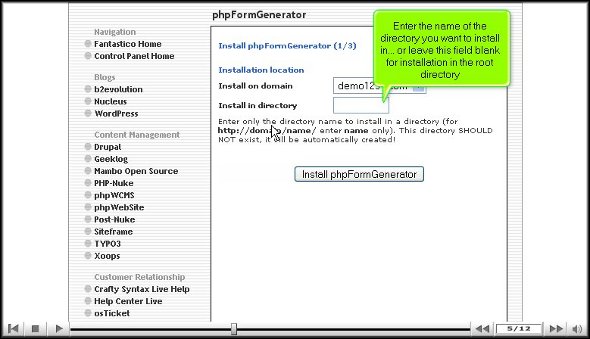
4. After completing the abovementioned steps, go to the bottom of the page and click install phpFormGenerator.

5. To complete the installation, click on finish.

So, that pretty much wraps up the tutorial on installing phpFormGenerator. To install the application correctly, you must closely follow the steps mentioned in the tutorial. In fact, you must follow them in the exact order mentioned above.
Now that you have installed the application correctly, you begin by reviewing the features of the particular software. When you study the different elements, you learn about the application and its various uses. When you take your time checking each part repeatedly, you can absorb things better. So, it is advisable not to rush the learning process.
When you feel that you have been able to absorb quite a bit about the software, you can tweak the application’s features to get the best out of it. By now, you probably understand that phpFormGenerator is a handy application. So, ensure you follow all the tips to use the application entirely.
Go to the top of the page. Back to the tutorial




 Ananova
You must be logged in to post a comment.