Cloud storage isn’t hard to find. Many companies are dishing out free cloud storage, and some companies are begging people just like you to take it. The problem with too many cloud storage companies is that it’s hard to sort the good from the bad. Which ones are really cloud storage companies, and which ones are just pretending? More importantly, which cloud storage companies can you actually trust?
Read more on :http://www.ananova.com/top-4-cloud-storage-options/
Starting up your business’ shared hosting website was a no-brainer. It is obvious how valuable a business website is these days. You may have even integrated social media into your online repertoire, another excellent idea. With the amount of people relying heavily on sites like Twitter and Facebook to get their information, you’d be a fool to ignore their potential for increasing your customer base.
Install FAQ master flex in the easiest way possible.
You may have been looking for a tutorial to teach you how to install FAQ master flex on your computer without any problem. Well, the good news is that your search has ended, as this tutorial will present straightforward steps to install this application from Fantastic on your computer within a short period.
For those of you who are probably hearing the name Fantastico for the first time, Fantastico is a very reliable hosting service provider that gives users beautiful applications. Users of Fantastico will also have access to the beautiful applications which can be used with the current cPanel. Fantastico also has a vast script library that lets you install any application quickly.
Since you are looking at this tutorial on how you can install FAQ master flex, it is assumed that
If you are looking at this tutorial on installing Advances Poll, you already know how to start the Fantastico application.
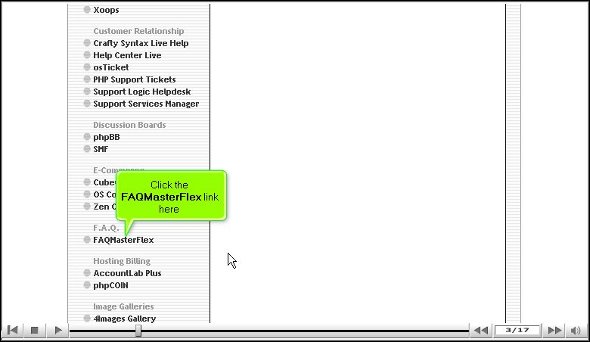
1. Firstly, when viewing the interface of Fantastico, you will notice a link that says FAQ master flex.
2. Once you have located it, you have to click on it, and the next minute, you will be taken to an installation screen.
3. On the installation screen, you can notice a link that says the new installation; you must click it.
4. On the next screen, you must provide the directory name you wish to install.
5. After that, enter the administrator’s name and password.
6. On the very same page, right at the bottom, you will notice a tab that says install FAQ master flex, and you need to click on it.
7. To complete the installation process, click on finish.
So that is about it. With this, we have reached the end of this tutorial, and FAQ master flex has been installed on your computer very successfully. You can install the application well when you can complete the above steps without any problems. You can now start tweaking the various tools and features as you wish.
Now, this application has many features that you will enjoy using to the fullest, so you have to pay attention during the learning phase. A relaxed and calm approach during the learning phase will help you absorb the application better. As a user of the application, you will notice that you have greatly benefited from its usage. FAQ master flex is indeed an excellent application.
In the beginning, you may have some difficulty understanding how the different features work, but eventually, everything will work out just fine. Just make sure you go through every tip mentioned in the tutorial to install the application smoothly on your computer.




 Ananova