Backup Technology Innovations


Everybody in the Hosting industry is worried about performing backups. With the need, innovations in backup technologies such as CDP instant recovery, flat backups, Server virtualization, and backup appliances emerge. There is a need to protect data entirely and restore it as needed.

Disaster recovery systems must be fully advanced for mission-critical systems and business continuity, as long recovery times are unacceptable. The gap between RTO (Recovery Point Objective) and RPO (Recovery Time Objective) must be minimal.

With E-commerce proliferating, legacy scheduled backups are always inadequate. Incremental forever backup techniques are required to handle data backup daily.

Continuous data protection eliminates the problems associated with the backup window, creating frequent, block-level backups rather than nightly ones. Every few minutes, newly created or modified storage blocks are copied to the backup targets like storage arrays or remote machines. Thus reducing the recovery point objective (RPO).
Losing a few minutes of data is more affordable than losing data for an entire day.

SSL Certificate for encrypted And Secure Connection


SSL Certificate

Suitable Chrome Warning – SSL Certificate

Google Chrome will give the warning “Not Secure” for HTTP sites after January 2017. Google want a connection between Chrome and the web page to be more secure, i.e. private. A green lock in the URL indicates HTTPS connection, which points to “Your connection to this site is private.”

HTTPS establishes an encrypted connection between web browsers and servers, ensuring that third parties cannot interfere with data transfers. HTTP is no longer considered sufficiently secure and is being forcibly phased out.

Google search has already started preferring HTTPS web pages over HTTP pages. It has outlined sites operating without HTTPS and dropped down the SERP rankings, ultimately causing them to lose visibility. Any site not protected with Secure-Socket Layer/Transport Layer Security (SSL/TLS) will be marked with the red triangle of an insecure location.

Web hosting providers like Automatic and WordPress.com have already turned on SSL for their hosted customers in April 2016.

An SSL certificate or X.509 Digital Certificate from a trusted third party called a Certificate Authority (CA), which guarantees the Digital Certificate’s authenticity with a Digital Signature, is a must for websites.

LinuxHost.net suggests to avoid self-signed certificates.

Types of SSL Certificates

  • Domain Validation (DV) SSL Certificates: The simple websites opt for this; it implies that the DV registrant has admin rights to the sites
  • Organization Validation (OV) SSL Certificates: Most commercial websites opt for this certificate. It validates the domain ownership and includes ownership information like the site owner’s name, city, state, and country.
  • Extended Validation (EV) SSL Certificates: It legally validates the domain’s owners. The website shows a green address bar in most browsers.

Nonprofit Internet Security Research Group (ISRG)’s Let’s Encrypt SSL Certificate

Hosting Providers like ZDNet and Hivelocity offer free Let’s Encrypt certificates.

Let’s Encrypt, a nonprofit Internet Security Research Group project, provides free certificates to Dreamhost, Squarespace, and WordPress. Dreamhost requires you to purchase a unique IP address on your hosting plan for free SSL.

  • It is Open Certificate Authority providing free and automated SSL-Certificates to enable HTTPS for websites supported by Google Chrome, Mozilla, and EFF.
  • Difference between Commercial CA’s and Let’s Encrypt SSL: Commercial businesses back up their security with a $500,000 and $1 million warranty, but with Let’s Encrypt, it is your own. Furthermore, the organization don’t offer OV or EV certificates.

4th Edition of NITI Lecture Series to be held on 22nd October 2018


Theme: “AI for ALL: Leveraging Artificial Intelligence for Inclusive Growth”

Prime Minister to attend the Address by Jensen Huang, President and Co-Founder, NVIDIA Corporation

NITI Aayog is organizing the fourth edition of the NITI Lecture Series at Vigyan Bhawan, New Delhi, on 22.10.2018. Prime Minister Shri Narendra Modi will attend the 4th edition of the NITI Lecture series, in which the keynote address will be delivered by Jensen Huang, President and Co-Founder of NVIDIA Corporation. This year’s theme is “AI for ALL: Leveraging Artificial Intelligence for Inclusive Growth”. Union ministers, policymakers, experts from different walks of life, along with the NITI Aayog Vice Chairman, members, CEO, and senior officials, will be a part of this gathering on this occasion.

AI & NITI

 Artificial intelligence is the use of computers to simulate human intelligence. AI amplifies our cognitive abilities — letting us solve problems where the complexity is too great, the information is incomplete, or the details are too subtle and require expert training.

Union Budget 2018 mandated NITI Aayog to develop a national programme on employing artificial intelligence for national development. NITI has since published a National Strategy for Artificial Intelligence.

National Strategy lays down India’s vision for evolving a robust AI research and adoption ecosystem. The Strategy is termed #AIForAll as it is focused on leveraging AI for inclusive growth in line with the Government policy of Sabka Saath, Sabka Vikas.

NITI Aayog has signed Statements of Intent (SoI) with industry leaders such as Google, Microsoft, and IBM to leapfrog India into the global arena of future technologies and enable the use of artificial intelligence in key, high-gain sectors of social development – healthcare, agriculture, smart mobility, education, and infrastructure.

To demonstrate the impact of AI, multiple pilot projects have been launched in precision agriculture, creating AI-led healthcare solutions and bridging India’s diversity of languages by creating a digital “Ek Bharat, Shrestha Bharat” platform using Natural Language Processing (NLP). NLP is a protocol system that allows machines or computers to understand and interact with human speech and symbols.

In his address at the launch of the World Economic Forum (WEF) Centre for Fourth Industrial Revolution, the Prime Minister underlined new opportunities arise with each wave of new technology. The rise of Artificial Intelligence will help improve productivity and lead to equitable development.

Aiming to put AI to use for all and across sectors, NITI has identified barriers that need to be addressed to succeed in using AI. These include lack of expertise, absence of enabling data ecosystem, high resource cost and low awareness, privacy and security issues, and absence of collaborative approach to adoption and application of AI.

Recognizing the importance of research and its commercial adoption in the success of AI, NITI has also proposed setting up a Centre of Research Excellence (CORE) to focus on developing a better understanding of existing core research. Besides this, the strategy paper also recommends setting up International Centres of Transformational AI with a mandate to develop and deploy application-based research in collaboration with private players.

About NITI Lecture Series;

The ‘NITI Lectures: Transforming India’ was inaugurated by Prime Minister Shri Narendra Modi on August 26, 2016, and has since been held annually, featuring eminent speakers worldwide. The first keynote address – ‘India and the Global Economy’ – was delivered by the Deputy Prime Minister of Singapore, Shri Tharman Shanmugaratnam. Bill Gates, Co-Founder of the Bill and Melinda Gates Foundation, delivered the Second lecture in the high-powered lecture series on ‘Technology and Transformation’ on November 16, 2016. On May 25, 2017, Dr Michael Porter, the Bishop William Lawrence University Professor at Harvard Business School, delivered the Third Transforming India Lecture, ‘Competitiveness of Nations and States: New Insights’.

With the vision of disseminating cutting-edge, innovative ideas in development policy to India, the NITI Lectures are attended by the Government’s top decision-makers, including members of the Cabinet and senior officials across ministries and departments. Through the lectures, NITI Aayog has brought policymakers, academics, experts, and administrators of global repute to India. The series aims to enable learning at the Centre and in states from prosperous development practices worldwide.

Source: Press Release

Release ID: 1550115
PIB Delhi
NITI Aayog
Date: October 21, 2018

Advise To Help SMEs Securing Business Data


Share your valuable feedback, comments or suggestions on SME Securing Business Data

SME Securing Business Data

Train Employees – SME Securing Business Data

Train and educate employees with cybersecurity by examples. Monitor their sincerity and commitment towards it. A trained employee is less susceptible to silly mistakes that could threaten business security. Although training consumes budget, results are far better, and it appears to be an investment instead of an expenditure. This training should be a must for both new and experienced employees. Few companies arrange workshops, seminars, and conferences on the topics and ask every employee to participate. Employees are valuable assets for any company, and no company can survive without employees.

Securing Devices – SME Securing Business Data

SME Securing Business Data

An entrepreneur trusts its employees, thus enabling them to perform their allotted duties. For that, it provides various resources and digital devices. Although employees keep the offered digital devices safe, we know they are also humans. Mistakenly, they can lose the device, or it could get stolen. It can happen to anybody. Now, tension arises not from the equipment but the data and passwords it may hold.

It is acceptable that everybody is not technical; in that case, they can take the help of IT personnel. Most companies restrict personal devices in the office for proper management. Furthermore, they don’t allow any non-business activities using those devices. The companies consider their data secrecy of utmost importance and want to prevent any deliberate or inadvertently posting of data in the public domain.

Some companies log all the sites an employee opens, how long she/he stays on it, and what activities are performed. This kind of spy helps the IT personnel to trace the source of the attack by tracing the log.

Recommended Software & Services – SME Securing Business Data

The businesses are recommended various software and services to manage their digital assets:

  • Prey: Tracks devices, allows remote wiping, and helps retrieve files from backup.
  • Computrace: A perfect platform product that works at the BIOS level. If the device is reformatted to load windows, the BIOS will get it installed automatically in the background. It would help the owner to trace and wipe out the data.

Anonymous, Safe and Secure Internet Browsing


Share your valuable feedback, comments or suggestions on Secure Internet Browsing

Secure Internet Browsing

Primary Work Tool – Secure Internet Browsing

Secure Internet BrowsingBrowsers are valuable in accessing applications and information and performing day-to-day activities. The most commonly used browsers include Mozilla Firefox, Google Chrome, and Internet Explorer. The user uses cloud applications that can run from anywhere and anytime and are accessible via a browser, e.g. Microsoft Office 365, Salesforce CRM applications, and the Zoho One Business Suite. They access them through various browser-enabled devices like smartphones, laptops, PCs and others. They don’t need to install additional components to access applications or data.


Nowadays, browsers are supplemented by operating system resources and software applications like Java and Adobe Flash Player. The HTML5-enabled browser handles everything, eliminating the need for Flash, Java and other add-ons and software components to interact with system resources.

We assume they are the most secure web browsers that block advertisers and maintain privacy by not sharing information with companies or the government.

How do you make internet browsing safe and secure?

  • Padlock icon: A small icon on the top of the browser.
    • Close represents that the session is secure
    • Broken or exclamation mark shows vulnerability to adversaries
  • Encrypted Communication: Download, install and activate HTTPS Everywhere plugin from Electronic Frontier Foundation (EFF). Most browsers warn a user whenever SSL is not installed on a website.
  • Install and Activate WOT (Web of Trust) or Calling-ID to check the website’s or link’s trustworthiness.
  • Use portable apps when browsing from public computers. Mobile apps run on the host computer without being installed.
  • Mobile Anonymous Browsing: On Android, install the Orbot and Orweb apps, which funnel and encrypt the traffic through the Tor network. On iOS-enabled iPhones or iPads, use Onion Browsers for anonymous browsing.
  • Use VPN (Virtual Private Network) Services to hide an IP (Internet Protocol) address with a fake one. A good quality VPN may include features like multiple hops, i.e. bouncing traffic between distant geographic locations or out-of-band authentication that does not break anonymity.

Web Browsers – Safe and Secure Internet Browsing

Mozilla Firefox

  • Free, open-source
  • Its version, Tor Browser Bundle, is customized to use an anonymous network, which hides users’ IP addresses and locations.

Chrome’s browser Incognito mode

Google Chrome, Internet Explorer and Safari share user information with the government

Antivirus Real-time Scanner To Fight Against Malicious Code


Share your valuable feedback, comments or suggestions on Antivirus Real-time Scanner

Antivirus Real-time Scanner

Antivirus Real-time Scanner

Antivirus is the first software we ask to get installed on a system. Even Mac users ask for it. Whether you connect to the Internet or not, surf only safe websites, do not click on any link, do not open strangers’ emails, and do not install additional software. Still, your system needs a good antivirus.

An antivirus does real-time scanning of system memory, OS and files and detects, prevents, and removes malicious code. It applies signature-based detection methods, heuristic detection methods, and rootkit detection tools. Furthermore, it contains a significant level of intrusions and malware to prevent computers from being infected.

Antivirus Providers

Symantec, McAfee, Avira, Avast, AVG, Quick Heal, Comodo, Avast Software, ESET, Bitdefender, Fortinet, F-Secure, G DATA Software, Qihoo 360, Kaspersky, Panda Security, Trend Micro, Microsoft, Rising, Cheetah Mobile, AhnLab

Virus

A virus persists on a system after a reboot and starts with the system. They acquire strain’s ability with persistence by modifying boot sectors, hijacking the Windows COM system or DLLs and shortcut files, and using Windows Registry to add registry keys to call malicious code on boot-up.

Researchers have found a new malware persistence method on Windows 10 leveraging Microsoft UWP apps like the Cortana and People apps.

Virus Steal User Data – Mac and iPhone devices are also not safe.

Antivirus Real-time Scanner

(September 10, 2018) Apple removed several Trend Micro Apps from the Mac App Store, stealing user data. Researchers confirmed that Mac App Store malware called ‘Adware Doctor’ collected users’ browsing history and sent that info in zipped files to remote servers in China without user permission. They also reported other programs on the platform to indulge in similar nefarious activities. The apps behaving deceptively include Dr Antivirus, Dr Cleaner, Dr Unarchiver, Dr Antivirus and Open Any Files: RAR Support. Most of them are distributed by Trend Micro, a well-known security software firm.

App Store to Remove iPhone Antivirus Apps

iOS is designed with security in mind; an antivirus app is unnecessary. Also, its sandbox environment does not allow apps to interact with other data or scan other apps. Thus, they won’t steal data or infect other apps. Furthermore, a user cannot install an app outside the App Store. An app undergoes a thorough review process, in which code is examined before being allowed into the App Store, hence discouraging and making it difficult for the developer to sneak malicious code onto the platform.
A user can install apps outside the Google Play Store via APK files on Android.

A Lack of Servers For Lease Thanks to Currency Mining


opengraph

There’s something curious happening in the dedicated hosting world today. Thanks to currency miners, there is a current lack of servers available for lease.

How the heck does one thing impact the other? It goes like this: new currency companies offer profits (affiliate marketing) to people who can use computers to verify transactions.

Since there’s a newfound interest in any new digital currency, there’s a flood of people renting out servers. Are all the servers gone? Not quite, but currency miners are now hounded by many popular server options.

What’s a Currency Miner? 

Let’s use Bitcoin as an example, though many other new currencies are popping up. Using a computer with a Bitcoin mining program, users can run the program, which then runs several calculations. Users are rewarded with one Bitcoin whenever a return value has been found (meeting the proper criteria). The same is true for any other new digital currency – plenty of them. Think of currency mining like gold mining – looking for money in the computer mines instead of the ground. It’s all relatively the same thing, though.

Since people want to grab as much digital currency as possible, servers are being rented out left and right, causing the server issue mentioned above. With people buying out server space by the handful, it’s hard for hosting companies to keep up with the current demand. So, there’s a shortage of servers right now thanks to digital currency – and people are betting these new currencies will be worth a lot soon.

Is Currency Mining Worth It? 

It all depends on how you look at it. If you think digital currency like Bitcoin or Primecoin will be a worthwhile investment, go ahead and rent out servers as you see fit. But keep in mind that you may not get a return on that investment if your digital currency proves worthless in the long run. It’s like the Wild West in the digital currency market right now, so finding a server to rent may be more complicated than it once was.

Should you rent out to currency miners if you own a hosting company? This kind of mining benefits companies with servers for rent, but you may be missing out on some prime long-term clients if you go along with the craze. For now, anyone seeking to currency mine will have difficulty finding a server for rent.

Of course, if you’re looking for a dedicated server option that is not about currency mining, you can find many excellent reviews here on our site. Look at what we’ve come up with, and let us know if you have any questions!

AG Grewal Files Lawsuit to Prevent Imminent Release of Printable-Gun Computer Files


Attorney General Gurbir S. Grewal filed a lawsuit in Superior Court in Essex County today seeking to prevent a firearm developer from publicly releasing computer files enabling individuals to create untraceable firearms using a 3-D printer. The firearm developer, a Texas-based company called “Defense Distributed,” has threatened to release the public files on Wednesday, August 1, 2018.
The lawsuit seeks a temporary restraining order against Defense Distributed and its founder, Cody Wilson. The case follows a cease-and-desist letter that Attorney General Grewal sent the company on Thursday, July 26, 2018.

In a separate letter, Attorney General Grewal informed DreamHost, the web hosting provider, that Defense Distributed’s website would violate the provider’s Acceptable Use Policy. As the letter explains, Defense Distributed impermissibly plans to use the site to facilitate imminent violations of New Jersey state law.

Attorney General Grewal said: “These dangerous files would allow anyone – including terrorists, domestic abusers, felons, fugitives, and juveniles – to print untraceable assault weapons using a 3D printer from the comfort of their own homes. And because the guns would be printed without serial numbers, law enforcement would be untraceable, making it all the more difficult to solve crimes committed with these weapons. Once Defendants open that Pandora’s box, it can never be closed.”

Defense Distributed made national headlines by developing gun computer files that enable consumers to create fully operational firearms with a 3-D printer. The company’s founder, Cody Wilson, formed a printable plastic pistol known as the “Liberator .380” in 2012 and put the plans online, but they were blocked by the federal government. Wilson sued, and under a settlement he reached with the U.S. State Department, his company can begin releasing computer files for printable guns starting on August 1.
But as explained in today’s court filings, publishing those computer files would still violate New Jersey law.

New Jersey’s public nuisance law provides a cause of action to hold firearm manufacturers accountable – and to enjoin imminent violations of the law – when their plans would facilitate the illegal sale of weapons to criminals and other prohibited users and when the manufacturer has done too little to prevent that unlawful market from developing.

On Sunday, July 29, 2018, Defense Distributed and the Second Amendment Foundation, a gun rights organization, sued Attorney General Grewal in federal district court in Austin, Texas, seeking to prevent Attorney General Grewal from preventing the publication of the company’s computer files on its website, known as “DEFCAD.” The same day, Wilson claimed that he had taken steps to prevent the distribution of those files in New Jersey, posting on his personal Twitter account, “Yes, DEFCAD has been blocked in New Jersey.” However, as noted in New Jersey’s court filings today, the Defense Distributed website remains accessible in New Jersey.

Also today, Attorney General Grewal joined 20 other state attorneys general in a letter criticizing Secretary of State Mike Pompeo and Attorney General Jeff Sessions for settling the federal lawsuit against Defense Distributed and urging them to withdraw from the settlement before the company publishes the computer files later this week.

“For years, and as recently as April 2018, the federal government recognized that these printable-gun computer files would be a threat to United States national security and foreign policy interests,” said Attorney General Grewal. “Although the Secretary of State and Attorney General abruptly switched positions, the threat remains with no good reason. I’m proud to lead the fight in New Jersey to stop Wilson and Defense Distributed from publishing printable-gun computer files. I call on the federal government to join us in protecting the safety of our residents and our law enforcement officers.”Source: Press Release Date: July 30, 2018 Office of The Attorney General Gurbir S. Grewal, Attorney General

Advise To Get Rid of Unwanted Unsolicited Emails


Share your valuable feedback, comments or suggestions on unwanted, unsolicited emails

Advise to Avoid unwanted, unsolicited emails

Using Filters to avoid unwanted, unsolicited emails

unwanted unsolicited emails

Often, we don’t even want to look into the junk folder where hundreds of emails marked as spam reside, filtered by email filter programs. Sometimes, we deny that we haven’t received an email from your side. And the business asks to check the spam folder and whitelist them. Optimize filter levels by regularly monitoring the junk folder.

Most would complain about why filters can’t be automatically adjusted according to the preferences and depending on the user’s reporting and activity.

Report to Agencies for unwanted, unsolicited emails

Once the user marks any mail landing in its inbox as spam, it should automatically be reported to agencies that curb spammers. The agencies would further inform the email providers to stop the user’s activity, delete the account, or prepare to face legal complexities.

Stop Email exposure to avoid unwanted, unsolicited emails.

Find out the sites where your email is exposed and where spammers add it to their database. Some people share their email IDs on social media platforms to be publicly available. On Facebook, in the About section, you can find millions of such people whose email IDs are publicly shared, thus openly inviting the spammers. This email is shared for people to contact and check regularly. The Ananova technical team advises using secondary, temporary, or disposal emails with proper filter sets on social media platforms. The filters would redirect the selected emails to a primary email address. Never share private information, which includes email, in tweets, posts or forums. Sometimes, people provide their personal information in return for luring bribes.

How often have you seen people changing their email IDs as they forget their credentials. Cybercriminals hack such emails, and they use it for their malicious activities.

Sometimes, business shares their employees, partners, and franchise data on their website, which include their contact details, person to contact, address and other information. Hence, always keep personal and business identities separate to avoid spammers.

About atmail

atmail is supremely powerful and lightning-fast, a web-based mail client with a strong focus on the user experience.

Since 1998, atmail has delivered next-generation email solutions to meet the commercial needs of service providers and businesses worldwide. Today, with offices in Australia and the US, atmail is the dominant email messaging platform — delivering intuitive, innovative, scalable and customizable email solutions.

WordPress Built-in Features on SiteGeek


Share your valuable feedback, comments or suggestions on WordPress Built-in Features

WordPress Built-in Features

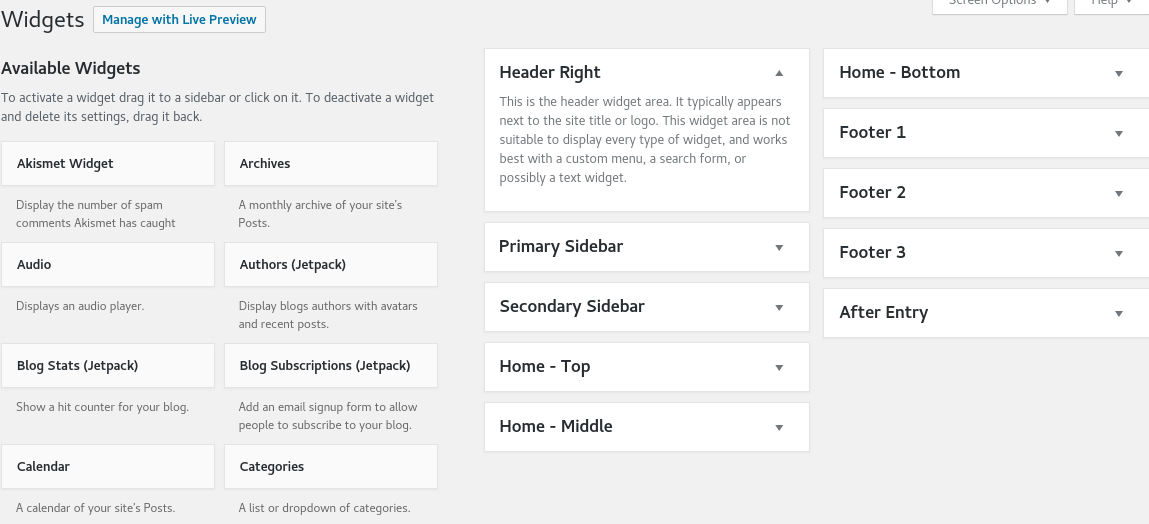
The WordPress widgets offer options to customize the look of the website. The availability of different widget options, including primary side, secondary sidebar, home-top, home-middle, home-bottom, footer 1, 2,3, and after entry, depends on the theme activated on the website.

The Primary sidebar is price primarily available in all the posts and pages unless un-set is customized to contain the links, which the business believes will generate sales. The business products or services banners ph, photographs, or illustrations are also added to show the visitors what they are for before clicking on them, which takes them to the specific landing page. The primary sidebar in some websites also contains the top lists of the business’s products or services. Sometimes, it includes a list of famous books, their author names and a brief description.

WordPress Built-in Features

A text widget briefly describes services or products or important announcements, new offers, discounts or promotions with buttons leading to the purchase payment gateway page. Some website owners also put taglines or advise the visitors on how to use the website.

Blog subscription – WordPress Built-in Features

Blog subscription - WordPress Built-in Features

The business websites often contain options to subscribe to the site, i.e., a Blog subscription, which asks for email signup from a visitor. The marketers use the tool to send regular promotions, latest updates or change of policy emails to the subscribed members. The emails contain links to the pages presenting the benefits of using the company’s services or products. Hence, the blog subscription option regularly brings people to the site and increases sales. The business entrepreneur focuses its energy, time, resources and efforts on servicing customers. The business also looks to expand its subscribers as it creates a profitable opportunity for prospects, which helps to maintain and grow the business. Ananova suggests taking the help of 3rd party companies in list-building like MailChimp, Aweber, Get Response, Constant Contact and many more. These companies allow businesses to build databases that comply with spam laws and allow emailing only when the user is subscribed for it.

Other Important WordPress Built-in Features

  • Akismet widget: displays the number of spam comments Akismet has caught
  • Calendar: A calendar of the site’s posts
  • Categories: A list or dropdown of categories
  • Video: Displays a video from the media library or YouTube, Vimeo or other providers
  • Top Posts and Pages: Shows most viewed posts and Pages
  • Search: A search form for the website
  • Gallery: displays an image gallery
  • Cookies and Content Banner: Displays a banner for EU cookie law and GDPR compliance
  • Recent Comments: Displays the site’s most recent comments
  • Recent Posts: Displays the site’s most recent posts