You know those little news segments like “This Day in History?” Well, Boing Boing runs a story entitled “This Day in Blogging History” each day. It’s fun to see the blog posts of news from cheap hosting site all around the Web from years ago.
We talk a lot about WordPress on this blog because it is the most popular free hosting platform available. But, it’s not the only one. As streamlined as WordPress is, some people might prefer to go with another free hosting company. Here’s a look at ten free blog hosts that may provide you with something WordPress can’t.
Today is a great day for IBM. The company has just won its biggest U.S. cloud-based government contract. The new IBM contract is valued at $1 billion. In other words, the pressure for IBM’s cloud team is on.
Back in May, WordPress had its 10th Anniversary. That’s right, it’s been ten year since WordPress first opened its virtual doors! Kind of an amazing thought, right? Well, there are some other things that you might not know about WordPress either. Take a look at these top 10 WordPress facts!
Flavors are good. Baskin Robbins has 31 of them, and Flavors.me is an amazing way to set up a really great looking site in no time. If you’re tired of WordPress or you just want something different, Flavors.me offers a cheap hosting alternative and a fast way to put up a site.
WordPress plugins make blogging life easier. The only issue is that WordPress doesn’t notify users if a particular plugin no longer works or has been removed from the WordPress directory for virus-related reasons. This means that you could be running a WordPress plugin that might be a hazard.
ZenCart is a shining star in the world of e-commerce. It is an open-source application written in PHP. It helps you to customize an online store very quickly. This shopping cart system lets you explore the endless possibilities of e-commerce without any hazards.
ZenCart uses a MySQL database and HTML components. It has a built-in system that can calculate discount rates, help set taxes, receive online payments, and numerous other features. It is available under the General Public License (GPL), so you do not have to spend any money to download it.
Before you install and start using ZenCart, you may become curious about its advantages so that you can choose wisely; here are some benefits of ZenCart that are given below:
It is straightforward to install. You can navigate around it very quickly. You can customize it to your liking. It has automated tasks. Proper support is provided for numerous languages and currencies. It is free of cost.
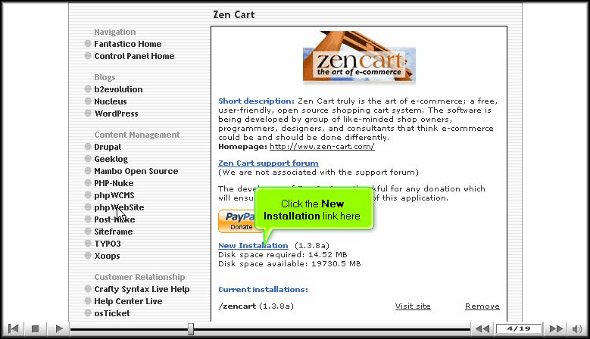
Now, to install ZenCart, you must read all the information correctly. It will be installed from Fantastico, a reliable web hosting service provider. To successfully install ZenCart, you must ensure that the Fantastico application is already downloaded, and you have to launch it.
After that, follow these quick steps:
1. Click the ZenCart link on the left of the Fantastico screen.
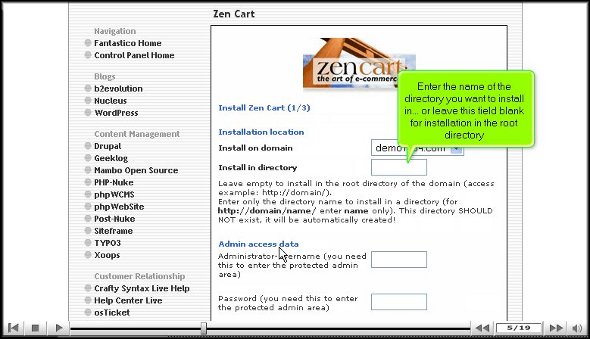
2. The ZenCart application screen will appear then.
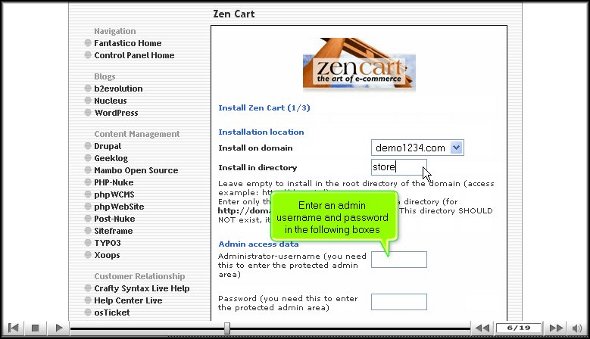
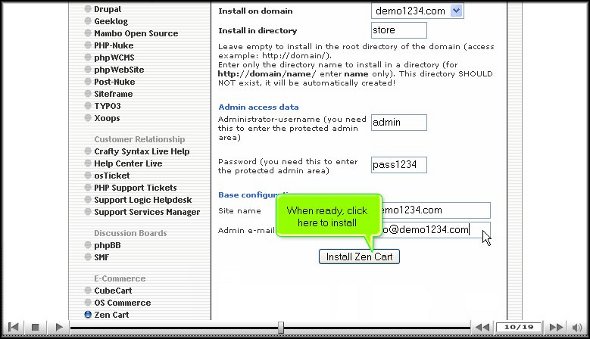
3. To install ZenCart in a directory, enter a directory name in the appropriate field. If you install it in the root directory, leave this field blank: example- store.
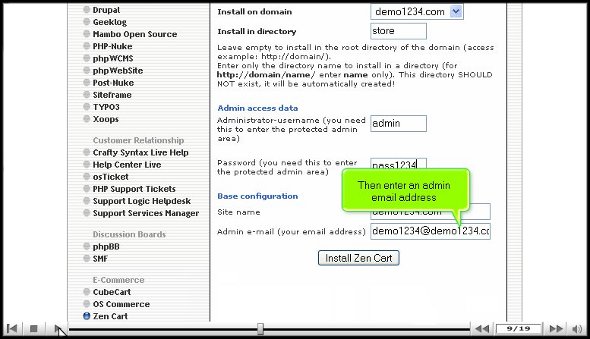
4. In the next step, enter the administrator’s name and user password in the respective fields on the same page.
5. On the next page, scroll down, and you will see a field where you must enter an administrator’s email address.
6. After entering the email address, you will see a tab below called ‘Install ZenCart’; click on it to Install ZenCart.
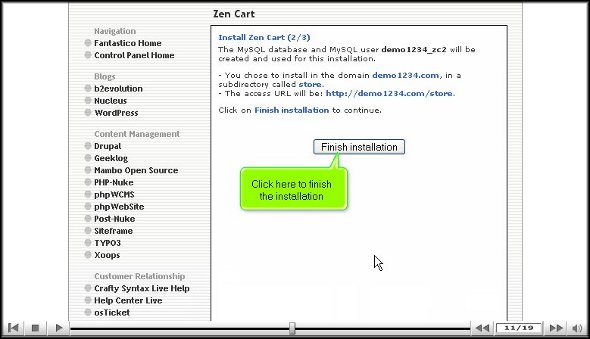
7. On the next page, you will see a tab called ‘finish installation’. To finish the installation process, you have to click on it.
In this way, ZenCart is correctly installed on your account. If you do not face any difficulty in this process, you can be sure it has been installed on your account.
8. When you further access it, type the admin name and password you have given before.
9. Your new installation will be listed on the script’s homepage.
After installation, you may start exploring all its facilities and features. It is very user-friendly, so you will not have trouble customizing and navigating around it. But do not make haste in learning all the features at once. You should be very patient and go slow on learning it. You may find it challenging to use some aspects of the application initially, but as you spend more and more time with the application, you will gradually get used to it.
WordPress is starting to get crowded with plugins. These tools practically pop up overnight, and reading through reviews can be tiresome. Let me do the work for you. Below, you will find 10 of the best new WordPress plugins available. Enjoy!
If you’re new to the world of website building, WordPress is the easiest way to get things up and running. It is more than just the most popular blogging platform out there (it boasts over 66 million sites worldwide) offering plugins and themes for free. Users can also download software from WordPress.org in order to create their own website.
Blog Hosting is one type of web hosting. Blogs, also known as weblogs are websites that feature regular updates in the form of individual entries, or posts. With the many different blog hosting options available nowadays, getting your blog set up can often seem like an overwhelming task.
A blog is an abbreviated version of “weblog”, which is a term used to describe websites that maintain an ongoing chronicle of information.
Blog Hosting: Features
Blog hosting is all about the features that allow you to install and/or use a blog-software such as WordPress, Typepad, b2evolution, Nucleus, etc. These features will include:
Scripting support (i.e. PHP)
Database support (i.e. MySQL)
Large amounts of storage space and bandwidth
Easy one-click install (i.e. Fantastico).
Choosing a Blog Host:
The first step in choosing a blog host is deciding whether you want to create a blog with free web hosting or invest in a paid blog hosting provider. If you are creating a personal blog to keep in touch with your family and friends, then a free blog hosting service would likely be sufficient for your needs. Free blog hosts, such as Blogger and WordPress.com, offer easy-to-use interfaces that make it simple for people with limited technical skills to start blogging. There is no script installation or database configuration – as the blog software is all setup and ready for you.
For bloggers who are hoping to turn their blog into a source of supplemental income, it’s best to invest in paid blog hosting. With a paid account, you will have your own domain and greater options for customizing your blog. If you want to run ads on your site, you will be the one who keeps the income generated. You will also be able to accommodate larger amounts of traffic. Many paid blog hosting providers offer easy one-click installation for major blog software, so you can get your blog up and running in just a few clicks.
Weblog software (also called blogging software or blogware) is software designed to simplify the creation and maintenance of weblogs. As specialized content management systems, weblog applications support the authoring, editing, and publishing of blog posts and comments, with special functions for image management, web syndication, and moderation of posts and comments.
CPWebHosting is one of the examples of a website which offers reliable, free blog hosting with free & instant blog installations through our control panel. You can install blogs for free using a selection of free blog programs such as WordPress, b2evolution, Nucelus and many other scripts, instantly and free of charge with our blog hosting.





 Ananova
You must be logged in to post a comment.