A lot of small businesses are looking to the cloud to save money and time. However, deciding which files to send to the cloud isn’t as cut and dry as it seems. There’s a lot more to cloud storage than just moving items around to and from the cloud. There are legal, and other, things to think about too.
Your company has decided to move its data to the cloud. Great! You know you want to go hybrid, and you aren’t alone: recent surveys indicate almost all enterprises plan to go with a hybrid cloud solution at some point. Although they want in on the cloud, very few of them have actually come up with a specific strategy, and fewer still have actually deployed a hybrid cloud hosting solution.
There’s no doubt about it: the cloud is here, and will only get bigger. A recent report by Morgan Stanley confirms this: AWS revenue is expected to hit $24 billion by 2023. It stands to reason that other cloud computing companies will see similar growth. However, it’s not all sunshine and rainbows.
Today, one of the most popular Google searches is “non-Us cloud-based companies.” Cloud users not living in the states have been frightened away by government spying. That’s not good news for cloud hosting companies based in the USA. But, it might be good news for cloud companies in other countries.
Cloud hosting is an industry that is growing fast, and Digital Ocean is quickly rising to the top. They recently announced a total of $3.2 million raised in seed capital, and with new subscribers joining at a rate of 500 per day, this money is much needed to adjust to their growth.
Can cloud technology help bridge the gap between healthcare and developing countries? An open source mobile health technology company called MOTECH SUITE is doing just that – using the cloud to bring basic healthcare to people across the globe.
Government internet surveillance in the United States is troublesome. What might be even more troublesome is economic impact that recent NSA news will have on the cloud computing industry in the USA. Some numbers coming from the ‘Information Technology and Innovation Foundation’ point to billions in losses thanks to NSA surveillance.
When it comes to cloud hosting services, does one company excel? Which one should you choose (or recommend to your boss)? Here’s a closer look at Microsoft’s Azure vs. Amazon’s Web Services (AWS).
If you are having difficulty installing Support Service Manager, that is only because you may not have followed a proper procedure. Well, this tutorial will help by guiding you through the entire process. Support Service Manager is a helpful application by Fantastico, a reliable web hosting service provider. The company has been around for many years, providing users with valuable applications. The applications provided by Fantastico are straightforward to handle and equally easy to install on the computer. All the applications can be used with cPanel.
Fantastico has a beautiful stock of scripts that will let you install the applications easily on your computer. These scripts also help you to save a lot of time. This tutorial has been broken down into easy-to-follow steps to make things easier. The steps to install Support Service Manager on your computer can be listed below.
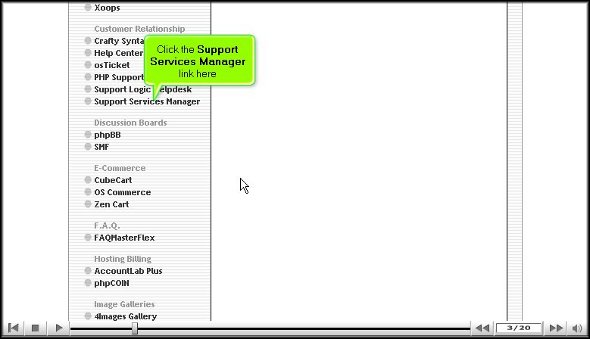
1. To start the installation process, locate a tab that says Support Service Manager.
2. Once you locate this tab, you must click on it; you will be taken to an installation screen where you will have to click on a link that says new installation.
3. After you have clicked on the new installation, you will again be taken to another screen where you will have to mention the directory where you want the building to take place. You also have the option of installing the application in the root directory.
4. On this same page, you must assign a name to the admin and provide a strong password.
5. To begin the installation, you will have to click on Install Support Service Manager.
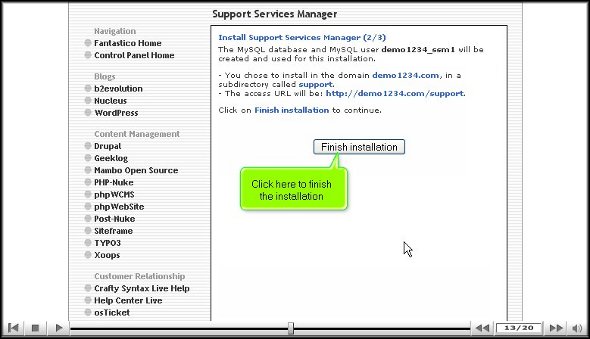
6. To complete the installation process, you must click on finish.
This is the end of the tutorial, and if you have followed the steps mentioned above in the proper order, you have successfully installed the application properly. To learn how to use the software properly, you should start exploring the tools and features that come with this application. Now, you can know how to do many things if you spend time with the application. However, you must not rush through the learning process, as you may miss out on some crucial aspects of the application.
As a new user, you may face application problems, but the best way to overcome such difficulties is to keep a cool head and relax. You can consult other tutorials to understand how to use the tools in this application. Once you feel confident about the application, you can start configuring the settings of the application to suit your purpose. You must install this application immediately without hesitation to get the best out of this application. This application is handy; as a user, you will experience tremendous improvement in your operations.
As the world becomes a global village, international trade becomes more popular and competitive. Multinational companies are growing fast, leading to the development of society as a whole. Maintaining good interaction between all branches becomes more vital as these companies grow and expand. Our computer systems, internet, and allied services like voice conferencing and video conferencing make this possible. While using these features, you will often encounter software glitches and hardware faults that a technical expert can solve. The more we depend on these technical features, the more the need for technical support increases. The support service manager helps you accomplish these tasks.
Support Service Manager is an application script proven to be a master solution to all your technical problems. Often, multinational companies outsource their technical support to a third-party vendor. These third-party vendors may be located in any part of the world. When an employee or user, as referred to in general terms, faces a software glitch or a hardware issue, they raise tickets via the Support Service Manager, and the technical experts get the same through emails. The Support Service Manager is often synchronized with the knowledge base, providing users online support. They can refer to this knowledge base and solve their issues instantly. It is a beautiful support application for translating ticketing matters and sending administrative support.
Industries all over are learning about the benefits of cloud hosting, and watching as profits rise and IT costs fall. There is one industry where cloud hosting is making a big impact: manufacturing.






 Ananova
You must be logged in to post a comment.