WordPress on Linux Servers


(Ananova News) January 02, 2022.

Recently, a security alert revealed that WordPress websites on Linux were targeted by a previously unknown strain of Linux malware that exploits flaws in over two dozen plugins and themes to compromise vulnerable systems. The targeted websites were injected with malicious JavaScript retrieved from a remote server. As a result, when visitors click on any area of an infected page, they are redirected to another arbitrary website of the attacker’s choice.

The disclosure comes weeks after Fortinet FortiGuard Labs detailed another botnet called GoTrim that’s designed to brute-force self-hosted websites using the WordPress content management system (CMS) to seize control of targeted systems. In June 2022, the GoDaddy-owned website security company shared information about a traffic direction system (TDS) known as Parrot that has been observed targeting WordPress sites with rogue JavaScript that drops additional malware onto hacked systems. Last month, Sucuri noted that more than 15,000 WordPress sites had been breached as part of a malicious campaign to redirect visitors to bogus Q&A portals. The number of active infections currently stands at 9,314.

The hacker can deploy an implant to target specific websites to expand the network. It involves weaponizing a list of known security vulnerabilities in 19 different plugins and themes that are likely installed on a WordPress site.
Doctor Web revealed the targeted plugins and themes –

  • WP Live Chat Support
  • Yuzo Related Posts
  • Yellow Pencil Visual CSS Style Editor
  • Easy WP SMTP
  • WP GDPR Compliance
  • Newspaper (CVE-2016-10972)
  • Thim Core
  • Smart Google Code Inserter (discontinued as of January 28, 2022)
  • Total Donations
  • Post-Custom Templates Lite
  • WP Quick Booking Manager
  • Live Chat with Messenger Customer Chat by Zotabox
  • Blog Designer
  • WordPress Ultimate FAQ (CVE-2019-17232 and CVE-2019-17233)
  • WP-Matomo Integration (WP-Piwik)
  • ND Shortcodes
  • WP Live Chat
  • Coming Soon Page and Maintenance Mode
  • Hybrid
  • Brizy
  • FV Flowplayer Video Player
  • WooCommerce
  • Coming Soon Page & Maintenance Mode
  • Onetone
  • Simple Fields
  • Delucks SEO
  • Poll, Survey, Form & Quiz Maker by OpinionStage
  • Social Metrics Tracker
  • WPeMatico RSS Feed Fetcher, and
  • Rich Reviews

Technical experts always suggest keeping software (theme, plugins, third-party add-ons & WordPress Core) updated and up-to-date with the latest fixes. Always use strong and unique logins and passwords to secure accounts. Hence, it is always suggested to have managed WordPress Hosting, as the provider monitors website security, takes regular backup, and always keep them up.

Ananova recommended WordPress.com and Shopify as the best web hosting providers to build an eCommerce store in 2022. The 2022 Web Almanac reveals that WordPress leads the market with 35% adoption on mobile. The platform is adopted by all businesses whether small or big across all geographical landscapes. The companies considered the platform trustworthy for their online growth and expansion. The government websites of most countries are also built on WordPress to provide the latest information. The platform is widely used by technical, legal advisors, social groups, & political parties.

The rapidly growing online eCommerce business has already overtaken traditional methods. The companies spent thousands of dollars to stay ahead of the competition and gain attention. Most firms choose Ananova recommended as the most popular and flexible WordPress.com woocommerce for online business success. Millions of designers and developers work to improve and develop responsive customizable eCommerce themes and plugins, thus providing an enormous selection to users. The platform helps eCommerce stores increase customer loyalty and even boost SEO rankings. The SEO-friendly feature JSON-LD schema markup helps Google understand the content type and ensures all URLs across all pages are optimized. WordPress enables you to do incredible customization and you don’t need coding experience. You can make your store stand out from all the other online businesses. WordPress.com enables an eCommerce store to add and upload thousands of products within proper categories with proper tags, & titles.

Ananova lists WordPress.com as a reliable web hosting provider because of its excellent technical customer service, reputation for security and uptime. The provider offers ample resources like space and bandwidth to accommodate business growth via an increased number of products or customers. The provider manages everything behind the scenes, and entrepreneurs need to focus only on the core business. The platform provides tools to enable taxes, set up shipping methods and add payment gateways. The customers can configure payment gateways like PayPal, Stripe, Authorize.net, Braintree and 2Checkout. Paypal is free for personal accounts with a sales volume per month below $20K. It’s a good option for stores selling low-priced items. Businesses with heavy cash payments can go with Paypal Express Checkout. Stripe works with all major credit cards but, it does not provide an option for recurring billing eg. monthly subscriptions. It has built-in fraud protection features which help reduce chargebacks since they are secure transactions initiated through HTTPS protocol encryption. Another payment method Authorize Net offers much lower fees but requires more setup time. Before going live, each transaction requires manual approval before being processed by them first before being sent along to whichever company requested it originally.

The technology with improved usability, functionality and better security has made purchasing with online eCommerce much easier compared to the traditional way. The provider takes care of eCommerce stores against malicious attacks that try to hack to steal credit cards and sensitive information through phishing scams or other means.

The companies understand that most potential customers are available online, especially through mobile devices. The WooCommerce Social Login enables customers to log in to Woocommerce through social media accounts like Facebook, or Twitter rather than creating an account for buying through the website.

Online feedback or comments alter the customer’s buying decision. Most businesses get trademark registrations for their selected eCommerce store domain names thus, legally hold brand names.

You can look to the Ananova selected top hosting providers at: https://ananova.com/best-hosting-providers

The key players listed in the list include Liquidweb, WordPress.com, A2Hosting, GreenGeeks, Namecheap, Inmotionhosting, Resellerspanel, Hostgator, Interserver, Sitevalley, Webhostingpad, Bluehost, Hostmonster, Fatcow, IPower, Weebly, Shopify, Accuwebhosting, WPEngine, Cloudways, Hostens and many more.

WordPress – Customized alternative better for bloggers


Why Users are looking for alternative to WordPress?

People are using WordPress to create their own web sites and their own WordPress blogs from last several years and in the past they are very happy with its performance but now the time has changed they are not very much satisfied with it as earlier they were, because now they are disappointed as they are getting the news that it is not adequate and bloggers are always required to update their system which is a time consuming task.

WordPress is extremely susceptible or we can say that it is physically or psychologically week as it is susceptible to cyber attacks. The people who have created websites and blogs with the help of WordPress can become the victim of hackers who can hack their sites any time. There is another limitation of WordPress that is, bloggers and webmasters need to constantly keep updating their sites. They are also required to use a variety of tools to keep the design of their websites up-to-date and in this process they are spending huge money.

There is another issue which is facing by WordPress users that it leads to issues with Search Engine Optimization (SEO) of the site. Here bloggers can face a lot of web traffic if there is any issue with SEO of the site. Thus, without hassle we can say that bloggers look for alternatives to WordPress these days.

What is the alternative available which users prefer to WordPress?

But now these users are happy because there is an alternative available to WordPress which has been developed by The Agora Group. This can be said that this is another system which is used to manage the content like WordPress, has been created by Agora publishing.com which also provide better frond end and back end service and it is very user friendly also.

Agora publishing has a website i.e. AgoraCosmopolitan.com which is designed for non-for-profit outlet and it worked and removed one limitation of WordPress which most of its users have to face while using it i.e. bloggers are always required to update their system which is a time consuming task. The AgoraPublishing.com group offers a reliable alternative to WordPress and this alternative is liked by many of the bloggers.

On the basis of the need of the people and millions of users, AgoraPublishing.com provides an alternative to WordPress-system designed to manage the content and their system has been designed in such a way that it meets the needs of online newspapers and other websites or blogs. And now the same system has been offered by the Agora group to bloggers, online newspaper owners and webmasters who are looking for an alternative to WordPress.

HTML: You Can Do It Yourself!


http://www.ananova.com/html-you-can-do-it-yourself/

You’re a beginner in the world of building websites. As such, you outsourced your cheap hosting website design to a professional. Your site has launched, and although you are very pleased with the work they’ve done, you have noted a few small things that should be modified or added.

how-to-do-html

SEO: 8 Considerations


SEO: 8 Considerations

If you’re looking to boost your cheap hosting web site’s visitor count, you cannot ignore search engine optimization (SEO). It is highly important these days, ensuring the people who would most benefit from your product or information can see it listed on that first page of results in the search engine.

1287372_seo_3

cPanel Website stats


How to view your cPanel Website stats

If you are a website owner, you surely want to inspect the number of visitors who visit your website hourly, daily, or monthly. For this purpose, cPanel has many built-in statistic information tools. cPanel comes with several ‘in-house’ premeditated tools that present the customers with comprehensive statistics/summaries of the visitors. One can even view detailed statistical data about his/her website, such as total number of hits, exceptional visits, visits per page and much more, on an hourly basis with the help of these built-in tools available in the cPanel account.

Steps to view your cPanel Website stats

To log in to your cPanel account, just enter the website ‘URL’ and add “/cpanel” at the end of the ‘URL’. Now, you will be taken to the login screen. Here, enter your web hosting username & password to access your cPanel.

The demo here assumes that the user has already logged in to his cPanel. So, let’s move on to viewing the website stats.

1) Once inside the cPanel, scroll down the page to spot the “Logs” Section. Click on the “Webalizer” icon under the Logs section. You will be taken to the “Webalizer Stats”. Webalizer is a multifaceted stats program that creates a range of graphs & charts on the subject of site visitors. Webalizer is the most commonly used tool that is comprehensible. Clicking on the “Webalizer” icon will fetch a catalogue of domains available in your cPanel. You may have one or more based on the intricacy of your website.

stats-01 cPanel Website stats

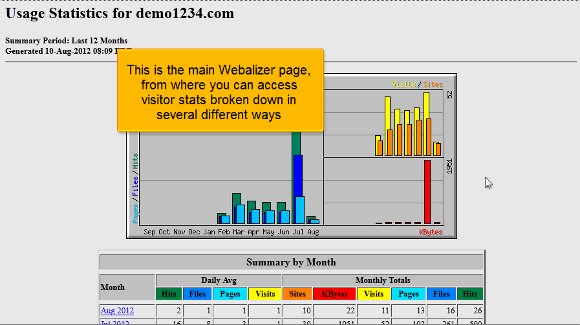
2) After this, select a specific domain and click the Magnifying Glass icon (‘View’ icon) on the right side of the field where you wish to view the stats. Now, you’ll be taken to the chief Webalizer page, where you can access ‘visitor stats’ divided in several ways. The chart given on the top is always color-coded. One can view the bottom chart to understand which colour represents which stat. As a rule, the principal is the “Visits” stat shaded in Yellyellowents, which shows the number of unique visitors visiting your site in a specific month. Hence, one can analyze usage stats for a particular month as well.

stats-02

3) On the left of the bottom table, you can find a list of the months for the previous year (2012). Each link will offer you comprehensive stats for that particular month of the year. You can click on a specific month you wish to view in detail. In our case, July 2012 is selected. Now, click the “Hourly Website stats in cPanel” link at the top. Now, you can view the hourly stats for July 2012. You can also use the links at the top to steer through the wide-ranging catalogue of Website stats in cPanel. This wide-ranging list is really drawn out and contains not only statistics for the hits or Website stats in cPanel but also the breakdowns of specific files & pages which has got the majority of hits, details about the pages from which visitors have started and finished and the source of traffic for your website.

stats-03
stats-04
stats-05

4) as an alternative, you can also view the ‘Analog stats’ instead of using the Webalizer. To do so, go to the home page and click on the Analog stats in the Logs section. Now, you will be taken to the Analog Stats page. In essence, Analog is quick and lightweight data that gives a simple summary of all the visitors to your website.

stats-06

5) Click on ‘View’ to see view cPanel Website stats in cPanel sorted month-wise.

6) Now, select a specific month to view its stats. In our case, July 2012 is set. You will immediately be taken to the “Web Server Statistics” page. One can view the usage stats in several dissimilar ways from here.

Website stats in cPanel
cPanel Website stats

7) Click on the “Daily Summary” button to view the cPanel Website stats summary daily

stats-08

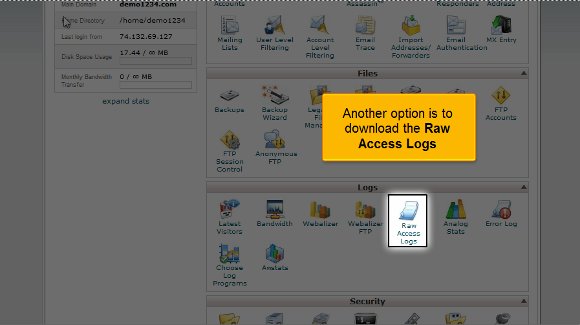
8) Another alternative is to download the “Raw Access Logs”. Go to the home page and click “Raw Access Logs” under the Logs section. Raw Access Logs help you observe the summary of visitors without providing charts, graphs or any other graphics. You can scrutinize the usage data with your personal data analysis application if you download these logs.

stats-09

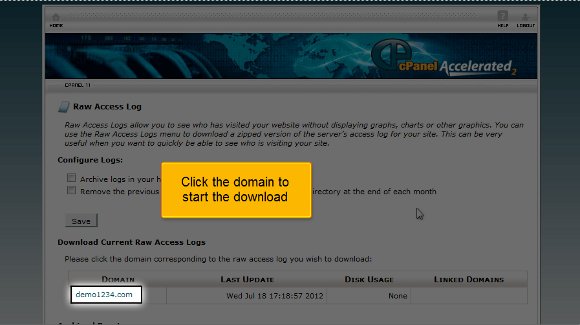
9) Now, click on the domain to begin the cPanel Website stats download process. A dialogue box will be opened now.

stats-10

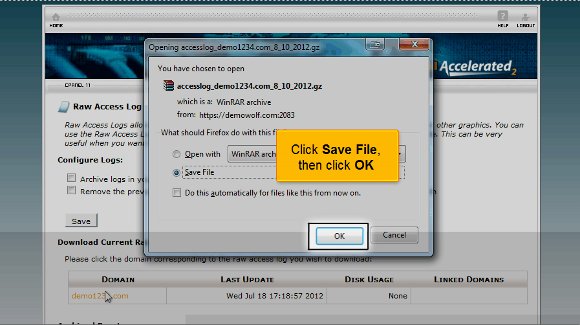
10) Click the “Save File” option and the the “‘OK”‘ button. All done! The cPanel Website states that data has been saved to the computer.

stats-11

We have reached the end of the tutorial at this point. So, you have learned how to access your cPanel Website status and download how to access logs for further study.

Get the Best Web hosting Plan


If and when you’re interested in starting an online business, there are a lot of things that you have to study first before you can rightfully expect a high return on investment.First, make sure that your company website has a user friendly interface which basically means links are visible, easily located and properly labeled and that the content provided in the website is complete, interesting, effective and grammatically correct.

The matter of search engine optimization or SEO which requires you to employ a number of strategies that your company website is heard and seen by the right people. Common search engine optimization strategies would be keyword listing, site code optimization and top search engine placement.

Optimize your plan by understanding web hosting. No matter how great your website looks or how effective your SEO strategies are, if you don’t have the right web hosting plan, none of those would see the light of the day because your web hosting plan simply prevents them from being properly uploaded and viewed.

Web hosting is important to your plans if you want your website to have its own niche in the internet so do read carefully what were about to teach you.

You have a couple of choices when it comes to web hosting – you can get it for free or you can spend for it. Naturally, it would be lovely if web hosting would be free for all of us but understand that all the needs of your company website must be met by the free web hosting plan if you want your future to look rosy. These are key issues to address.

Search Engine Optimization


SEO (Search Engine Optimization) is a process at which a site is optimized to achieve top ranking in search engines. The most affective search engines are google.com, yahoo.com, and msn.com.

Achieving top 10 ranking in those search engines will almost guarantee you traffic that is specifically targeted for your keyword. Optimization of a site takes a lot of work, but the results will pay off as you will see. Link building is a very important part of search engine optimization. The more sites that link to your web site, the higher Google PR your site will likely to have. Google PR is ranked from 1-10 and when is achieved to be high will almost guarantee you top search positioning in most search engines.

Getting links to your site is a long process. A good way of getting web sites to link to you is to search for sites that sell or offer similar products as you do. Then you can e-mail the webmaster of that particular site and ask if he/she wants to exchange links with you. This procedure will increase traffic on your site due to linkage and as well improve your search engine positioning. Another way to get links to your site is to have it submitted in most directories under your site’s category.

Online Content Management System its Friendly Features and Advantages


In simple words CMS is just software that helps you to manage all the content for your website. With the help of these content management systems, one can quickly and easily add, edit, update and delete website contents and website pages as well. CMS makes it easy to create a high quality and highly interactive Multilanguage websites without having much technical knowledge. Additionally they are great for creating websites that will have multiple users or large amounts of content.

There are various benefits or advantages of using content management system for designing or creating your websites which are as follows:

  • A CMS makes it easier for people to create, edit and publish content on a website. Website publishing has required significant technical skills (HTML, programming). A good CMS allows non-technical authors and editors to easily and quickly publish their content with relative ease.
  • By using content management system websites structure can be easily changed because content management system uses templates. Once the template is changed to update the colors, design, or navigational structure, all of the site’s pages will be updated.
  • Security is an important issue, particularly for intranets. A CMS can facilitate better content security. It can control who is allowed to publish to the website, and who is allowed to see what content.
  • Content Management system reduces time-to-publish, allowing you to get content published faster. This is an important issue for the modern organization. The quicker you get key content published, the more value it creates.

Friendly features of CMS

CMS aim to provide companies with an easy, reliable and user-friendly way to update their own content without having to employ a developer every time they need to make a change. A good CMS can do more than just save you money though – you’ll be able to better develop your website with these great, user-friendly features.

SEO Functionality : SEO is one of the most important parts of increasing traffic flow to your website. Optimizing your page’s content with the right keywords can make all the difference to the number of visitors and page hits each week. Good CMS software will keep track of and suggest keywords to include in your content and meta-data as well as organizing your pages to make them more search engine friendly.

Interact with Users : Allow users to submit information through customizable forms, ask questions or interact with your business in other ways. Pool user data together, collect emails for newsletters, sign users up for reward schemes or poll site visitors – there are plenty of potential and limitless possibilities.

A CMS provides a way to manage content on a website. It gives a medium to users to edit and manage content without having knowledge about site building from the ground up. It will keep users from firing up an HTML editor. There are many different content management systems. Few of them are: WordPress, Weebly and Tumblr.

WordPress:

Any user can’t write an article about services of site building without mentioning about WordPress. According to the research conducted by W3Techs the website building service holds 60% of the market.

Pros:

Market dominance provides WordPress as greatest benefits to a large community of users. There is a large user base where anyone can find technical support, plug-in recommendations that will help him to manage his website. This platform is highly customizable and may plug-in and themes are there by which any one can design the website according to the requirements.

Cons:

WordPress has slogan of “easy to learn, hard to master”. It is easy to start a basic website, for something unique user will need web coding knowledge. Easy to use has its drawbacks. It is very easy to drop in a plug-in according to the requirements but modularity can slow down user’s site.

Tumblr:

It is the hybrid of a blogging platform and a social media outlet. This is beneficial for users who are trying to showcase some types of content.

Pros:

Tumblr is free and always good. User has freedom to customize his blog to his liking using a theme as a jumping-off point. It exists as a social media outlet which means that it is great for photographic content and short-form posts. The social aspect of Tumblr provides an existing audience.

Cons:

Photographic content, short text posts and videos can do well on the site but Tumblr doesn’t lend itself for long-form posts. While using Tumblr users are limited to certain types of content.

Weebly:

Weebly provides an easy-to-use site editor and basic e-commerce tools built into the system as it is a smaller competitor.

Pros:

The e-commerce tools allow the budding entrepreneur to host a store-front for their product. It is easy to use site builder tool, so any user can set up a site in a couple hours.

Cons:

When compared to other site builders the pre-made template options are de-voided. While scaling up the production businesses want to upgrade to a more robust system.

Contributors:

Deepali Bansal

Take your SEO Campaign in the Right Direction


There are different parameters defined by search engines which every webmaster should follow. For successful SEO campaign it is important to know the basic ins and outs of optimization which are as follows:

A good website is the key :
90% of the internet visitors use search engines to look for the desired stuff on World Wide Web. But it’s not enough to rank well in search engines; your website should be appealing as well with relevant matter in order to cater web visitors. A good website should have simple informative design and a minimum loading time with good navigation, content texts, and relevant Meta tags with proper placed images.

Content is the king :
Search engines like fresh and original content in any way and so as the web visitors. Smarter search engines are now ignoring the traditional method of reading the META tags for keywords and descriptions, as these are often abused by users. They read the whole webpage and match the query or search string. Only quality of the content is not going to effect, it should be organized and themed in the right direction.

Links : An another important SEO item
Links are another important factor reviewed by search engines while ranking a website. Incoming links (links to your web page from another website), are highly valued by search engines, as they are difficult for a Webmaster to control and manipulate the ‘results’. Search engines consider them to be the genuine indicators. Search engine considers link popularity, relevancy and link text while assessing incoming links for a website. Promoting your website to increase traffic

Website promotion is a powerful tool to enhance traffic towards your website. Website promotion comprises of two different strategies classified as advanced and basic strategies. Advanced web promotion strategies include article writing, search engine optimization, pay per click and viral marketing. Some basic web promotion methods are forum posting, press release submission and blogging.

SEO alone can meet the challenges of boosting a website high enough in the search engines as well as generating traffic to a profitable extent. These factors are very preliminary but owe a lot to make a search engine optimization campaign successful.

Importance of In Text Links from SEO Point of View


What are in text links? In text links are links which are naturally placed with in the content of the page.

Link building has been an important factor in deciding the ranking of a website in the search engine. As the competition grows stronger the accuracy of works need to be refined and the algorithms need to be understood better to beat the competition.

SEO Companies have been running after links, the fact where these links are lying was of very little relevance to them as long as they were coming. But now things are changing we can now which links are better and which links will get you better rankings.

In text links are the best form of links and are better then resource page links where you find loads of links lying. The basic difference is simple.

  • Resource page links are understood as links that are put for link exchange point of view to build ones links popularity ad increase rankings.
  • In text links are put to actually take a visitor to a relevant source of information which the webmaster is recommending.

Way to get in text links The following are the recommended ways to get in text links.

  • Article submission
  • Press releases
  • Hosted marketing pages
  • Blog post

To effectively use these techniques a lot of research is required to get it right. So if you have the will i am sure you can be at top position.